state of the workweek report hero image
Report

State of the Workweek 2026: Burnout, AI, and the Work Employers Don't See

Ask employees how much of their workweek their employer actually sees, and 54% say half or less. The rest of it happens after hours, inside AI cleanup, and behind an “I’m fine” that 55% admit they’ve given a manager when they were overwhelmed.

Most of what a manager knows about someone’s workweek still comes from a few sources: meetings, status updates, and finished work. But a lot happens outside those places. An employee can spend an evening clearing their inbox, lose two hours fixing a colleague’s AI-generated draft, or push through months of exhaustion without anyone above them noticing.

When employers see only part of the workweek, they make decisions with partial information. That includes setting workloads without knowing who’s already stretched.

Key findings

Here’s what participants told us about their workweek in 2026:

  • 54% say their employer sees half or less of their workweek.
  • 44% of remote and hybrid employees now work on-site more often after their employer asked or required it.
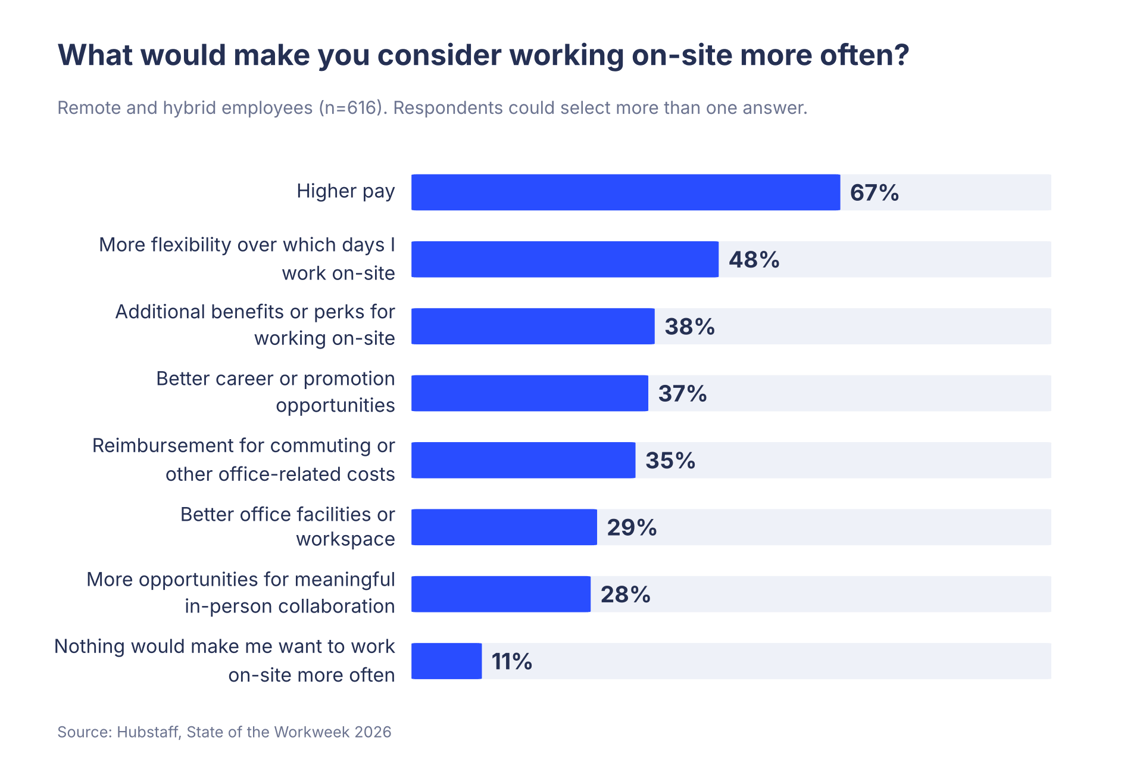
  • 67% of remote and hybrid employees say higher pay would make them consider working on-site more often.
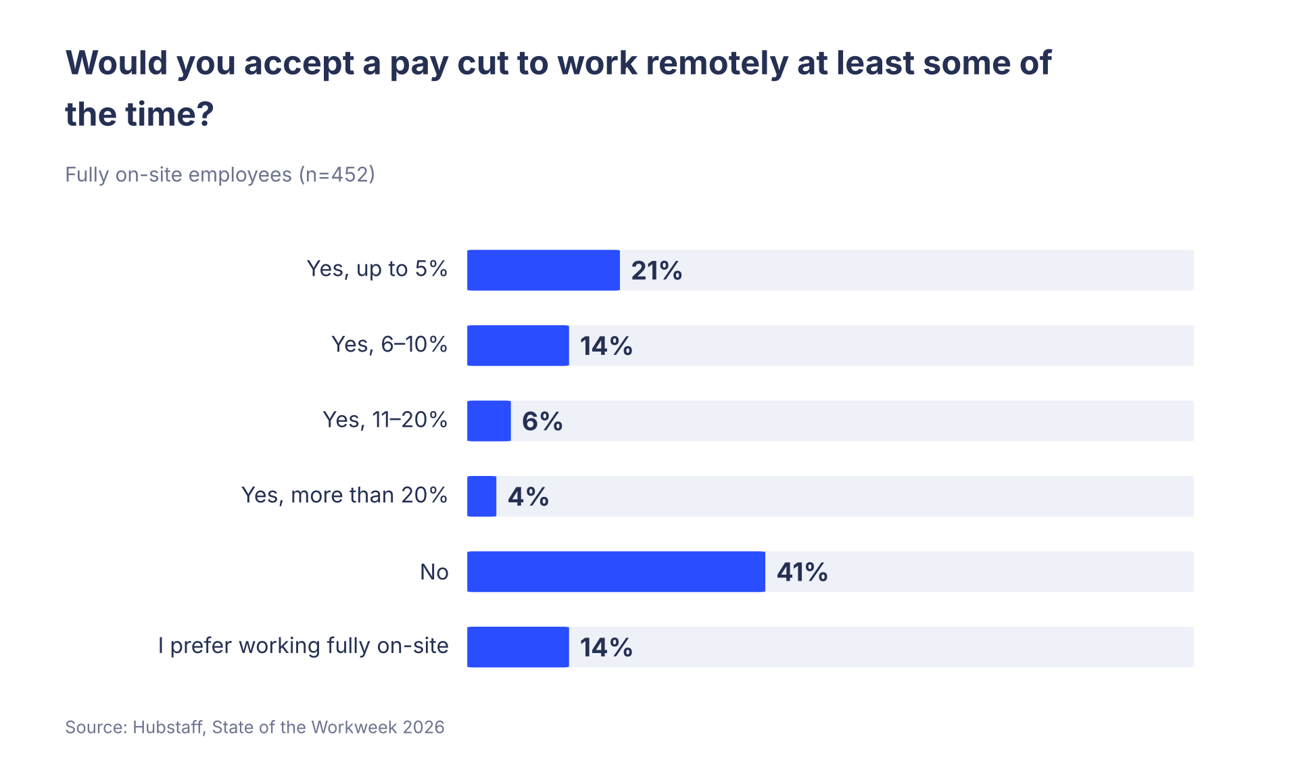
  • 45% of on-site employees would accept a pay cut to work remotely at least some of the time.
  • 46% of employees who use AI at work say the amount of work expected from them has increased.
  • 53% of AI users receive AI-generated work from colleagues that needs significant editing or correction at least once a month.
  • 45% of AI users spend an hour or more a week reviewing, editing, or correcting other people’s AI-generated work.
  • 69% say they experienced burnout in the past 12 months.
  • 30% seriously considered quitting because of their workload in the past year.

Methodology

Hubstaff, a time tracking & workforce intelligence platform, commissioned an independent survey of 1,068 full-time workers in the United States, ages 18 to 64, whose jobs mainly involve working at a computer. The survey was performed through Pollfish, a market research survey platform, in October 2026.

Results are unweighted and percentages are rounded to the nearest whole number, so some totals may not add up to 100%. The margin of error is ±3 percentage points at a 95% confidence level for the full sample, and it’s larger for questions asked of smaller groups:

  • Remote and hybrid respondents: 616
  • Fully on-site respondents: 452
  • Respondents who use AI tools for work: 839
  • Respondents who experienced burnout: 741

Most employees say their employer sees only half of their workweek

We asked employees how much of their real workweek they believe their employer actually sees. 54% said half or less, and 26% said a little or almost none. Only 15% believe their employer sees all of it.

The question asked about the real workweek, meaning the full week as employees live it. That includes late replies, rework, and the effort of keeping up, which rarely come up in a meeting or a status update.

01-workday-visibility-1.png

Managers assign projects, set deadlines, and judge performance based on the work they can see. Without workload data, those decisions rest on status updates and finished work. With half the picture, workloads can look lighter than they are, and problems can go unnoticed until someone misses a deadline or resigns.

Employees feel the effect, too. Effort that goes unseen is hard to recognize, reward, or reduce. An employee who believes their manager sees little of their day may also have less reason to expect support when the work piles up.

Return-to-office mandates are working, but employees put a price on the office

59% of remote and hybrid employees say their employer asked or required them to work on-site more often in the past 12 months. Most went along with it, and 44% of all remote and hybrid employees now spend more time on-site as a result.

For many employees, extra on-site days cost them commuting time and money without any change in pay, and they lose the flexibility they’d built their week around. 

Employers pay for it, too. Among employees who were asked to come in more and didn’t, 47% seriously considered quitting over their workload in the past year, against 30% across the whole sample.

Employees are also clear about what would make the office more appealing, and their answers point to practical, tangible rewards. These were the three most common among remote and hybrid employees:

  • Higher pay (67%)
  • More flexibility over which days they work on-site (48%)
  • Additional benefits or perks for working on-site (38%)

Collaboration and workspace rank near the bottom. 28% picked more opportunities for meaningful in-person collaboration, and 29% picked better office facilities. Only 11% say nothing would make them want to work on-site more often.

The ranking suggests employees see on-site days as a cost and expect something concrete in return.
02-what-would-bring-employees-on-site.png

Pay leads by a wide margin, which suggests employees treat office time as a cost. Commuting costs employees time and money. When a policy adds on-site days and offers nothing in return, employees cover those costs themselves. Flexibility over which days ranks second, and it costs an employer far less than a raise.

Employees who already work in the office full time value flexibility, too. 45% of them would accept a pay cut to work remotely at least some of the time, and most would give up 10% or less of their pay.
03-pay-cut-for-remote-work.png

That gives employers who offer some remote work an advantage in hiring and retention. They’re offering something nearly half of on-site employees would pay for.

More time in the office doesn’t seem to make work more visible, though. 58% of on-site employees say their employer sees half or less of their workweek, compared with 51% of remote and hybrid employees.

If one goal of a return-to-office policy is a clearer view of how work gets done, these numbers suggest physical presence won’t deliver it alone. Sitting near a manager doesn’t reveal evening work, AI rework, or how much capacity someone has left. Comparing remote vs. in-office performance with workforce data gives employers a clearer answer than location does.

For most employees, the workday doesn’t end when it’s supposed to

For a large share of employees, work continues after the official end of the day. 71% check work messages outside their working hours at least a few times a week, and 39% do it every day.

The extra time goes beyond messages. 43% work evenings or weekends most weeks or every week, and only 44% say they can fully log off at the end of the workday.

04-after-hours-work.png

Most employers never ask anyone to work after hours. It happens because a message comes in at 8 p.m., or a deadline can’t be met in a regular day. Since no one asked for the extra work, no one keeps track of it.

Uncounted evening and weekend hours create a planning problem for employers. Most capacity planning assumes a 40-hour week. A workload that only fits when employees add evenings and weekends looks manageable against those 40 hours, even when the real number is closer to 45 or 50.

With 43% regularly working outside standard hours, many teams are running on hours their employer never planned for.

Rest is affected, too. 28% of employees worked during their most recent vacation, which means more than a quarter came back from time off without fully resting.

Employers can reduce after-hours work with a few specific policies. Stating when a reply is expected, scheduling non-urgent messages for the next morning, and arranging coverage during vacations all remove the guesswork that keeps employees checking in.

AI saves employees time, then creates more work

79% of employees use AI tools for work, and the time savings are real. Among AI users who told us how much time they save, 76% save at least an hour in a typical week and 32% save four hours or more.

Saved time doesn’t always stay saved, though. 46% of AI users say the amount of work expected from them has increased since they started using AI tools, and only 5% say it has decreased.

05-ai-work-expectations.png

For nearly half of AI users, the tools raised the bar. When expectations grow as fast as the time saved, an employee’s week stays as full as before. Employers who plan to add work on the back of AI gains should first check how much of the gain is still available.

AI has also added a new task to the workweek, which is fixing other people’s AI output. Here’s how often AI users deal with it:

  • 53% receive AI-generated work from colleagues that needs significant editing or correction at least once a month.
  • 23% receive it at least once a week.
  • 45% spend an hour or more in a typical week reviewing, editing, or correcting AI-generated work from other people.
06-ai-generated-work-needing-correction.png

AI often saves time for one person and costs time for another. The person who generates a quick draft saves time, and the colleague who receives it spends time checking facts, fixing errors, and rewriting. The time spent fixing AI output rarely gets reported, so the savings look bigger than they are.

For employers planning capacity around AI, individual time savings overstate the gain for the team. A fuller measure subtracts the hours colleagues spend on review and correction, and then asks where the remaining capacity went. Only 26% of AI users say they take on more work with the time they save. 39% finish their work earlier, and 15% say nothing really changes.

Asking all three questions in the same team survey gives a more accurate number: time saved, time spent on correction, and what the saved time was used for.

Review standards help, too. A team can agree that whoever uses AI to produce a document checks its facts and edits it before passing it on, so the cleanup stays with the person who saved the time.

Most employees have experienced burnout, and many have kept it to themselves

69% of employees say they experienced burnout in the past 12 months. For most of them it was brief, but for 22% of all employees it lasted an extended period or is still going on.

Much of it stays hidden. 55% have told their manager everything was fine when they were actually overwhelmed, and 47% of employees who experienced burnout say their manager or employer didn’t know.

07-burnout-past-12-months.png

With more than two in three employees reporting burnout in a single year, it’s likely that someone on most teams is dealing with it at any given time. Nearly half the time, according to employees, their manager has no idea.

The “everything’s fine” finding explains part of the problem. A manager who asks “How are you doing?” and hears “Fine” has done what most managers are trained to do. The answer is reassuring, it may be inaccurate, and the manager plans the next month of work around it.

General check-in questions aren’t enough to surface burnout. Specific questions are harder to deflect, such as asking which project is taking the most out of someone, or what they’d drop if they could. Managers can also look at workload directly by reviewing how many projects each person is carrying.

Even when burnout is visible, it often goes unaddressed

Awareness alone doesn’t solve the problem. Among burned-out employees whose manager or employer knew, 64% say nothing changed.

Only 19% of employees who experienced burnout say their manager knew and took action.

08-manager-awareness-of-burnout.png

A manager knowing about burnout is a starting point, and in about two out of three cases it’s also where things stop. When speaking up changes nothing, employees have less reason to speak up the next time. That may help explain why so many say they’re fine.

Managers aren’t always in a position to act, though. A team lead who knows someone is burned out may not have the authority to move a deadline or bring in help. Employers can give managers specific options to offer, such as reprioritizing projects, extending deadlines, or approving time off.

The stakes are high. 30% of employees seriously considered quitting in the past year because of their workload. Workload is something an employer can change, but only after learning about the problem and responding to it.

What this means for managers

Here are five things you can do as a manager:

  • Ask about the whole workweek. In one-on-ones, ask what took longer than planned this week and what got done after hours. 54% of employees say you’re seeing half of their week or less.
  • Make “I’m overwhelmed” safe to say. 55% of employees have said they were fine when they weren’t. Ask about workload directly, and respond to an honest answer with a change the employee can see.
  • Follow awareness with action. When someone tells you they’re burned out, agree on one specific change, such as moving a deadline or reassigning a project. Check back within two weeks.
  • Account for AI rework. Ask your team how much time they spend correcting AI-generated work, and agree on a review standard before AI output gets passed to a colleague.
  • Set expectations for after hours. Tell your team whether evening and weekend messages need a reply before the next workday. 71% are checking them at least a few times a week.

Seeing the whole workweek

The workweek employers see is the shorter one. The full version includes messages answered at night, hours spent fixing a colleague’s AI output, and burnout that 47% of affected employees say their manager never knew about. None of it shows up in a status update.

The good news is that most of what’s missing can be found by asking. Employees told us about all of it in a 20-question survey, and they’ll tell a manager who asks the right questions, too.

About Hubstaff

Hubstaff is where time tracking meets workforce intelligence: one platform to track, manage, and understand a distributed workforce at scale.

Growing organizations use Hubstaff to see where time goes, how work gets done, and how much capacity their teams have, so leaders can make staffing and workload decisions based on reliable workforce data.

Explore Hubstaff's AI-powered workforce analytics

Book a personalized demo to learn how Hubstaff seamlessly converts workforce data into insights that help leaders understand capacity, control costs, protect margins, and make better operational decisions.