How to get stakeholder buy-in for Hubstaff

Selecting the right software platform is only part of the puzzle. Getting leadership, IT, HR, and other stakeholders aligned means answering different questions about value, security, rollout, and risk. Use this guide to build the case for Hubstaff, anticipate stakeholder questions, and move your buying committee from consideration to decision-making.
Hubstaff Insights dashboard displaying weekly time tracking, project budgets, daily limits, and productivity metrics.

What's in this guide

This guide includes everything you need to help your buying committee understand where Hubstaff fits, what it changes for the team, and why it makes sense for your organization.

You won’t have to build the case for Hubstaff from scratch, because this guide gives you practical talking points for answering every question:

  • Why Hubstaff may be the right tool for your team compared with other options in the industry
  • How does each stakeholder involved benefit from the platform
  • How to handle potential objections
  • How to respond to questions from your IT and Security teams
  • How to address concerns about team adoption
  • How to turn interest into a clear path toward an internal decision

This guide gives you what you need to make the case to everyone involved in the decision, from leaders focused on business impact to IT teams evaluating security and deployment.

Forward it to a stakeholder, use it to prepare for an internal meeting, or work through it with your Hubstaff rep to build an approval plan around your organization.

Why should you choose Hubstaff (and how it compares)

There are several time tracking and workforce management platforms available, but Hubstaff brings time tracking, workforce analytics, reporting, operations, and payments together in one place. That gives you and your stakeholders greater visibility into work without having to rely on separate systems.

Hubstaff’s flexible deployment supports various work environments, including personal and company-managed devices, while APIs and integrations help you integrate it with the systems your organization already uses.

hubstaff-account-provisioning.png

For larger, more complex organizations, you get enterprise-level capabilities that provide additional infrastructure and controls for managing workforce operations at scale.

Hubstaff's AI-ready workforce data also makes it easier to query workforce information and get specific answers using the Hubstaff CLI.

This gives you a different value story depending on who's asking:

  • Leadership gets better workforce visibility.
  • Operations get more streamlined workflows.
  • HR gets tools for consistent rollout and policies.
  • IT gets security, deployment, and integration capabilities.
  • Team leads get the data they need to evaluate performance and workflows.

Here's how those capabilities map to the stakeholders who are most likely to care about them:

PillarStakeholders likely to care

Workforce analytics/Insights

Executive sponsors and C-suite leaders can connect workforce trends to business outcomes, helping them evaluate performance, utilization, and potential ROI.

Workforce Operations

HR and Operations teams can manage scheduling, attendance, and payroll workflows in one place, reducing the need to coordinate across disconnected systems.

Flexible deployment

IT and Security teams can support different deployment requirements across company-owned and personal devices.

UI & ease of use

HR and rollout owners get a straightforward experience that can make implementation and ongoing adoption easier for teams.

API & developer platform

IT and Security teams can use SSO, integrations, APIs, and extensibility options to connect Hubstaff with their existing technology stack.

If stakeholders want to evaluate alternatives before moving forward, compare Hubstaff with other workforce management platforms to see how the options stack up and find the right fit for your organization.

Know what your stakeholders need

An important part of choosing time tracking software is recognizing that the person who discovers the need around a problem isn't necessarily the person who gives the solution the green light.Β 

hubstaff-workforce-analytics-screenshot-1.png

That's why, instead of running everyone through a feature list, it helps to show each stakeholder how Hubstaff connects to the outcome they're responsible for, making the evaluation more relevant to the questions they actually need answered.

Here's how that looks:

StakeholderWhat they care aboutLikely questionHow to position Hubstaff

Executive Sponsor / Dept. Lead

Team output, time saved, solving the original problem

β€œWhat changes for my team on day one?”

Lead with the workflow win, not the tooling

IT / Security

Deployment risk, data handling, integration overhead

β€œHow does this get deployed and secured?”

Point to SSO/SCIM, Role-based permission, encryption, and personal-device vs. company-device deployment options

HR / People Ops

Team member experience, policy consistency, change management

β€œHow do we roll this out without backlash?”

Point to configurable privacy controls, clear policies, and employee-facing rollout resources

C-Suite / Final Approver

Cost, risk, organizational fit

β€œWhy this, why now, and what's the risk if we don't?”

Lead with ROI and compliance-readiness, not a feature list

For HR and People Ops, trust often comes down to how tracking is introduced and used. Hubstaff's guiding principles provide useful context for creating a transparent approach to workforce data and team member privacy.

Keep the conversation focused on the question each stakeholder needs answered:

StakeholderKey questionsBuying committee priorities

Department lead/champion

β€œWhat actually gets better for my team?”

The workflow problem you're solving and the time you'll get back

IT/Security

β€œHow will we deploy this and protect our data?”

Deployment, SSO/SCIM, role-based permissions, encryption, integrations

HR/People Ops

β€œHow will team members respond?”

Clear policies, configurable settings, privacy, and rollout communication

C-Suite /final approver

β€œWhy this, why now?”

Business impact, cost of the status quo, risk, and organizational fit

Objection handling tips

A stakeholder raising concerns doesn’t necessarily mean that it’s a no. They're often doing exactly what their role requires:Β 

  • Finance questions cost
  • IT questions risk
  • HR questions rollout

Acknowledge the objection first, then answer it with the business context, documentation, or proof point that the stakeholder actually needs.

ObjectionResponse guidanceSupporting resources

"We don't have the budget for this."

Reframe around the cost of the status quo β€” manual reporting hours, payroll errors, inefficient processes β€” rather than defending the price.

"We already have something in place."

Acknowledge the existing tool, then isolate the specific gap it doesn't close.

"What about data security and compliance?"

Give technical stakeholders direct access to certifications and documentation rather than general reassurance.

"Will our team push back on being tracked?"

Acknowledge the concern and show how clear policies, communication, and configurable settings support rollout.

"How long will this take to roll out?"

Define the deployment approach, scope, and stakeholders involved so implementation feels manageable, not like one large project.

Now, let’s look at each objection type in detail:

β€œWe don't have a budget for this.”

Don't defend the price right away, compare it with the cost of doing nothing. Budget is a fair concern, but the real comparison is Hubstaff versus what your current processes already cost.Β 

Look at how much time and money go into workflows like:

  • Preparing reports
  • Reconciling timesheets
  • Correcting payroll errors
  • Managing manual approvals
  • Working around disconnected systems

Then use Hubstaff's ROI calculator to put a number behind the opportunity for your organization. That gives stakeholders something more concrete to evaluate than the software price alone.

β€œWe already have something in place.”

When the question around existing tools comes up, don't suggest replacing everything at once.

Start by understanding where the gap is. Having an existing system doesn't necessarily mean it solves every problem.

Ask:

  • What's still taking too long?
  • What still requires manual work?
  • Where does your team end up without the information it needs?

β€œWhat report, approval, or process is still harder than it should be?”

The answer gives you a much stronger case than comparing two feature lists.

If visibility is one of those gaps, Hubstaff workforce analytics can help connect workforce data with utilization, productivity patterns, and operational performance.
security-compliance-1.png

β€œWhat about data security and compliance?”

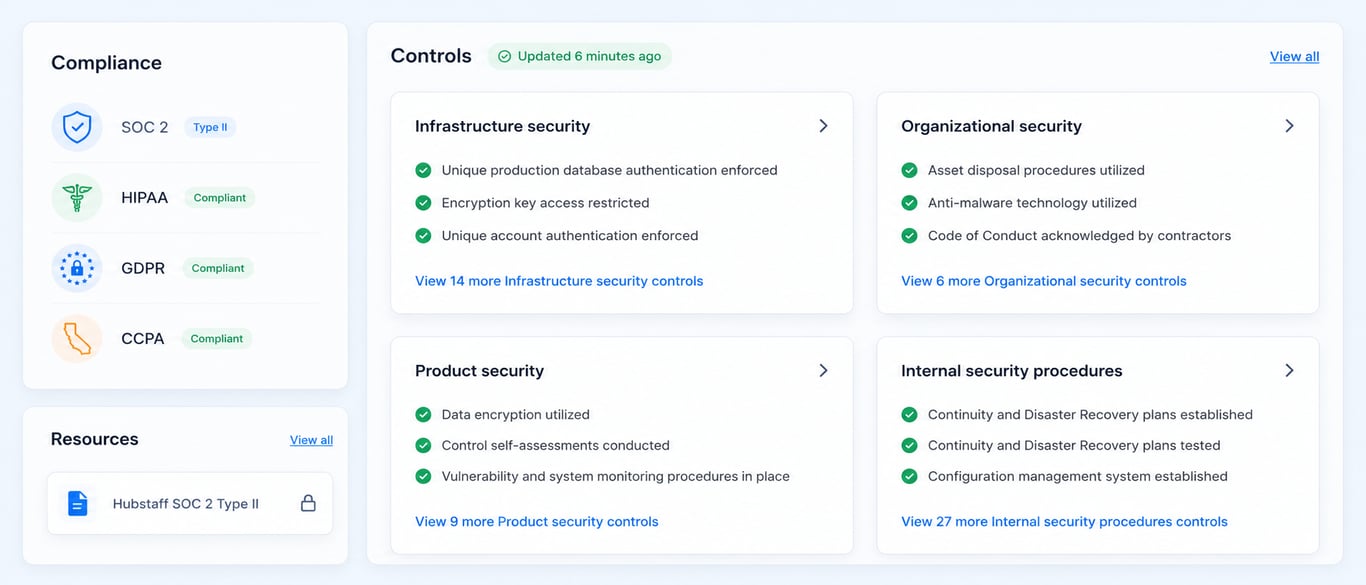
Bring IT and Security into the conversation early. They're responsible for understanding the technical requirements of a new platform and validating whether it meets the organization's standards.

Security isn't an objection you need to β€œovercome.” It's something your technical team needs to validate.

Give them direct access to Hubstaff's documentation, including SOC 2 Type II, HIPAA, and GDPR information.

If they have questions specific to your organization's requirements, connect them directly with your Hubstaff rep rather than serving as the middleman for technical answers.

β€œWill our team push back on being tracked?”

Make transparency part of the rollout from the beginning. It's reasonable for HR and People Ops to ask how team members will respond. Start by making the purpose of Hubstaff clear:

  • What you're tracking
  • Why are you tracking it?
  • Who can see the information?
  • How the information will be used

Hubstaff's configurable settings let organizations adapt tracking to their policies rather than taking a one-size-fits-all approach.

Use our guide to getting employee buy-in for Hubstaff to plan those conversations before rollout.

β€œHow long will this take to roll out?”

Implementation time is a valid concern, particularly when IT, HR, Operations, and other stakeholders need to be involved.

Instead of treating implementation as a single large project, establish the deployment approach, scope, success criteria, and the stakeholders who need to validate the setup.

This gives everyone a clearer idea of what's required and who owns each step.

For more context, see how long it takes to implement Hubstaff and use that information to set expectations with your buying committee.

What to say: Turn your case into a 15-minute conversation

You don't need an elaborate presentation to move a stakeholder decision forward. A productive 15–30 minute internal conversation can come down to four things:

  1. Start with the problem. Explain what's happening today and its impact. Keep the Hubstaff conversation for later.

  2. Connect the problem to the proposed solution. Be specific about what would change if Hubstaff were rolled out, rather than walking through every feature.

  3. Bring in the right stakeholders. Name who needs to be involved, what input you need from them, and why. Bringing IT, HR, or Finance in early can prevent late-stage blockers.

  4. End with one small ask. Don't ask everyone to approve the purchase immediately. Ask for the next action to move the evaluation forward β€” a technical review, a pilot, an ROI assessment, or a stakeholder meeting.

Here are a few ways to frame those conversations for each department.

Executive Sponsor/C-Suite

Lead with the business impact rather than what the tool can do. Name the specific ask up front rather than burying it.

For example:

β€œWe're losing about [X]/month on [specific problem β€” e.g., unbilled hours, duplicate tool spend, manual payroll reconciliation]. I've found a potential fix that could pay for itself in [timeframe]. Can you and [stakeholder] give me 15 minutes this week to review it?”

IT/Security

Lead with deployment and security specifics rather than the product pitch. This stakeholder needs to be involved early enough to understand the technical requirements and identify potential issues.

Share relevant SOC 2 documentation, HIPAA information, or GDPR resources from the start so they can evaluate the requirements directly.

For example:

β€œBefore this moves forward, I want to loop you in on the technical side. Hubstaff supports SSO, and I've pulled together information on security, data handling, API access, and encryption. Can you give me 15 minutes to sanity-check it before I take it to [exec/stakeholder]?”

Opening an internal meeting

Keep the agenda simple enough that everyone understands what decision needs to be made to move forward:

  1. Name the problem.
  2. Suggest the fix.
  3. Name who else needs to be involved and why.
  4. Make one small, specific ask.

For example:

β€œI'm bringing this forward because [X hours/dollars] are slipping through the cracks every month on [specific problem β€” e.g., unbilled client hours or manual timesheet reconciliation], and I think there's a fix. Here's what changes if we solve it, who needs to be involved, and the one thing I need from this group today.”

Mutual action plan

Internal software decisions can stall when nobody knows what needs to happen next.

A mutual action plan turns β€œwe'll discuss it” into a defined decision processβ€”with a role for every stakeholder, an outcome for every stage, and a target date.

Use this four-week plan as a starting point:

4-Week pilot planFrom pilot to rolloutPath to approvalPilot decision timeline

Week 1

Define success. Agree on the problem, scope, and what a successful outcome looks like.

Champion + Executive Sponsor

Agreement on what β€œsuccess” looks like before the pilot starts

Week 2

Run the pilot with key stakeholders.

IT, Operations, HR

Hands-on validation from the people who'll use or approve it

Week 3

Stakeholder review and objection resolution.

Full committee

Open questions answered and blockers surfaced early

Week 4

Final decision and rollout kickoff.

C-Suite/Final Approver

Signed decision and a named rollout owner

This plan will give you an outline that gives every stakeholder a role, every stage an outcome, and the process a target date.​

Resources

You don't have to make the case without supporting resources. A Hubstaff rep can help answer questions that require more than a webpage or a feature list can provide. Before your next internal conversation, ask for the materials that will help stakeholders complete their evaluation:

  • Security documentation and a Data Processing Agreement (DPA)
  • A tailored ROI or cost comparison
  • Customer examples relevant to your industry or company size
  • Pilot scope and timeline
  • Procurement or security questionnaire support

You can also explore Hubstaff customer stories to find proof points relevant to your industry, use case, or organization size.

Explore more details on what Hubstaff does and doesn't track, a breakdown of Hubstaff's core principles, and more.

Your guide to using Hubstaff as a team

Download the one-pager for details on what Hubstaff does and doesn't track, a breakdown of Hubstaff's core principles, and more.

Download

Your next step toward making a case for Hubstaff

Share this guide with the next person involved in the decision, bring the four-week plan to your next internal meeting, and work with your Hubstaff rep to adapt it around your stakeholders and approval process. The ultimate goal is to give each team the information they need to evaluate Hubstaff before making a decision.

Roll Hubstaff out with confidence across your organization

Build a clear path from stakeholder approval to successful rollout. Work with Hubstaff to create an implementation plan, so every stakeholder knows what to expect, and your team is ready from day one.