The AI Productivity Panel: Lessons From Leaders on What’s Working (and What’s Not)

 7 min read
- 85% of professionals say they're using AI, but only 4% of their time is spent on it. Closing the gap starts with role-based training, clear policies on what's encouraged, and low-risk pilots like shared meeting recorders and stakeholder personas.
- AI is forcing a rethink of productivity itself. 77% say AI reduces task time and 45% report a significant boost, but capturing that value means measuring outcomes over activity and recalibrating workloads as AI raises the bar.
- Audience questions surfaced two practical frameworks. Eryn Peters' tool pyramid moves from generalist LLMs to specialized platforms to custom agents, and Dr. Gleb Tsipursky's AI policy checklist covers governance, humans in the loop, and permissible examples.
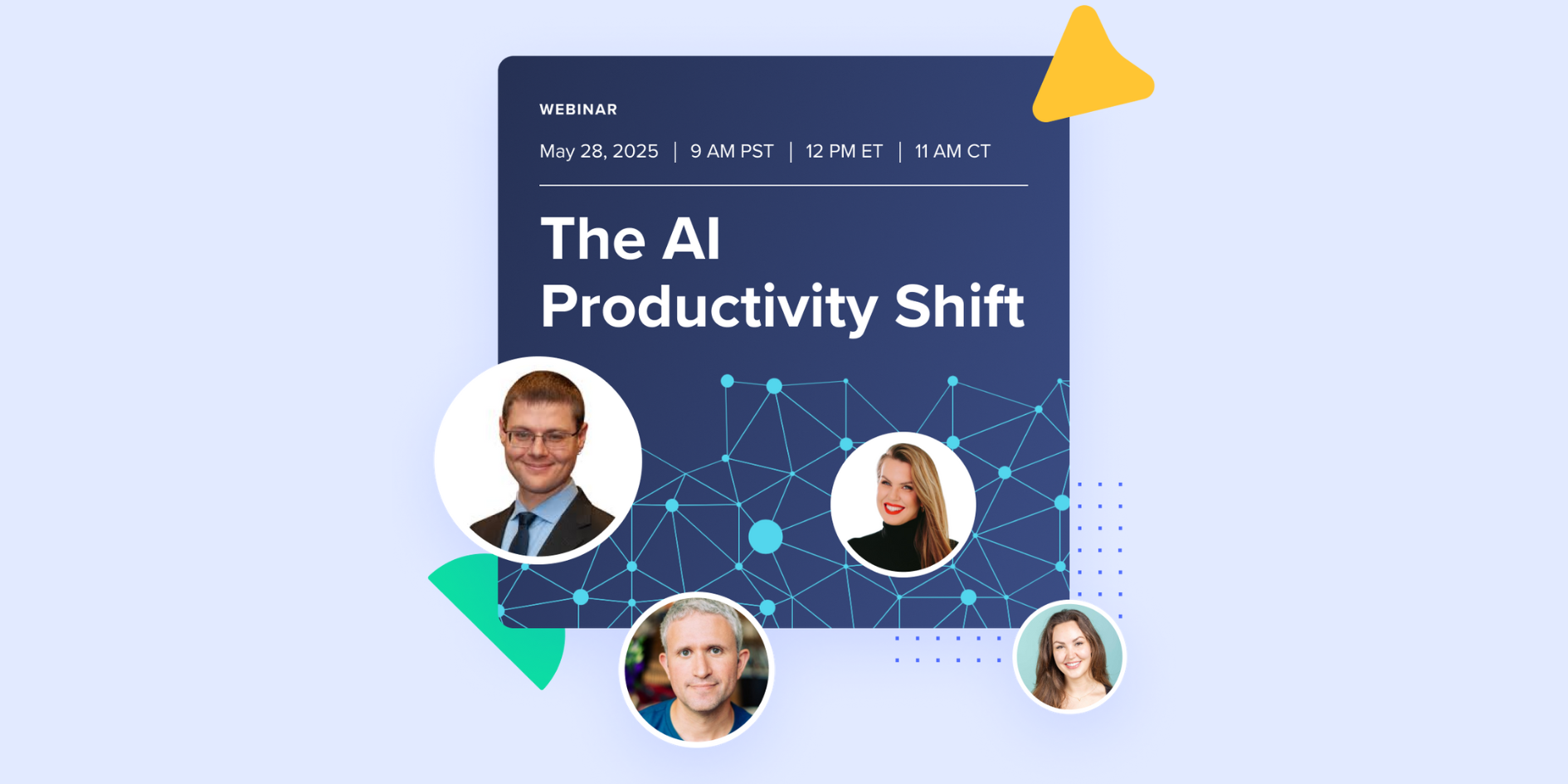
When I moderated this AI productivity panel, I expected a solid conversation. What I didn’t expect was the flood of real-world insights, vulnerable truths, and practical advice that would follow.
At Hubstaff, we’ve seen firsthand how AI can accelerate productivity, but we also know it doesn’t happen by magic. During our AI Productivity Shift panel, I had the chance to speak with four brilliant minds leading the charge on AI, remote work, and organizational change:
- Dr. Gleb Tsipursky – Cognitive scientist and remote work expert
- Eryn Peters – Co-founder, AI Maturity Index
- Nadia Harris – Founder, Remote Work Advocate
- Phil Kirschner – Workplace strategist and former McKinsey & WeWork exec
Together, we unpacked what’s working, what’s not, and how to lead smarter, faster, and more human-first with AI. Here’s a recap of what stood out and what you can act on right now.
Want the full data behind this conversation? Check out the full AI Productivity Shift report to explore the stats, trends, and insights shaping how teams are using AI at work. Or watch the webinar below.
Stay in the loop
Subscribe to our blog for the latest remote work insights and productivity tips.
1. The usage gap is real, and it’s not a tech problem
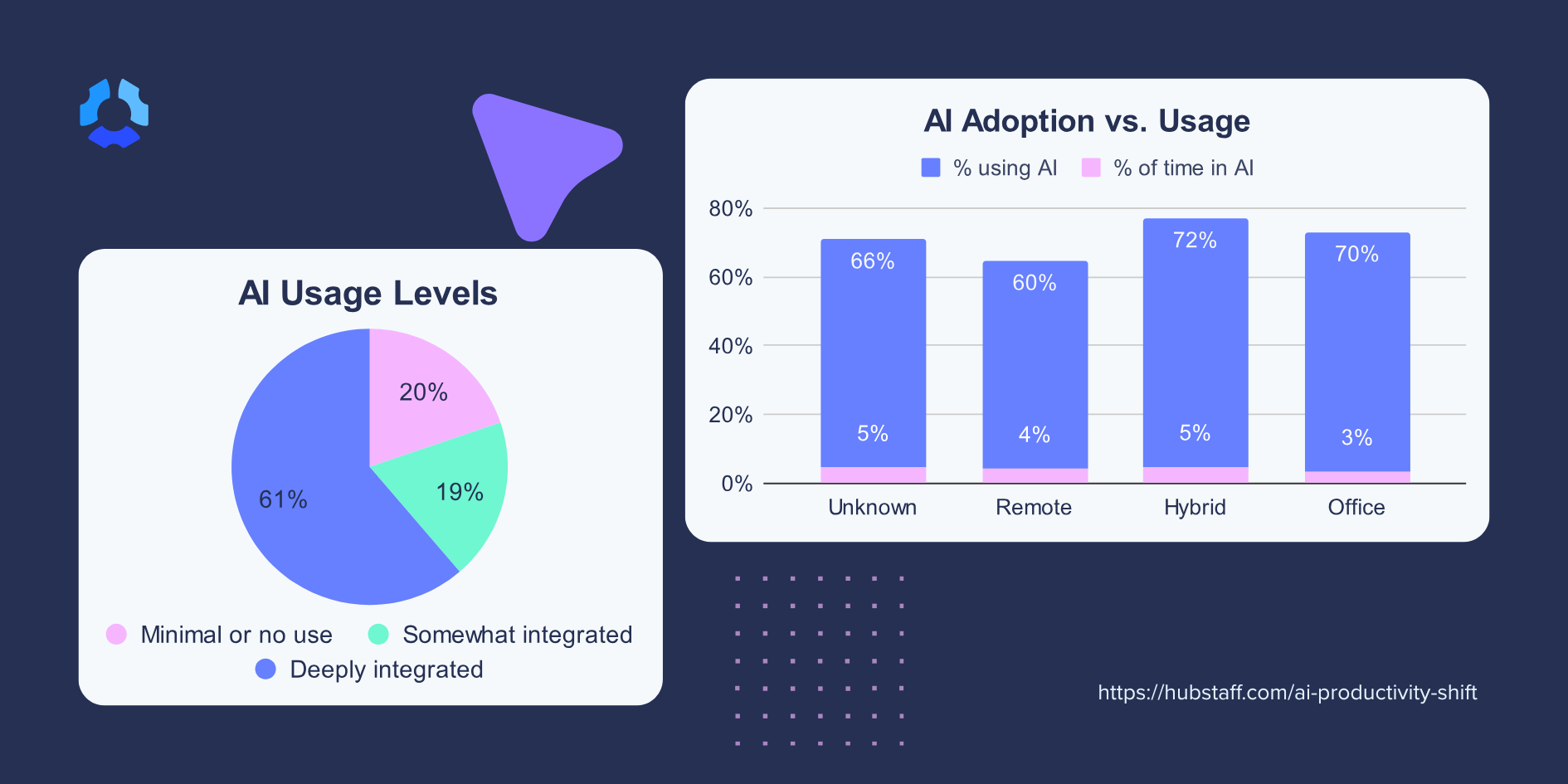
One of the headline stats from our research: 85% of professionals say they’re using AI, but only 4% of their actual time is spent using it. That’s a massive disconnect.
As Dr. Gleb put it, the issue isn’t access, it’s awareness. Most people don’t know they can switch models in ChatGPT or create custom copilots trained on internal templates. They’re poking around in the dark without a flashlight.
And as Nadia added, governance and compliance fears (especially in regulated regions like the EU) are making companies hesitant to go deeper. They’re unsure about how data is stored, who has access, and what’s truly compliant.
Takeaway: Start with education. Train your team in practical use cases. And build confidence with clear, role-based AI usage policies that include real examples of what’s encouraged and what’s not.
2. Fear is the quiet killer of innovation
One thing that really struck me: fear is doing more damage than we realize.
Eryn spoke about how companies send mixed messages, first warning employees not to use AI, then flipping to say everyone should adopt it. That kind of whiplash leads to confusion and resistance.
Phil added a truth I hadn’t considered before: some employees don’t want to share their AI workflows because it reveals too much about how they work, or what they’re automating and augmenting.
It’s a visibility problem and a psychological safety problem.
Phil also offered two low-risk ways to get unstuck. The first is to put your meeting recorder to work as a team. Most teams already record calls, but few take the next step of using one shared tool that distributes notes automatically or drafts the agenda.
The second is to build a stakeholder persona. Feed an AI tool everything about a key internal or external client, and the whole team can question it before meetings and communications. It’s engaging, immediately useful, and nobody has to reveal how they use AI in their own work.
Takeaway: Foster a culture of curiosity. Celebrate experimentation. Make AI visible, not secret. One way to start? Run an “AI Week” challenge internally where teams present how they’re using AI to improve workflows.
3. Embedding AI into workflows unlocks real impact
This was my favorite part of the panel, when real examples came to life.
Nadia shared how she helped a startup consolidate scattered data from multiple tools and automate core business processes using AI. The result? Massive time savings and clearer focus across teams.
Eryn talked about a small consulting firm that built custom agents to automate competitive analysis.
Research that once required teams two or three times their size now arrives as polished briefs before every meeting, and they’re closing enterprise deals that once felt out of reach.
Takeaway: Don’t start with “AI use cases.” Start with broken workflows. Where are your teams drowning in manual tasks or research-heavy processes? That’s your AI opportunity.
4. Let your team lead
I was really inspired by how Dr. Gleb’s approach flips the usual narrative. Instead of mandating one AI tool or workflow, he trains teams on how to use AI effectively and lets them build their own copilots.
At one insurance company, claims agents created their own Copilot agents to automate policy letters. Management picked the best one, scaled it, and got massive time savings across the board.
Takeaway: Enable your team to build what works for them. Give everyone foundational training, encourage exploration, and let the best ideas surface organically. That’s how innovation scales.
5. AI is forcing us to redefine productivity
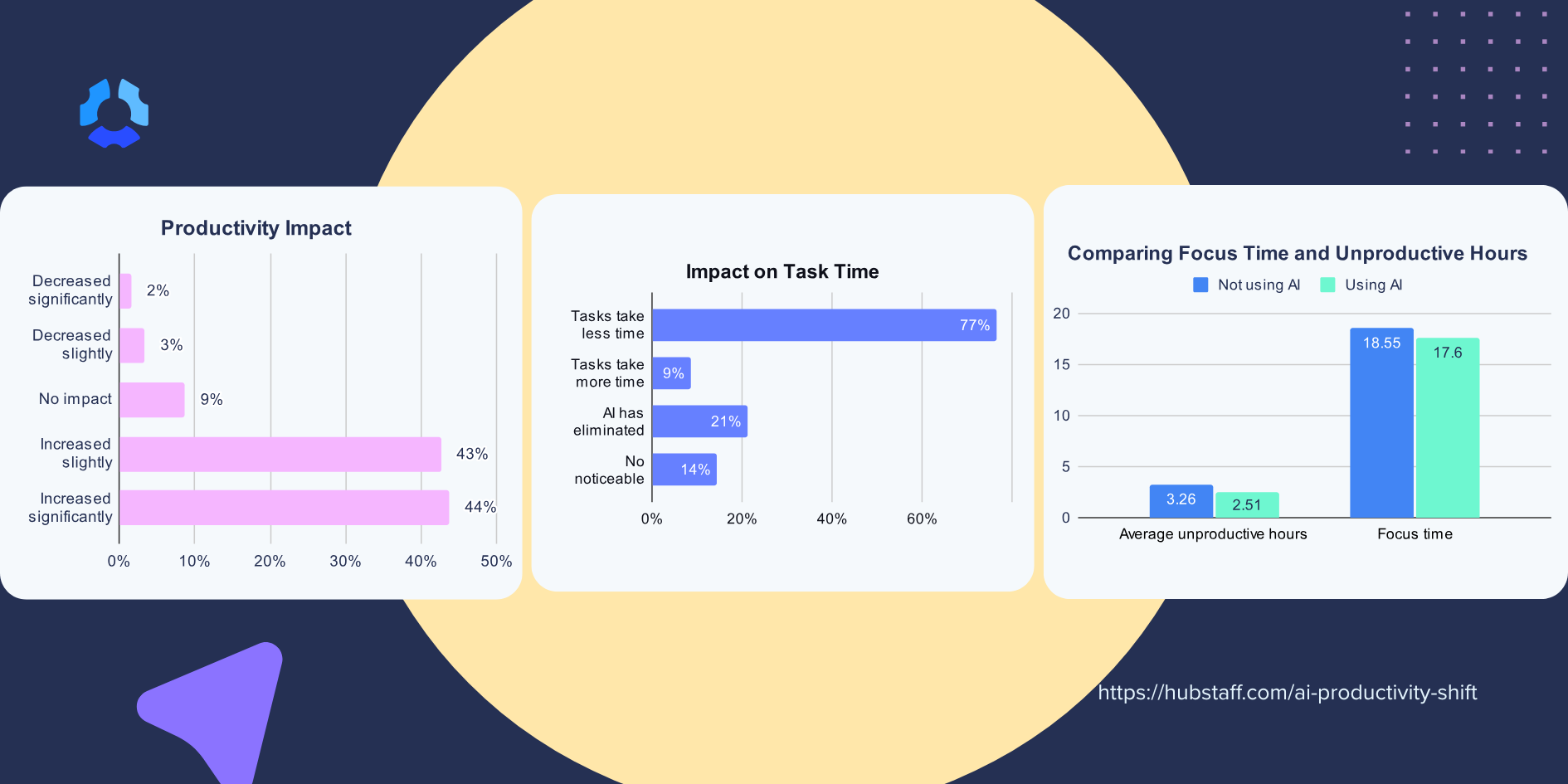
Here’s where things got real. We shared some striking stats from our survey:
- 77% of people say AI reduces task time
- 70% say it increases focus
- 45% report a significant boost in productivity
But what does “productivity” even mean anymore?
Nadia challenged the idea that staying late at the office equals productivity. It’s not about visible effort, it’s about meaningful outcomes. Phil emphasized that AI should give us more time to focus on the right things, not just more things. And Dr. Gleb cautioned that AI is, in fact, increasing workload, so the bar is rising whether we like it or not.
Dr. Gleb also warned managers to watch for what he calls dark leisure, where AI frees up time that drains into social media. His fix is recalibrating what a realistic workload looks like now that AI is part of it.
Phil pointed to a related gap between individual and corporate productivity. People usually sense whether they’re being productive, but that feeling rarely rolls up into organizational metrics.
He cited Johnson & Johnson narrowing its AI focus to supply chain and drug development, the areas that move revenue, as a sign of where executive attention is heading.
Takeaway: Shift your metrics. Move from measuring activity to measuring outcomes, speed, and effectiveness. Don’t punish employees for using AI to work smarter.
6. Hiring, training, and salaries are all changing fast
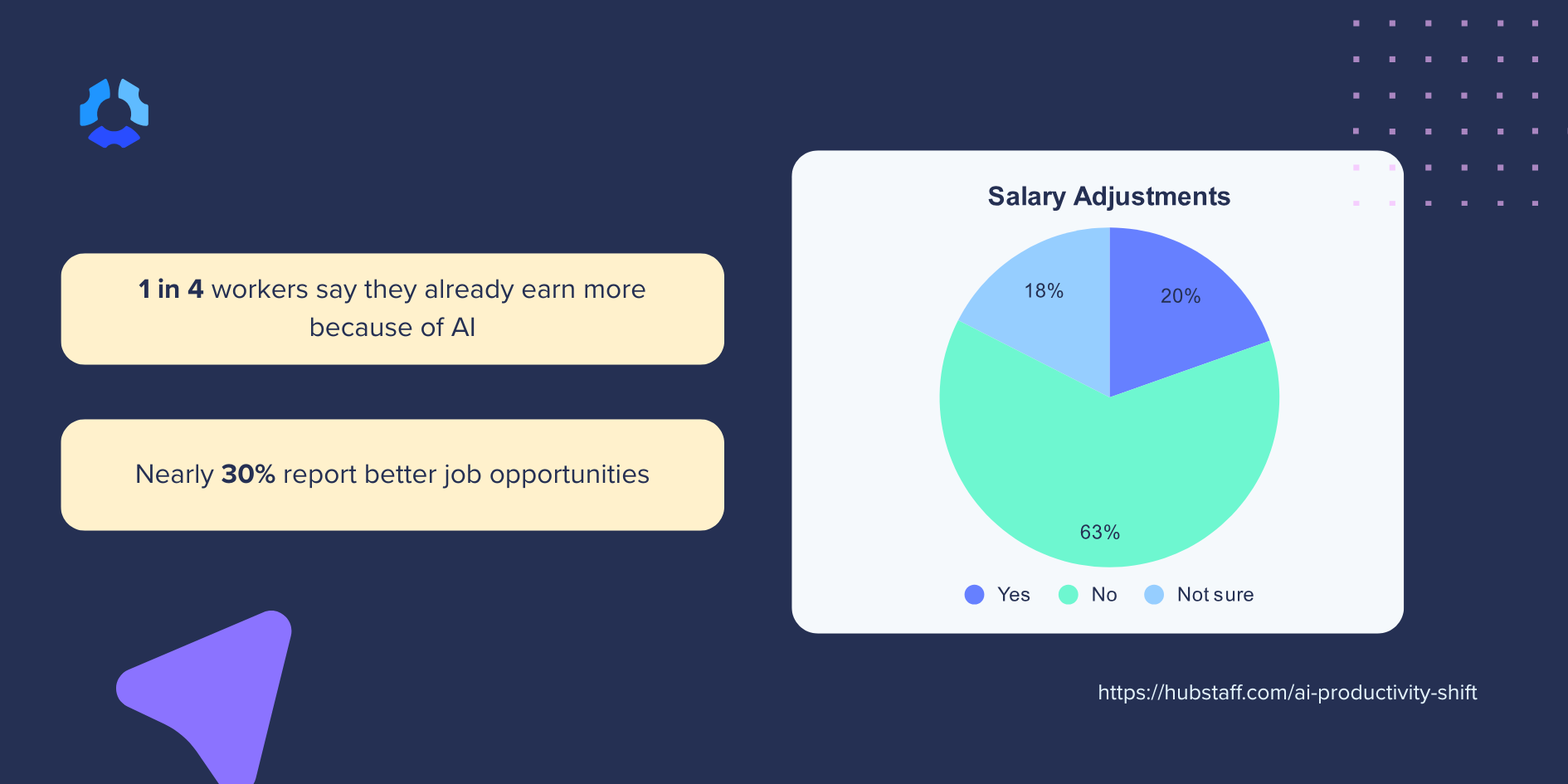
One stat that caught everyone’s attention: 20% of companies are already adjusting salaries based on AI skills.
Eryn called out the need to rethink hiring entirely. The half-life of skills is shrinking, so we can’t just look at job titles and degrees anymore. We need to value lifelong learners, curiosity, and adaptability.
And as Dr. Gleb showed, companies need clear policies that state AI is meant to augment, not replace people. That builds trust and drives smarter adoption.
Takeaway:
- Add AI fluency to performance reviews and hiring conversations
- Reward experimentation and adaptability
- Create policies that empower, not police
7. Why small teams move fast and how big ones can catch up
Small teams are winning with AI because they can act fast, take risks, and course-correct quickly. Phil described the cultural gap perfectly: in startups, “move fast and break things” is encouraged. In large enterprises, “take a risk and you’ll get fired” is the unspoken rule.
But big companies aren’t doomed. Eryn pointed to Accenture’s internal AI app marketplace as a great example of balancing control with empowerment.
Takeaway: Create your own internal AI marketplace or sandbox. Give employees an approved way to experiment and share tools without triggering months of red tape.
8. What AI will change for each of us next year
We closed the session by asking: What’s one way AI will impact your work in the next 12 months?
Here’s what the panelists said:
- Phil is using AI to support personal writing projects and automate email workflows
- Nadia is using AI to spot compliance patterns across companies and create faster audits
- Eryn is shifting from “creator” to “curator,” cutting through the noise to surface valuable insights
- Dr. Gleb is using AI tools to teach himself, learn platform updates, and tailor learning to his clients’ use cases
As for me? I’m focused on creating space for these conversations to keep happening because AI is only as powerful as the people driving it.
Takeaway: Ask yourself what one area of your work could be faster, easier, or smarter with AI? Start there.
9. What the audience asked: tools and AI policies
The Q&A brought two questions worth sharing.
First up: which tools should we try beyond ChatGPT? Phil’s advice was to run the same prompt across Copilot, Gemini, Claude, and ChatGPT and compare the answers. He also urged everyone to actually switch models within their tool, which he called the least-clicked button in AI.
Eryn described the tool landscape as a pyramid. Here’s how she breaks it down:
- Generalist LLMs form the base. Tools like ChatGPT handle almost anything reasonably well.
- Specialized tools sit in the middle. Legal AI and other niche platforms know your industry’s nuance and live where you already work.
- Custom agents sit at the top. Once you’re comfortable with the basics, build your own.
Her advice: pick where you are right now and climb.
The second question: what does a useful AI policy look like?
Dr. Gleb walked through a sanitized client policy built on one foundational principle, that generative AI augments human capability rather than replacing labor.
Beyond that, his checklist covers purpose and scope, regulatory context, data privacy and security, a governance committee spanning legal and IT, humans in the loop for critical decisions, permissible and restricted examples, third-party vendor review, ongoing training, and incident response.
His tip on examples stuck with me: if you don’t spell out what’s permitted, anxious employees will assume it isn’t.
Final thoughts: AI’s true value comes from people
Moderating this panel reminded me of something simple but powerful: AI works best when we keep it human.
Train your teams. Build curiosity. Focus on outcomes. Automate what doesn’t matter and protect what does. The teams that win won’t just use AI. They’ll use it well.
Thanks again to our panelists, our audience, and to everyone trying to lead this shift with intention and heart.
Let’s build smarter together.
Want the full data behind this conversation? Read the AI Productivity Shift report to explore the stats, trends, and insights shaping how teams are using AI at work.
Most popular
The Top Time Management Statistics in 2026 for Workplace Productivity
We all have the same hours in the day. But when employees struggle to focus, those hours likely won’t be used effectively. Witho...
The Best Coaching Conversations Start With Productivity Data
Most coaching conversations happen too late. A deadline is missed, or a client flags a problem, and then a manager schedules a sit...
A Quick Guide to Work Order Management
From quick fixes to long-term stability, work orders are crucial to asset management and helping managers keep operations running...
How to Identify High Performers Using Work Patterns
Every business has top performers, and managers are told to find them all the time. But in most cases, they default to approaches...