Is Automatic Time Tracking Right for Your Organization?

 8 min read
- Automatic time tracking eliminates manual timesheet errors that cost an average of $291 each to fix, making it a high-ROI investment for compliance-heavy industries and distributed teams.
- Hubstaff's automatic time tracking runs in the background on company-owned devices with SOC 2 Type II, GDPR, and HIPAA-ready security — no employee action needed after enrollment.
- Before deploying automatic tracking, confirm device ownership, define clear objectives, audit legal requirements, and communicate transparently with employees to ensure a smooth rollout.

Automatic time tracking sounds as straightforward as it gets. Employees sit at their desks, the software runs in the background, and the tool does its job while they focus on work.
For some organizations, that’s exactly what they need. But for others, it can be the beginning of a trust problem they didn’t know they were creating.
In this guide, we’ll help you decide whether this kind of tracking fits your organization — your devices, your legal environment, your culture, and your relationship with the people who show up to work every day.
What is automatic time tracking?
Automatic time tracking is software that records work hours in the background, without requiring employees to manually start or stop a timer each session.
Typically, these tools run on company-issued devices, are deployed by an administrator, and capture time continuously without any action on the employee’s part. This is worth distinguishing from personal productivity apps like Toggl Track or RescueTime that an individual might use to understand their own habits.
Organizational automatic tracking is different: it’s an administrative decision, applied at scale, across an entire workforce, and with that, businesses’ permissions and needs factored in from the start.
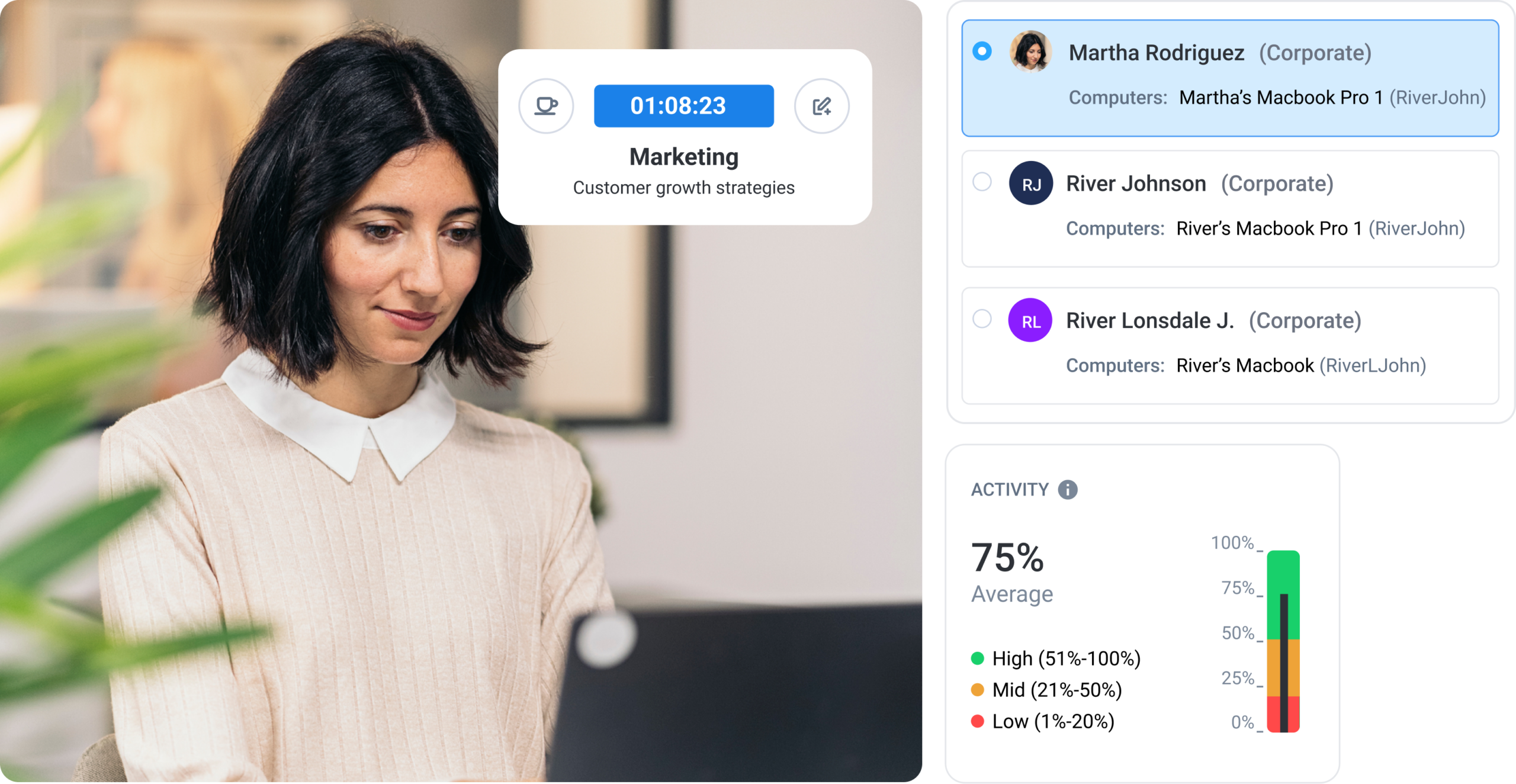
Core capabilities of automatic time trackers usually look like this:
- Background tracking without employee action. Once deployed, the software runs without requiring employees to interact with it at the start or end of a session.
- Activity and app usage monitoring. Beyond raw hours, automatic tracking can capture information like website and app usage (and time spent in said tools), giving organizations a more granular picture of how they spend time at work.
- Compliance-ready reporting. Tracked data is logged automatically and formatted for audit purposes, which matters for industries with strict labor, billing, or government contracting requirements.
- Account provisioning and user management. New employees added to the organization can be automatically enrolled in the tracking policy. This reduces administrative overhead as teams grow.
- Offline tracking with automatic sync. Hours recorded without an internet connection are stored locally and synced once connectivity is restored to protect against gaps and inconsistencies in record-keeping.
What unites all of these capabilities is that they remove the human variable from the equation (e.g., forgotten clock-ins, rounded timesheets, the end-of-week reconstruction of hours). Whether that’s a feature or a concern depends almost entirely on context.
Benefits of automatic time tracking for organizations
With automatic time tracking, the administrative burden of managing the time tracking largely disappears after the initial setup phase.
There are no timesheets to chase, no hours to reconcile at the end of the week, and no holes in the record for someone to go back and fill in. That’s a lot of operational value for organizations managing distributed teams or compliance-heavy workflows.
Automatic time tracking also has a slew of other benefits, like:
- Payroll accuracy. Automated logs capture hours as they happen, which means teams don’t have to deal with manual timesheets, an unreliable basis for payroll. Manual payroll tracking errors cost teams an average of $291 to fix.
- Admin time savings. Time tracking running in the background means HR and operations teams spend far less time chasing submissions and reconciling discrepancies.
- Consistent, complete data. Because tracking doesn’t depend on employee action, time records are uniform across the organization. It has the same format and level of detail, regardless of role or location.
- Compliance-ready reporting. Automatic logs produce auditable, timestamped records that labor law compliance, DCAA government contracting, and client billing require.
- Workforce visibility at scale. Automatic tracking works the same way whether a team has 10 people or 10,000, across time zones, device types, and roles.
The compounding effect of these improvements is that processes that consume significant time and cause stress become virtually invisible. In other words, managers have more time to focus on higher-value tasks.
Which types of organizations benefit most?
Automatic time tracking isn’t a universal solution, and no organization should be forced to fit into a box to accommodate it.
Automatic tracking works best in specific organizational contexts where device ownership is clear, compliance requirements are strict, and the volume of work makes manual tracking impractical.
Here are some examples of use cases for auto tracking:
- Organizations that issue company-owned or managed devices. Automatic tracking is designed for this environment. When the organization owns the device, the legal and administrative basis for background tracking is straightforward.
- Compliance-heavy industries. Government contractors working under DCAA requirements, health care organizations, and financial services firms all operate in environments where accurate, auditable time records aren’t optional.
- Remote and distributed teams. In a workforce spread across locations and time zones, consistent data collection is harder to enforce manually. Automatic tracking removes that dependency.
- IT and professional services firms. Organizations billing across multiple clients and projects need time data that’s accurate enough to invoice against. Manual entries introduce risk that automatic tracking eliminates.
- Field services and construction. Teams documenting on-site hours for work orders and project billing need records that reflect when and where work actually happened.
- Organizations with existing MDM infrastructure. Companies already running Jamf or Microsoft Intune for multi-device management (MDM) can deploy automatic tracking through their existing device management stack, which considerably simplifies rollout.
The common thread across all of these is that the organizations benefiting most are ones where time data has consequences — for payroll, for billing, for compliance, or for all three.
When automatic time tracking may not be the right fit
Automatic time tracking is a serious administrative tool, and, like any serious tool, it’s not appropriate in certain situations. The clearest disqualifier is device ownership.
Automatic tracking is designed for company-owned or company-managed devices. In a BYOD environment (where employees are working on their own laptops and phones) automatic tracking isn’t applicable.
Small teams with simple needs may find automatic tracking to be cumbersome. For example, if a five-person team is billing a handful of clients, the cost of deploying and managing an automatic tracking system probably isn’t worth it.
Another area to consider is culture. Automatic tracking requires a level of organizational transparency that not every workplace is ready for. That said, teams that roll out automatic tracking without informing employees often create more problems for themselves. That’s why we strongly encourage businesses to take the time to be intentional with their values.
Once trust is damaged, it’s expensive to rebuild. No time tracking system is worth that.
Is automatic time tracking right for your organization? A 6-step decision framework
Not every organization that can deploy automatic time tracking should.
Follow the steps below before installing any software to see if automatic tracking is the right fit for your team.
1. Assess device ownership
The first question is the most disqualifying. Do your employees work on company-issued or company-managed devices?
If the answer is no (or even mostly no), automatic tracking isn’t the right tool for your environment.
The legal and ethical basis for background tracking on personal devices is complicated enough, as consent is mandatory. In this instance, you should consider transparent time-tracking alternatives.
2. Define your tracking objectives
Before evaluating any software, you need to be specific about what you’re trying to solve.
Compliance requirements, payroll accuracy, client billing, and productivity visibility are all legitimate objectives. However, they lead to different configurations and different conversations with employees.
Vague objectives produce vague implementations. In turn, that produces rollouts that create problems later.
3. Evaluate IT readiness
Automatic tracking at scale requires infrastructure. If your IT team is already running an MDM solution like Jamf or Microsoft Intune, deployment becomes significantly more manageable, as tracking can be pushed to enrolled devices in batches rather than being installed one by one.
On the other hand, if that infrastructure doesn’t exist yet, you need a better understanding of what it would take to build it before committing to a rollout timeline.
4. Audit your legal and regulatory requirements
The rules governing employee time tracking vary significantly by country, state, and industry.
In the United States, the FLSA requires accurate records of hours worked. California’s CCPA adds requirements around how employee data is collected and used.
GDPR applies to organizations operating in the EU and generally requires that employees be informed about the data their employers collect. There’s also DCAA compliance, which applies to government contractors.
Understanding which of these apply to your organization before deployment is a central pillar of successful automatic time tracking.
5. Build your employee communication plan
This step deserves more attention than it typically gets.
Decide what employees will be told, when, and by whom. Do this before a single device is enrolled.
Automatic tracking that employees discover on their own (or that is explained poorly after the fact) tends to damage workplace trust. The communication plan needs to be part of the implementation.
6. Pilot before a full rollout
Start with a small group. A pilot gives you the chance to validate the deployment process, stress-test your policy settings, and understand what the employee experience actually looks like before you’ve committed the entire organization to an automatic tracking method.
Problems that appear in a pilot are manageable, but ones that appear after a full rollout are considerably more expensive.
How automatic time tracking works with Hubstaff
Hubstaff is a versatile time tracking software platform with built-in productivity monitoring, workforce analytics, reporting, and payment features. Businesses can utilize it in two different ways based on their needs:
- As a task-based time tracking software. The most common version of Hubstaff lets users track time to projects and tasks and view live time and activity data from their dashboard. This solution is great for users working from personal devices who want full control over when tracking starts and stops.
- As an automatic background time tracking software on company owned devices. Hubstaff can also run in the background on company-owned devices to automate time and activity tracking. When the device is on, tracking automatically kicks in. It’s great for high-compliance environments where businesses issue devices to their employees for work only.
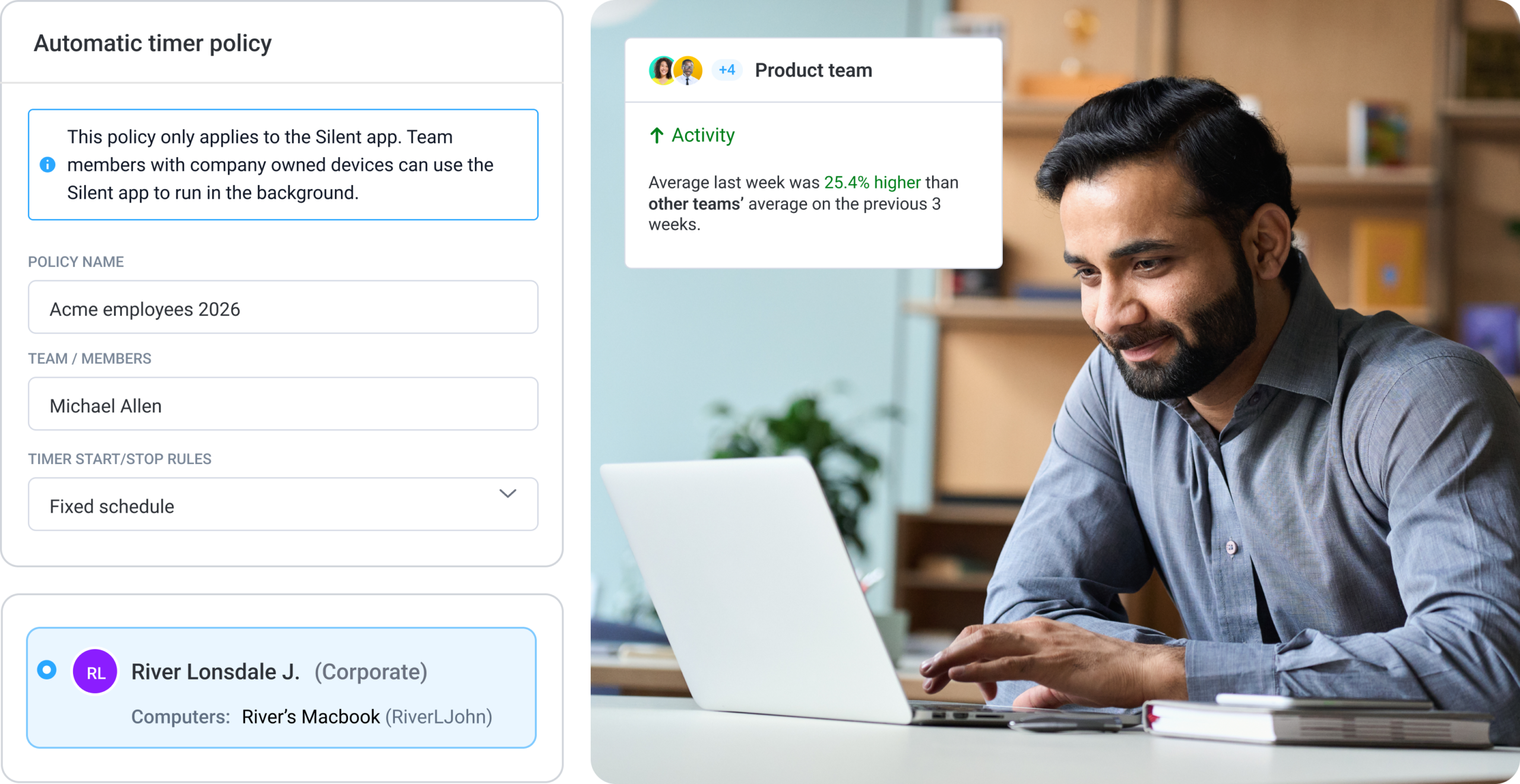
If you choose the automatic tracker option, admins can create an automatic tracking policy. From there, tracking runs in the background on enrolled company-owned devices, with no action required from the employee each session.
New users added to the organization are automatically enrolled in the policy. Deployment can happen individually for smaller teams or in batches via MDM for larger rollouts. Hubstaff supports Windows, macOS, and Linux.
- Background tracking. Once a policy is active, the timer runs without employees needing to interact with the application at the start or end of a session.
- Activity and app usage monitoring. Hubstaff captures which applications are in use and for how long, giving administrators a granular view of how team members spend work time across the organization.
- Compliance-ready reporting. Tracked hours are logged automatically and formatted for audit purposes. This supports labor law compliance, DCAA government contracting, and client billing.
- Account provisioning and user management. New users are enrolled in the tracking policy automatically. Administrators can manage users, teams, and permissions from a single dashboard.
- Customizable tracking policies. Admins can configure when tracking runs, whether that’s tied to scheduled shifts, fixed time windows, or continuously for company-owned devices.
- Offline tracking with automatic sync. Hours recorded without an internet connection are stored locally and synced once connectivity is restored.
- Enterprise-grade security. Hubstaff is SOC 2 Type II certified, GDPR compliant, and HIPAA-ready.
If you want to see how it works before committing, you can access all Hubstaff features with a 14-day free trial.
Frequently asked questions about automatic time tracking
Can automatic time tracking run without employees starting a timer every day?
Yes. Once an administrator sets up an automatic tracking policy, the timer starts and stops based on the policy configuration. Employee action is not required per session. Employees do not need to interact with the application for time to be recorded.
What’s the difference between Hubstaff’s standard app and automatic time tracking?
Hubstaff’s standard app requires employees to manually start and stop the timer each session. Automatic tracking removes that requirement entirely. Once a policy is active on an enrolled device, tracking runs in the background without any input from the employee.
Does automatic tracking run 24/7?
Not by default. Tracking policies can be configured to run during scheduled shifts, fixed time windows, or continuously on company-owned devices. Administrators define when tracking is active, and those parameters are set before any device is enrolled.
Is automatic time tracking right for you?
The decision comes down to a few honest questions:
- Who owns the devices?
- What does the compliance environment look like?
- Is the organization ready to be transparent with employees about what tracking means?
Not every organization is, and that’s a legitimate answer. For those that are, the operational return tends to be significant.
If you’re ready to see how it works in practice, try a 14-day free trial with full access to all Hubstaff features.
Most popular
The AI Productivity Panel: Lessons From Leaders on What’s Working (and What’s Not)
When I moderated this AI productivity panel, I expected a solid conversation. What I didn’t expect was the flood of real-world i...
Ask Your Workforce Data Anything with Hubstaff’s New AI-Ready CLI and API
It’s Monday morning. Your CEO asks, “Which projects went over budget?” Instead of pulling reports, exporting numbers, and ve...
How to Spot and Manage Work Overload Before Your Best People Burn Out
Work overload occurs when the demands placed on an employee or team exceed their available resources, leading to stress, burnout,...
Workplace Productivity Statistics in 2026: What the Numbers Say
For many businesses, having the ability to maximize output without compromising quality gives them a major edge over their competi...
![How to Use Time Blocking to Make 2024 Your Most Productive Year Ever [Free Template]](https://hubstaff.com/blog/wp-content/uploads/2018/12/time-blocking@2x-780x390.png)