A strong policy, in addition to listing what gets collected, defines the conditions under which tracking runs, the boundaries of what falls outside it, and how employees can see and understand their own data.
Devices covered
A device tracking policy applies to company-issued equipment, such as laptops, desktops, and mobile devices provided by the organization for work purposes. It does not apply to personal devices employees choose to use for work, sometimes called a BYOD (bring-your-own-device) policy.
If your organization has employees who work across both, that distinction needs to be explicit in the policy, as the rules differ. Conflating them can result in real problems.
What activity is tracked
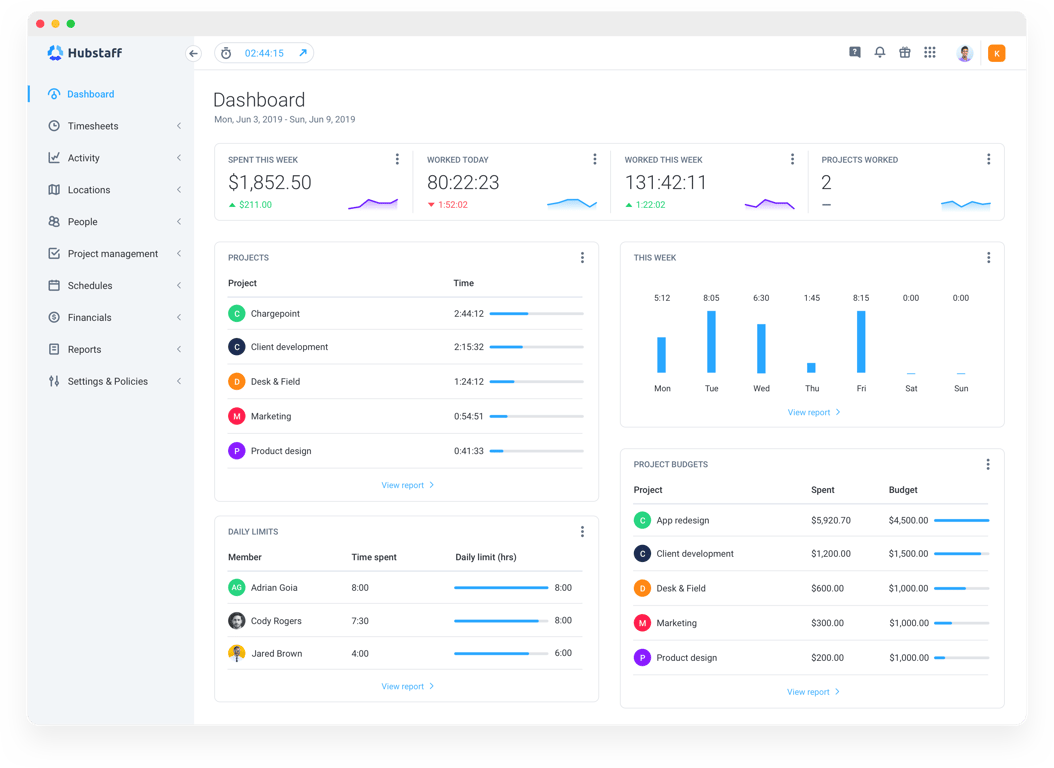
The specific data a tracking policy covers depends on how your organization has configured its tools, but most automated tracking systems operate across a consistent set of categories.
- Time tracking. When work sessions begin and end, and how time is distributed across projects or tasks.
- App and URL activity. Which applications and websites are used during tracked hours.
- Activity levels. Keyboard and mouse input used as a proxy for active versus idle time.
- Optional features. Some organizations also enable screenshots or GPS location tracking, depending on the nature of the work and applicable regulations.
Not every organization uses all of these. A policy should reflect what's actually enabled, not what the software is theoretically capable of, because listing capabilities you don't use can hurt trust just as much as omitting things you do.
Purpose of tracking
A policy should state clearly what the organization intends to do with the data it collects — not in vague terms, but specifically enough that an employee reading it can understand how the information connects to real operational outcomes.
Use the guide questions below to clearly define the purpose of your tracking:
- Do we have an accurate picture of how work time is distributed across tasks, tools, and projects?
- Are our project estimates grounded in actual time data, or are we planning workloads based on assumptions?
- Can we demonstrate compliance with internal policies or regulatory requirements when required?
These are the kinds of questions that come up in project retrospectives, resource planning conversations, and audits. Automatic tracking on company devices is one of the more reliable ways to answer them consistently.
When tracking occurs
Knowing that a device is monitored matters less to most employees than knowing when.
A policy that’s vague on timing cultivates uncertainty that does more damage to trust than the act of tracking itself. The answer, in a well-configured policy, is straightforward.
- Tracking runs during defined work hours only.
- Sessions are based on active computer use. Keyboard and mouse activity determine whether a session is live or idle.
- No tracking occurs outside of scheduled hours.
- Start and stop behavior is automatic, governed by the rules set at the policy level, not by individual user input.
The practical implication is that employees don't need to remember to start or stop anything. The system runs according to a predefined schedule set by the organization. Most importantly, outside of that schedule, it doesn't run at all.
Who can access the data?
Access to tracking data should be limited to people with a legitimate reason to see it, and a policy should name those roles explicitly rather than leaving it implied. In most organizations, that means managers who oversee the teams being tracked, and administrators who configure and maintain the system.
Managers typically see time and activity data for the people they're responsible for. This is enough information to understand how work is distributed and how projects are progressing.
On the other hand, administrators have broader access by necessity, but that access should be governed by the same policy that applies to everyone else.
Employees can view their own data, which is an important feature of any transparent system, though that visibility is read-only. They can see what's been recorded about their own activity, but the configuration of when and how tracking runs is set at the organizational level and isn't something individual users control.
Data storage and retention
A tracking policy isn't complete without addressing what happens to the data after it's collected. These are more than just bureaucratic details, as they are the parts of a policy that tell employees their data isn't being kept indefinitely for reasons nobody has thought through.
- How long is the data stored? Define a specific retention period (30 days, 90 days, or a year) based on your operational needs and any applicable legal requirements. An open-ended retention period is harder to defend and harder to explain.
- Where is it stored? Data collected through automatic tracking is held on the provider's servers, subject to their security and compliance standards. Your policy should reference the location of that infrastructure, particularly if your organization operates across jurisdictions with different data residency requirements.
- When is it deleted? State clearly what triggers deletion, whether that's the end of a retention window, an employee's departure from the organization, or a specific request. This makes the process more predictable than discretionary.
Most employees aren't scrutinizing retention schedules. However, knowing one exists (and a thoughtful one at that) matters more than the specific numbers inside it.
What is NOT tracked
If you only define what gets collected, you’ve got half a policy on your hands.
The other half (the part that does a lot of the work when it comes to trust) is a clear statement of what falls outside the scope of monitoring entirely. Employees reading a tracking policy want to know where it stops, too.
- Personal files. Tracking covers application and browser activity during work sessions, not the contents of files stored on the device. Documents, photos, downloads, and anything saved locally remain outside the system's scope for collection or reporting.
- Off-work activity. Tracking runs during defined work hours, per the policy schedule. Anything that happens outside those hours (evenings, weekends, time off) should not be recorded.
- Non-work devices. The policy applies only to devices the organization has issued and enrolled. Personal laptops, phones, and tablets that an employee uses independently are not subject to monitoring, whether or not they're used for work-related tasks.
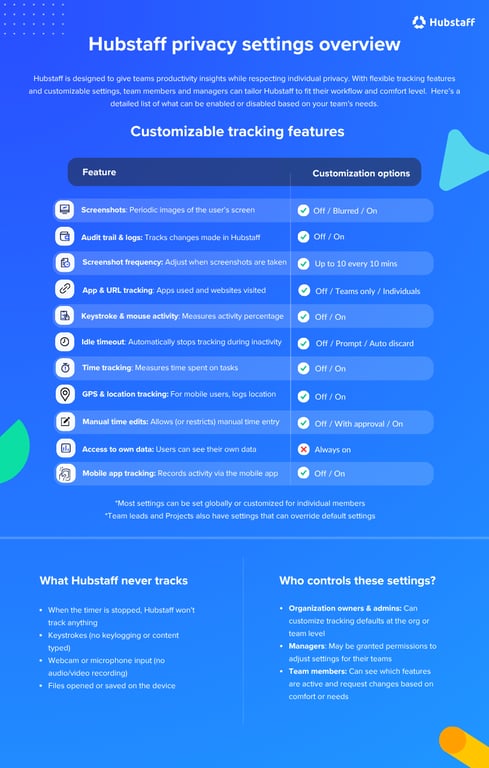
Stating these boundaries explicitly isn't a formality. These comprise the part of the policy that answers the questions employees are most likely to have but least likely to ask out loud. It deserves to be as deliberate as everything else in the document.