ActivTrak Review (2026): Features, Pricing, Pros & Cons

 10 min read
- ActivTrak's silent, automatic tracking with no employee control over time entries places the full responsibility on managers to set clear policies and maintain team trust.
- ActivTrak's advertised price rarely reflects the true cost — screenshots, live capture, HRIS integrations, and advanced support are all paid add-ons with no month-to-month billing option.
- Hubstaff goes beyond monitoring by combining time tracking with payroll, invoicing, and project budgeting — making it the stronger choice for teams that need workforce visibility tied to financial outcomes.

After testing ActivTrak, it became clear that its strength lies in providing insights into workforce productivity, work patterns, and team capacity. If you’re looking to understand how your teams spend their time, identify productivity trends, or determine whether your AI tools are delivering value, you’ve come to the right place. In this ActivTrak review, we’ll break down its features, compare it with alternative tools, and help you decide whether it’s the right fit for your business. If you’re unfamiliar with the software, here are some quick highlights:
- ActivTrak is a platform designed for mid-sized to large companies (with around 50 or more employees).
- Pricing starts with a free plan up to $19 per user/month billed annually, with custom Enterprise pricing above that.
- It has earned a 4.3 rating on G2 and a 4.5 rating on Capterra.
Before we review the platform, let’s delve a little deeper into ActivTrak’s background.
Hubstaff Walkthrough
Dive into our interactive demo and explore the features that make managing global teams easier than ever.
What is ActivTrak?
ActivTrak is a comprehensive workforce analytics platform that gives users a glimpse into how their team is performing. It tracks the tools teams use, the hours they work, and then aggregates this data into real-time dashboards that managers and decision-makers can act on.
Recently, the company has leaned harder into framing itself as a “work intelligence” solution instead of traditional monitoring, which is visible in how much it now centers on AI tool usage.
If you’re a smaller business just looking to track billable hours, this might also mean ActivTrak is a bit overequipped for your daily needs. It’s better suited for mid-sized and growing organizations.
ActivTrak’s data capture occurs silently in the background. While other tools in the space, like Hubstaff and Insightful, also offer automatic tracking, these tools also offer versions of the product that allow employees to choose when they track time.
ActivTrak does not. There’s no way to manually start or stop one’s timer or manually edit time entries.
While this can be a lot for some teams, it’s important to note that ActivTrak is very careful with the data it monitors. It cannot:
- Read emails
- Watch people through a camera
- Log keystrokes
Instead, it collects data to uncover trends and patterns. Privacy controls can be configured so a company can choose how much detail individual employees can see about their own activity, or how much anonymization the reporting uses.
Is ActivTrak’s monitoring ethical/private?
Whether ActivTrak’s monitoring is ethical or private depends on the team using it, their level of compliance needs, and their company-specific ethics and culture — not the tool itself.
ActivTrak is more than capable of supporting either intention:
- Transparency. Teams can use ActivTrak to prioritize aggregated data and to identify patterns without putting any one individual under a microscope. Used this way, it’s a tool for teams trying to understand how work happens at scale.
- Overt surveillance. Just as easily, ActivTrak can drill down to the individual, zoom in on every idle minute, and equip a manager with highly granular data to scrutinize and micromanage. When you also factor in that it’s automatic tracking, managers may never have to ever disclose their intentions or that they’re monitoring at all.
Ultimately, the question isn’t “is ActivTrak ethical,” but whether the team deploying it is.
If you’re using ActivTrak, the automatic nature of the software can already be problematic for some. As a manager or org leader, there may be added pressure on you to develop monitoring policies, get employee buy-in, and ensure the tool is used ethically.
The tool can do either job well, but you may have to work harder with your team than you would with Insightful, Hubstaff, and other tools to ensure transparency.
ActivTrak features
ActivTrak has a wide feature set, and it can be very tempting to explore every corner of it. But to save you time (pun intended), we’re going to go over the core mechanics of what it can do, so you can visualize yourself using it without getting lost in the weeds.
Activity and productivity monitoring
ActivTrak monitors what people do on their devices and sorts it into productive, unproductive, or undefined, without self-reporting required.
Teams get real-time visibility into who’s working, what apps they’re using, and what their productivity looks like throughout a day.
Real-time Pulse View
ActivTrak’s Pulse View shows who’s working right now, color-coded by status (i.e., active, passive, or offline), updated every few seconds.
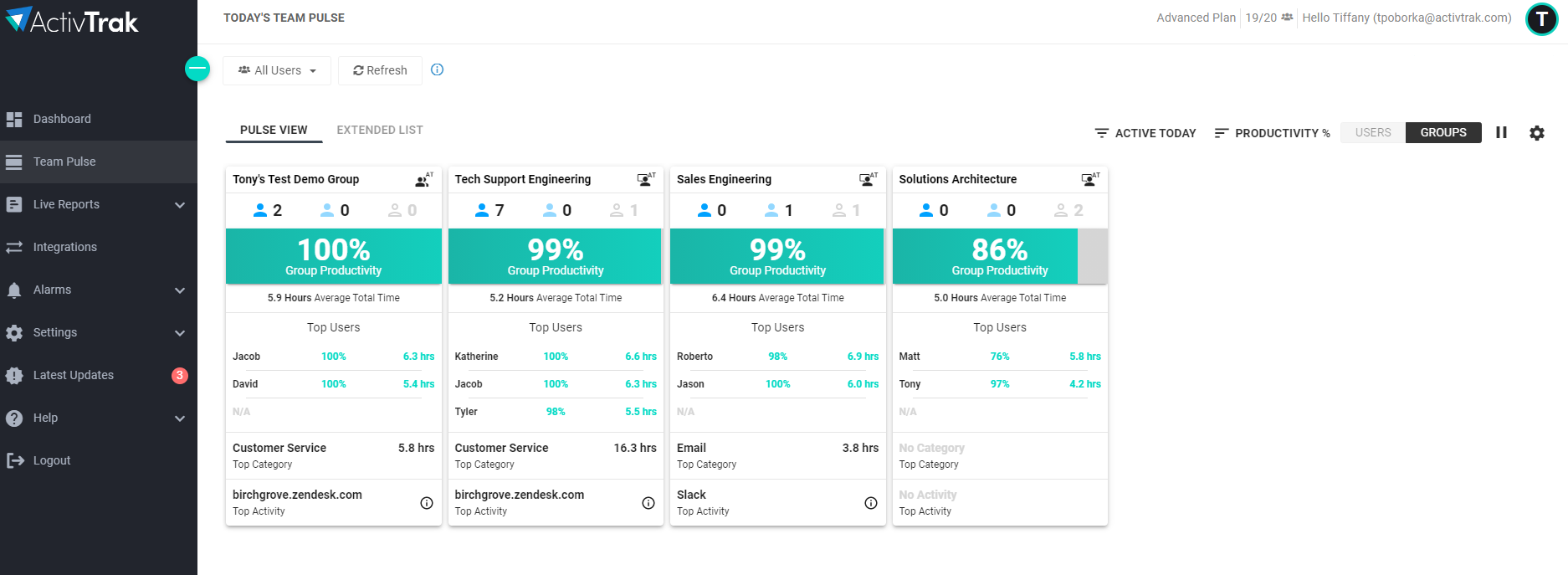
Switch between individuals and teams to see productivity ratios, top apps, and top activities as the day unfolds.
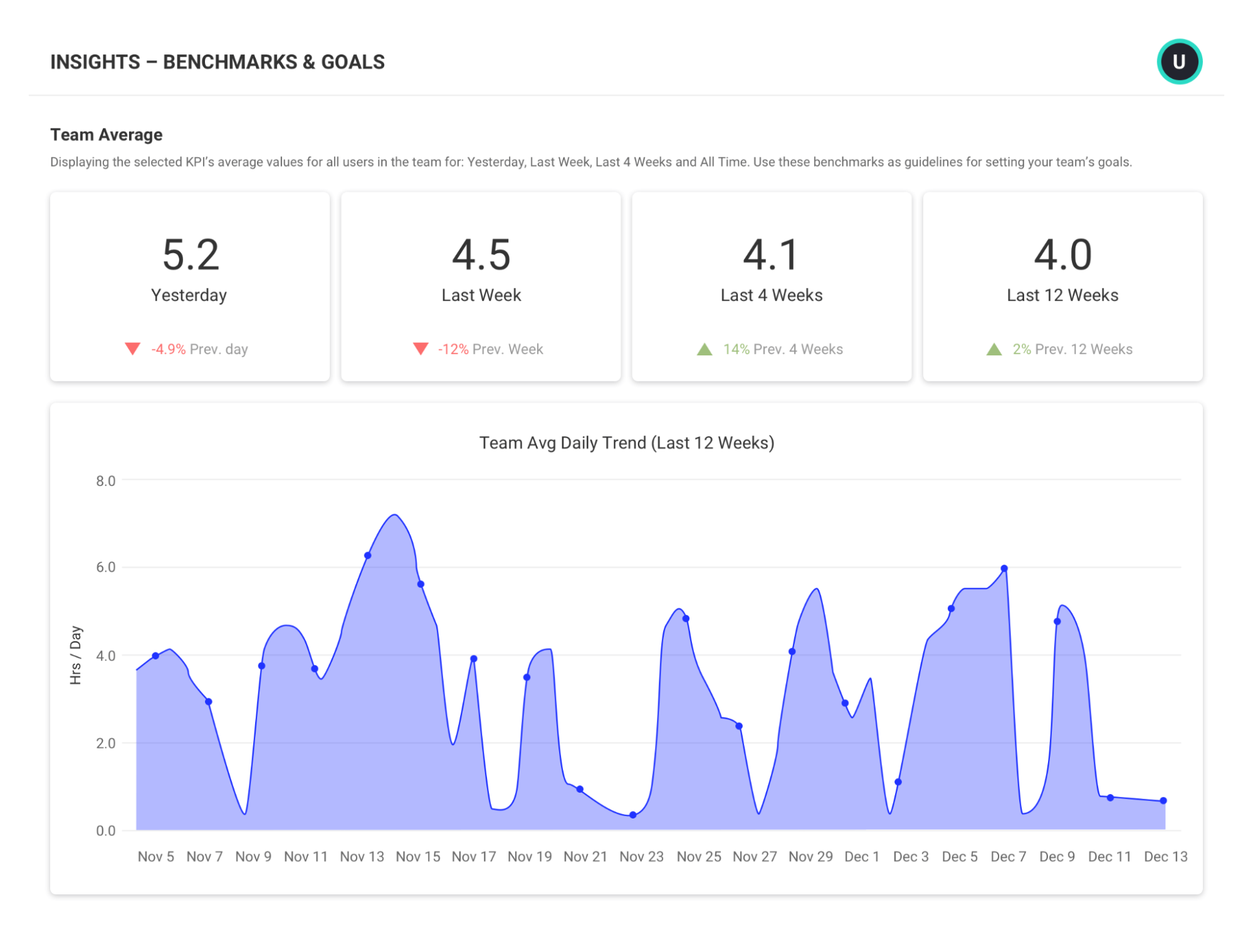
Productivity goals and benchmarks
Teams can set targets for productive, focused, or collaboration hours per day, then track progress against them automatically.
If you’re not sure where to start, ActivTrak’s benchmarks guide shows aggregate data across its customer base to set realistic goals instead of guessing. This feature is gated to Essentials Plus and above.
Team health, burnout risk, and capacity planning
ActivTrak can identify over- and underutilized employees, like anyone working more or less than roughly 30% off their goal. This gives managers a chance to rebalance workload before burnout sets in.
On the Professional tier, this extends into headcount and capacity planning: using real activity data to justify new hires or right-size a team instead of guessing. This is one of the platform’s strongest people management tools.
Location & schedule adherence
ActivTrak compares actual work hours against assigned shifts in one view, no self-reporting needed.
It also shows whether someone’s working remote or in-office (without GPS), which is useful for return-to-office compliance and figuring out if hybrid policies are actually working as intended.
AI features
ActivTrak tracks which AI tools (e.g., ChatGPT, Claude, Gemini) your team uses and how often, then classifies them into adoption maturity stages. That said, this is analytics and reporting, not a live coaching layer watching people as they work.
Integrations and compliance
ActivTrak connects to the tools widely used by businesses, like:
- Outlook and Google Calendar for scheduling
- HRIS platforms for PTO and time-off data
- Microsoft Entra ID and SCIM for user provisioning and access control
The ActivConnect API also adds pre-built BI templates for Power BI, Looker Studio, and Tableau, so you can make use of the data even outside of ActivTrak’s native dashboards.
What ActivTrak doesn’t do
ActivTrak is pretty clear with its boundaries. It doesn’t:
- Log keystrokes
- Monitor emails
- Track GPS locations
- Access cameras
- Records videos of employee screens
While screenshots are available, they are only available through the paid Screen Details add-on.
ActivTrak pricing
ActivTrak’s free plan covers up to 3 users with basic time tracking. Past that, paid plans range from $10 to $19 per user per month, billed annually, with no minimum user count.
Essentials, Essentials Plus, and Professional all support unlimited users at their respective price points.
| Plan | Price (per user/mo) | Notes |
| Free | $0 | Up to 3 users, 30 days of data history, basic time tracking |
| Essentials | $10 | Unlimited users, 6 months of data history, core monitoring and schedule adherence |
| Essentials Plus | $15 | Unlimited users, 6 months of data history, location policy adherence and workforce utilization reporting |
| Professional | $19 | Unlimited users, 1 year of data history, productivity goal-setting, burnout and workload balance tracking, capacity planning |
| Enterprise | Custom | Full report exports, advanced security audits, custom support tiers |
Billing is annual-only across every paid tier, so there’s no month-to-month option if you want to commit gradually. Some other things to note are:
- Screenshots and live screen capture are included with the Screen Details add-on.
- They are not part of the base plan, regardless of which tier you’re on.
- Deeper integrations like HRIS sync, the ActivConnect API, and custom BI dashboards are also add-ons rather than included features.
And while basic support comes with any paid plan, the more responsive Premier and Signature support tiers cost extra, no matter how many licenses you’re running.
None of this is hidden, exactly. That said, it means the number on the pricing page might not be the one you’ll end up paying once you start deploying the platform.
Silent deployment
ActivTrak deploys quietly by design. On Windows, IT teams can push it out remotely through:
- Intune
- Active Directory Group Policy
- PowerShell scripts
- Command line
All without anyone touching individual machines.
According to their support site, the desktop agent itself is lightweight, using around 32MB of memory according to ActivTrak’s own benchmarks, compared to 91MB for Slack on the same test machine.
macOS is a different story. Remote deployment is possible through Jamf Pro, Kandji, or similar MDM tools, but ActivTrak recommends transparent installation on Mac instead of silent.
Starting with macOS Sequoia, users have to manually grant accessibility and screen recording permissions regardless of how the agent got installed. This means going silent just delays a conversation that must happen anyway.
ActivTrak pros and cons
| Pros | Cons |
| Clean, role-based dashboards, quick to navigate. | Real cost is higher than the apparent price: screenshots and live screen view are a paid Screen Details add-on. |
| Fast, often silent deployment, especially on Windows. | Annual billing only, no month-to-month option. |
| Strong productivity-trend analysis and team benchmarking. | Accurate insights depend on ongoing manual activity classification and tuning. |
| Differentiated team-health, burnout-risk, and capacity planning, though gated to the Professional tier. | Some of the most useful reporting, like goal-setting, burnout tracking, and capacity planning, is locked to the top tier. |
| Privacy-first by default, with no keystroke logging, email monitoring, camera access, or video recording. | No GPS or geofencing, by design, which also means no location tracking for field teams that might actually want it. |
| Usable free tier for very small teams, up to 3 users. | Deeper integrations like HRIS, the ActivConnect API, and custom BI dashboards are separate add-ons, not included. |
| Solid compliance coverage, including HIPAA, GDPR, CCPA, and SOC 2 Type 2, available even on the free tier. | Premier and Signature support cost extra regardless of plan size. |
What real users say
ActivTrak holds a 4.3 on G2 and a 4.5 on Capterra, with most reviewers landing in the four- and five-star range.
The praise is consistent across both: people like how easy it is to set up and navigate, and managers specifically call out the coaching value, catching a drop in someone’s activity before it becomes a real problem.
The criticism clusters just as predictably.
Even for those who rate ActivTrak as a premier tool, a common complaint is that reporting can feel like ongoing maintenance.
Getting from the raw data to a simple answer about how a team is doing often means jumping between multiple reports. Plus, keeping the platform accurately tuned to the way the organization works (i.e., classifications and settings) requires additional, ongoing manual effort.
For instance, someone has to manually classify every app and website as productive or unproductive, and keep that list current.
Cost comes up, too — especially as headcount grows and more features turn out to be locked behind a higher tier. Renewals have also been brought up in more than one review, with users describing friction when trying to cancel or scale down a license count once a contract’s already been signed.
ActivTrak alternatives
ActivTrak isn’t the only name in this space, and depending on what you need, it might not even be the right one. Here’s how some of the closest alternatives compare.
Hubstaff
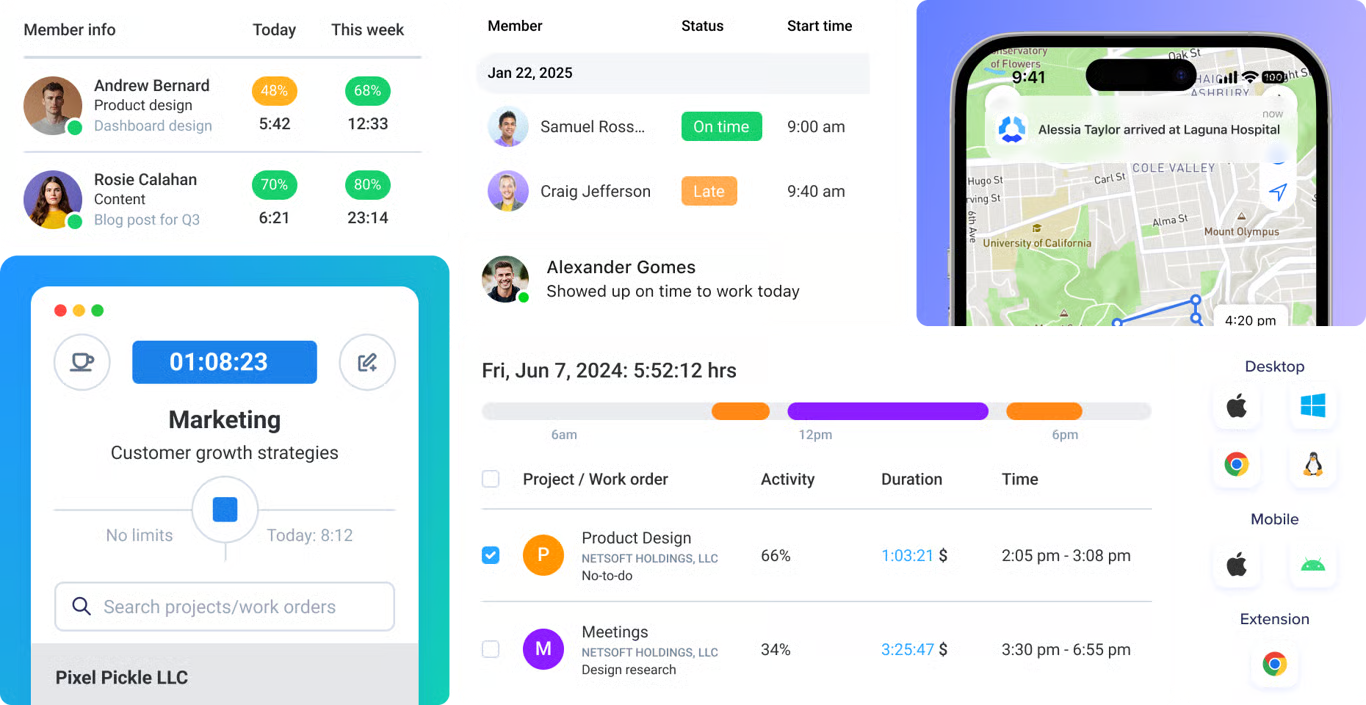
Hubstaff connects tracked time to the financial and operational layer that ActivTrak doesn’t cover. It offers project budgeting, billing, and automated payment capabilities, along with productivity monitoring and AI workforce analytics. It fits teams that need both tracking and operational workflows, rather than analytics alone.
See how Hubstaff stacks up against ActivTrak >
Teramind
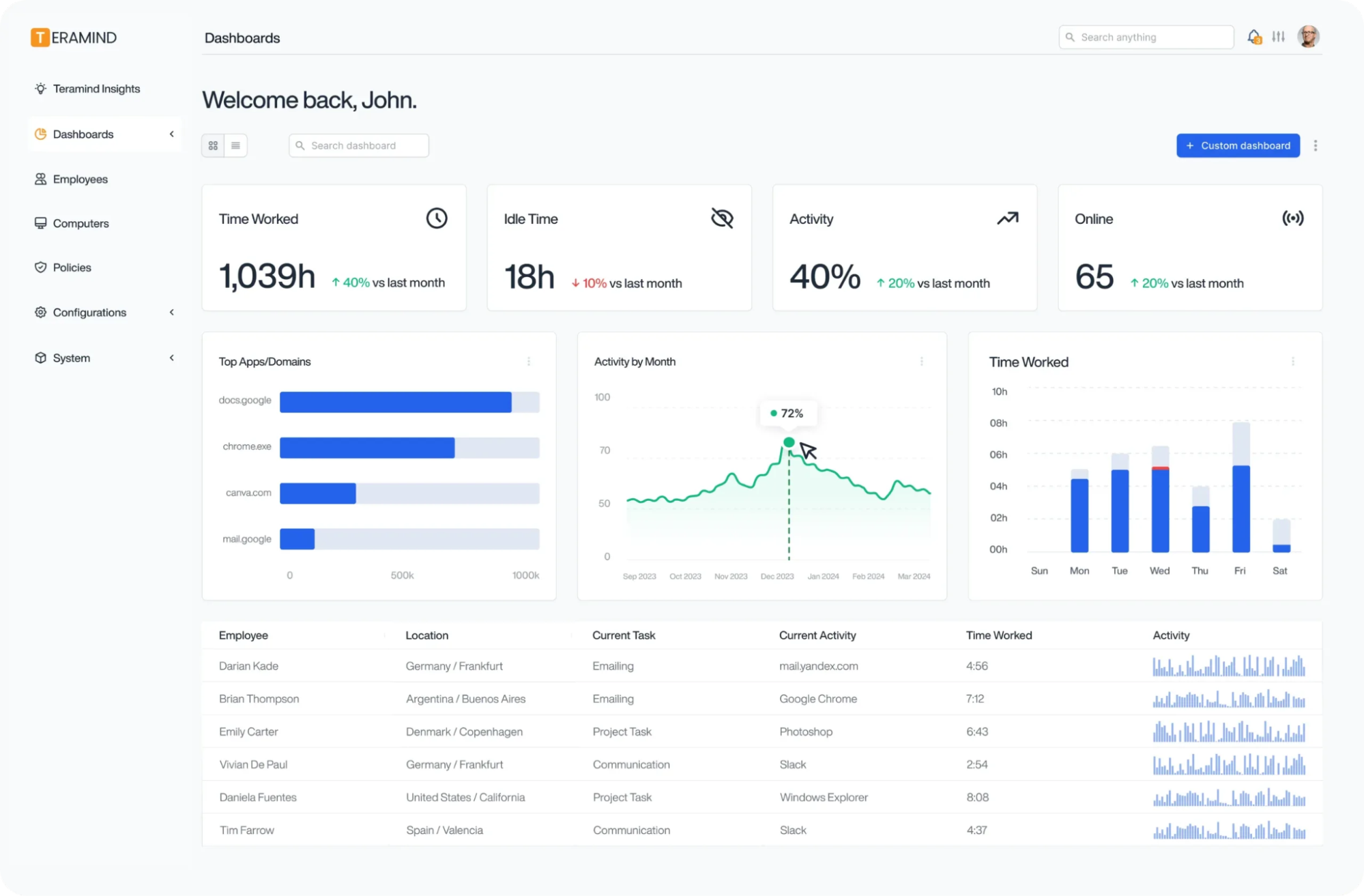
Teramind goes further into security than ActivTrak ever has. It comes with keystroke logging, OCR, and forensic-grade session recording. Built for insider threat and data loss prevention, Teramind suits regulated industries and security teams who need granular evidence, not productivity trends.
DeskTime
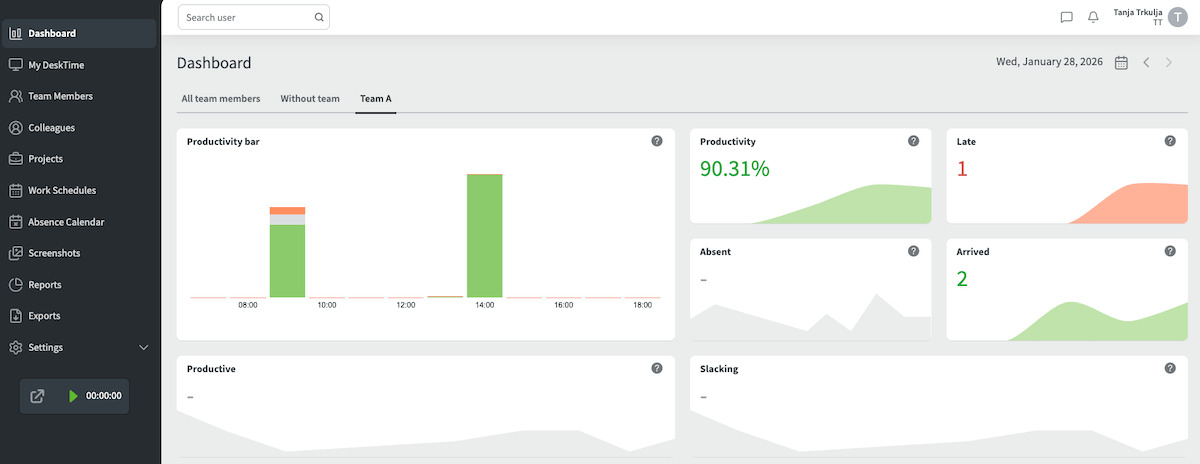
DeskTime strips things down to simple, automatic time tracking with a lighter footprint than ActivTrak’s full analytics suite. It swaps GPS for IP-based location detection and adds AI-generated daily summaries instead of dashboards. It’s a good fit for small teams who want an understanding of how their team works without the workforce-planning depth that ActivTrak offers.
Insightful
Insightful covers similar ground to ActivTrak, workforce analytics, and AI usage tracking, but adds an on-premise storage option. Its Analytics and Optimization plans are priced separately. Insightful suits remote and outsourced teams that want monitoring without surveillance.
| Tool | Best for | Starting price (user/mo) | Free option | Standout strengths | Notable gaps |
| ActivTrak | Workforce analytics and AI usage tracking for mid-to-large hybrid teams. | $10–$19, annual only, unlimited users on every paid tier. | Free plan for 3 users. | Team-health and burnout analytics, AI adoption tracking, and silent deployment on Windows. | No payroll or invoicing, no GPS, limited mobile, screenshots are a paid add-on. |
| Hubstaff | Global teams wanting time tracking, productivity, and analytics in one platform, plus the financial layer. | $4.99–$25, monthly or annual, 2-seat minimum. | Free plan plus 14-day trial. | Personal & company-device tracking, built-in payments & invoicing, project budgets — beyond background analytics, PTO/leave | More features than a pure time tracker, can be more than office-only teams need; advanced features tiered. |
| Teramind | Security-first monitoring, DLP, and insider-threat detection. | $14–$32, annual pricing shown. | Free trial. | Keystroke logging, OCR, forensic-grade session recording, hidden or revealed agent modes. | More surveillance-oriented than the others, more complex setup, pricier at the top end. |
| DeskTime | Simple automatic time tracking for small teams. | $6.42–$9.17, annual billing. | Free 1 user. | Lightweight automatic tracking, IP-based location detection instead of GPS, AI daily summaries. | Lighter analytics than the enterprise-focused tools, fewer compliance features. |
| Insightful | Workforce analytics and workflow optimization for remote and outsourced teams. | $8–$16, annual billing. | 7-day free trial. | No keystroke logging, on-premise storage option, employee-facing dashboards. | Newer combo-plan pricing structure, screenshots, and analytics depth vary by tier. |
Conclusion
ActivTrak is a serious analytics platform for teams that want to understand how work happens. If you’re managing a hybrid team, looking to organize your team based on each person’s strengths, or trying to understand how AI tools are impacting your team’s productivity, it’s a good choice.
But if you need to run payroll, bill a client, or track field teams by location, that’s beyond what ActivTrak offers.
In the latter case, Hubstaff is a stronger option. It offers strong workforce analytics features that ActivTrak is known for, along with project budgets, invoices, and automated payments, all in one place.
Frequently asked questions
What is ActivTrak used for?
ActivTrak is a workforce analytics platform that tracks how employees spend their time at work and transforms that raw data into productivity dashboards to help managers understand capacity, workload, and AI tool usage.
Does ActivTrak take screenshots?
Yes, but not by default. Screenshots are available through the paid Screen Details add-on, which applies to any paid plan. They’re not part of the base product.
Does ActivTrak do keystroke logging or video recording?
No. ActivTrak does not log keystrokes, record video, monitor email, or access cameras.
Is ActivTrak good for remote and hybrid teams?
Yes, it’s well-suited for this. It can track schedule adherence and compare productivity across office and remote locations.
Is ActivTrak worth it?
For teams of 50 or more who want to understand how work is distributed and where capacity is going, the cost is justifiable. For smaller teams who just want to confirm hours worked, that is not the case.
Can you cancel ActivTrak monthly?
No. All paid plans are billed annually. There’s no month-to-month option, and as multiple reviewers have noted, reducing licenses mid-year isn’t straightforward either.
Most popular
The Top Time Management Statistics in 2026 for Workplace Productivity
We all have the same hours in the day. But when employees struggle to focus, those hours likely won’t be used effectively. Witho...
The Best Coaching Conversations Start With Productivity Data
Most coaching conversations happen too late. A deadline is missed, or a client flags a problem, and then a manager schedules a sit...
A Quick Guide to Work Order Management
From quick fixes to long-term stability, work orders are crucial to asset management and helping managers keep operations running...
How to Identify High Performers Using Work Patterns
Every business has top performers, and managers are told to find them all the time. But in most cases, they default to approaches...