A Quick Guide to Work Order Management

 9 min read
- Work orders are the backbone of maintenance operations. They give technicians the job details, deadlines, and instructions needed to complete work with limited back-and-forth.
- Every work order follows the same basic life cycle. From creation and approval through assignment, completion, review, and filing, tracking each stage keeps projects on schedule.
- Effective work order management requires a clear strategy. Assign responsibilities, set maintenance frequency, simplify request forms, and prioritize tasks to prevent costly delays.

From quick fixes to long-term stability, work orders are crucial to asset management and helping managers keep operations running smoothly. They provide a roadmap for a company’s maintenance team, and giving teams the ability to track jobs ensures everyone can complete work quickly and that operational efficiency continues as usual.
However, work orders can pose various challenges. Each new piece of maintenance requires a new work request, and these can quickly mount up, making it difficult for teams to stay on top of documents and prioritize tasks.
A work order management strategy solves this, but it can be daunting to know where to begin. This guide covers what work orders are, how they move through their life cycle, and the best practices for managing them well.
Stay in the loop
Subscribe to our blog for the latest remote work insights and productivity tips.
What is a work order?
A work order is a paper or digitized document that provides maintenance details on equipment, tools, or jobs. It outlines all the steps needed to undertake a given task, and companies often use them for maintenance issues, audit follow-ups, or safety inspections.
Maintenance teams create work orders when consumers, managers, or employees file a request. In some cases, work order apps can automatically generate preventive maintenance requests like safety checks, training, or other necessary upkeep.
Let’s imagine that a call center sales team cannot make calls due to Wi-Fi issues, threatening to bring operations to a halt. The manager raises a service request form and quickly sends a work order to the maintenance manager. The work order states what needs to be done, and thanks to this, asset downtime is minimized. Instead of constantly checking in for information and guidance, maintenance teams have all the information they need.
Beyond setting out requirements, work orders provide additional information for field workers, including details about who was assigned a job, the proposed completion date, and general expectations.
What information is listed on a work order?
Work orders need a lot of information on them to function correctly. That’s where a good computerized maintenance management system (CMMS) comes in. Orders created in a CMMS typically contain more information than a physical work order and are easier to fill out and share with teammates.
At the bare minimum, work orders should include:
- Name of the requestor
- A description of the maintenance task or request
- Deadlines
- The location of the job
- Work order number (either manually or automatically assigned)
A more thorough work order could also include the following:
- An assignee or maintenance team
- Explicit directions for completing the task
- What tools and parts are needed
- Any relevant health and safety information
- The number of hours expected to complete the job
- Priority level
- Tags, metadata, or other criteria for organizational purposes
This information drives productivity because it ensures the maintenance technician has what they’ll need to complete the job with limited communication.
Types of work orders
Maintenance requests can vary significantly, so the required documentation will differ, too, depending on the work carried out. However, every type has an essential role to play in day-to-day facilities management.
Preventative maintenance
A preventative maintenance schedule can automatically generate work orders and prevent future emergencies. Inspections, routine maintenance tasks, and equipment updates are just a few of the tasks that make up preventative maintenance.
This form of work order is used most commonly in highly regulated industries, and ideally, it will make up the bulk of a maintenance department’s work. Fixing issues before equipment breaks down completely helps prolong machine life.
Corrective and reactive maintenance
These apply to unplanned work to fix a faulty or inefficient piece of equipment. Also called unscheduled, on-demand, or emergency orders, they’re typically high-priority tasks that must be completed immediately before resuming everyday work. Because they tend to be disruptive and hurt productivity, most maintenance teams try to keep unscheduled work to a minimum.
Safety inspections
Safety is an essential factor in maintenance scheduling. Hazards could range from chemical spills to tripping hazards, and safety work orders minimize these risks.
Third-party work orders
Sometimes, no one is available to perform maintenance on your machines and equipment. In these instances, you’ll need to hire external parties to do the job.
Maintenance managers can often save money on training and overtime costs by hiring specialists. In fact, some smaller businesses operate exclusively on third-party maintenance requests.
Manual entry work orders
Even today, many companies still rely on manual work orders to keep employees organized. While these orders often have “required” fields, there isn’t always someone around to ensure that they’re filled out correctly.
As a result, many manual work orders go unfinished, have mistakes, or don’t make it to their intended destination. Storing them is also a challenge, which usually leads companies to back these work orders up digitally anyway.
The work order life cycle
Managing work orders well is the backbone of any maintenance operation. While some work orders are a bit different from others, they all go through the same basic life cycle.
1. Creation
Work orders are made from a maintenance request or generated automatically from a maintenance schedule. They can also be created from inspections and previous work orders if an employee notices equipment needs more care.
Organizations that use maintenance software will often have a mobile app or desktop platform for creating work orders. Some of these tools even allow you to attach images and job notes. Otherwise, a customer or employee may trigger a work order by filling out a form on a website.
2. Approval
Next, management reviews the work order. They’ll decide if the work order should be approved, put on hold for future review, or denied.
Before assigning the task to a technician, the maintenance manager will usually note a priority level or completion deadline. They’ll then assess the required skills for the job to ensure they transfer the work order to the right team member.
3. Assignment
Once approved, the work order is assigned to a qualified technician. This can be done manually or with a CMMS tool’s email notification features.
The deadline or importance of the work order helps the technician minimize their downtime. The technician will review the work order in full, prioritize tasks, and arrive on-site with all of the tools and resources needed to complete the job.
4. Completion
When the technician completes a work order, they’ll mark it as complete, but that’s far from the last step in the process. A good project management cycle ensures this completed work order advances to the next step.
5. Review
Once a task is completed, it will be passed on to a manager for approval. Certain scenarios (like emergency repairs and new technology installations) may require a managerial sign-off. Once that phase is complete, it’s time to close down the work order.
6. Filing and sending
After a work order has received manager approval, it still needs to be filed away for future reference. Most tools allow you to export work orders as PDFs, CSVs, or Excel files. You can then send them out via email or save them to a folder or Digital Asset Management (DAM) system.
Why work order management matters
Every new maintenance task requires a new work order, and so does each team involved in maintenance. Without a proper system, maintenance managers and teams can quickly become overwhelmed by the demand. You’ll lose track of maintenance progress, and projects can soon fall behind schedule.
The right strategy can bring several benefits. You can better understand the equipment and parts needed for each job, track maintenance processes more efficiently, and analyze maintenance histories to identify common issues.
Tracking work order status also helps managers create KPIs for assessing each department’s performance. First response time, average resolution time, and repeat visits are just a few examples of KPIs you’d be able to track.
Work orders ensure nothing falls through the cracks when things get busy. They’re also crucial for asset management and inventory, since managers can log materials to keep track of what’s available in storage and what still needs to be ordered.
Correctly prioritized work orders with deadlines also keep maintenance departments from developing a backlog. This way, clients’ needs are met on time, and the facility continues to operate at its highest level.
Work order management best practices
So, where should your work order management strategy begin? We’ve compiled some of the best procedures for keeping on top of work orders.
1. Choose the right work order management system
A successful management process is all about organization and optimization. Smaller businesses often use Excel spreadsheets and Word templates to create work orders. However, for medium- to large-scale organizations, manual maintenance management can be impractical. With the scale of work orders needed, things can quickly descend into chaos as your team becomes overloaded with requests.
Investing in work order management software can pay dividends. The system provides critical data from a centralized platform, giving you real-time insights into your maintenance activities. You can easily track teams and ensure maintenance operations are running on schedule.
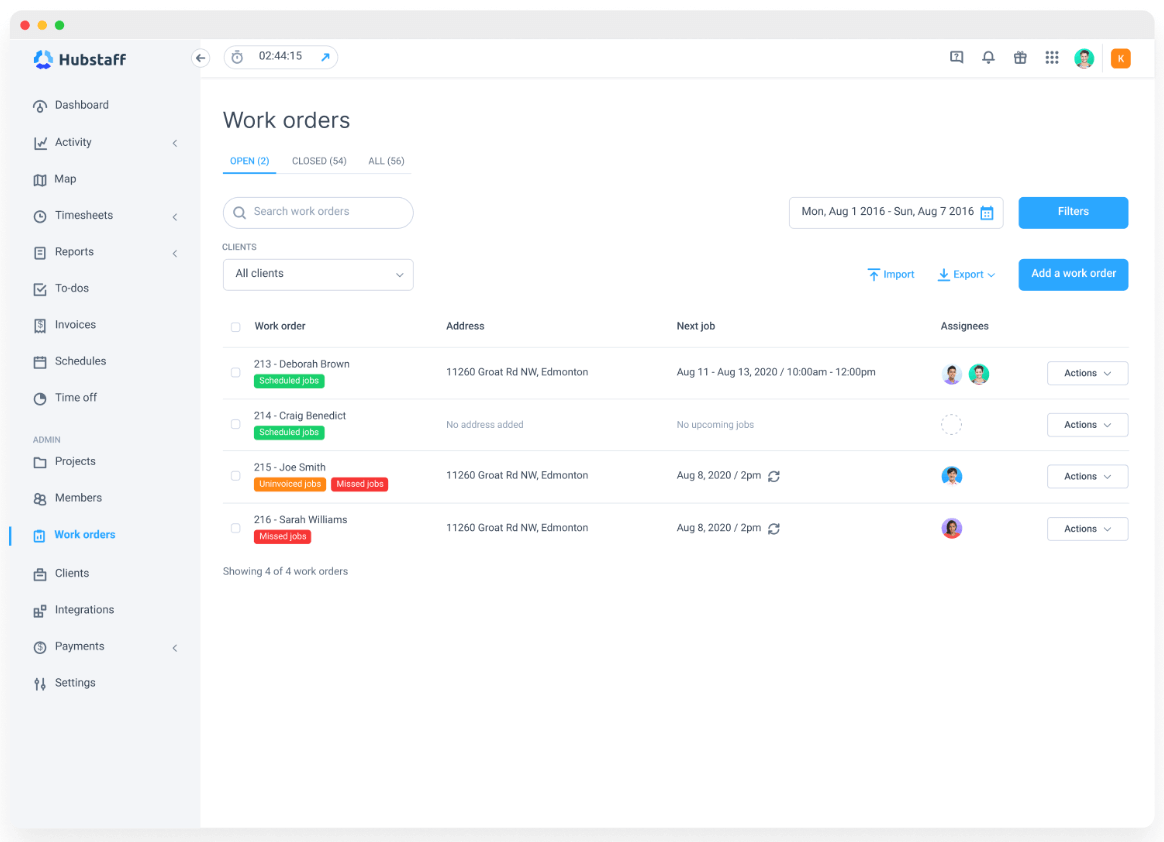
Other management system features to look for include:
- Maintenance planner. Create a maintenance schedule by assigning jobs based on the availability and capacity of staff.
- Time tracking. Track teams’ progress and see how long it takes to complete different tasks. Time tracking can reduce downtime and boost efficiency.
- Geo maps. Some systems enable access to interactive geo maps, so you can easily track maintenance teams and field technicians across different locations.
- Improved communication. Clear information about employee tasks assists communication in your business. Use alongside work phone apps, which enable the quick exchange of messages for workers on the go. This gives greater clarity and understanding of the activity.
2. Assign responsibilities
Assigning jobs for each stage of the work order process is essential to stay streamlined. Decide who is responsible for creating new work orders, who posts them, and who reviews orders when projects are complete. A set of clearly assigned tasks allows more transparent communication and ensures more efficient work order management.
3. Decide on frequency
How often will maintenance tasks take place? This is an essential consideration for your work order management schedule. Conduct maintenance tasks too often, and you can prevent employees from doing their work. On the flip side, too little maintenance can also cause disruption as systems fall into disrepair.
To help determine your maintenance frequency, refer to manufacturer guidelines for each piece of equipment. You can help prevent future breakdowns by conducting preventative maintenance promptly.
4. Provide access to maintenance resources
Lack of resources can be a millstone around the neck of maintenance teams. Let’s imagine urgent work is needed but progress comes to a halt because teams don’t have the right tools. Or, perhaps they run out of a specific material before they can finish the job.
When compiling work orders, list all the required tools and equipment. In addition, include documentation and instructions so maintenance personnel understand what’s needed to fix the faulty equipment. Maintenance staff will work with various devices daily, so providing them with resources to help jog their memory is highly beneficial.
For maintenance crews conducting work remotely, ensure they can access remote support software, such as RealVNC. This ensures teams can view learning materials easily, even while on the job.
5. Simplify request forms
Teams must work quickly when you have a high volume of maintenance work. Lengthy, complicated forms only slow the process and increase the likelihood of mistakes. Save time by simplifying forms into more streamlined documents.
Begin by customizing forms for each maintenance task, focusing on sections that are only relevant to that particular project.
6. Prioritize tasks
It’s essential to use priority levels in your work order management process.
Which projects need the most urgent attention? Which tasks are part of predictive maintenance and can be put on the back burner?
Without a clear focus, the most critical maintenance tasks won’t be completed on time, and these delays can grind your organization to a halt.
The process of prioritization is split into three steps:
- Identify. What maintenance tasks are needed?
- Assess. How urgently does a task need to be completed? Does an issue pose a health risk, impact daily operations, cause costly downtime, or create issues for customers?
- Allocate. What resources are needed for effective maintenance?
7. Measure performance
Most businesses understand the need to keep a close eye on sales engagement, but many don’t apply the same rigor to work orders. It’s crucial to know that these are completed and done to a high standard. That’s why it’s useful to have a method for measuring the success of maintenance projects.
Measuring performance requires a constant flow of data, so it’s essential to ensure your ingestion process is streamlined. This way, you know you have access to the most up-to-date data and can monitor metrics more effectively.
There are three simple steps you can take to measure work orders:
- Identify goals for maintenance.
- Decide on a set of key performance indicators (KPIs) that align with your goals.
- Choose metrics to help measure progress toward your objectives.
8. Track the entire process
A key part of work order management is keeping track of different requests, and simply knowing which maintenance orders are in motion isn’t enough. You must carefully monitor them from creation until completion.
Your maintenance department must be integrated with other parts of the business, so make sure there is regular dialogue between maintenance managers, field techs, and any other teams involved.
An enterprise cloud-based phone system is ideal for larger organizations, as this ensures smooth communication regardless of employee location. It’s also beneficial for maintenance managers of global teams to track processes among different workforces.
Alongside this, it’s also essential to track resources as projects progress using an analytics dashboard.
Are certain materials being consumed faster than expected? Does a task require more significant staffing than anticipated? This information can be used to improve future maintenance projects.
Kickstart your work order management
Work orders are fundamental to maintenance efforts in any business. Despite their importance, many organizations fail to optimize the process, leading to delayed projects and critical maintenance being overlooked. These problems can all be avoided with proper work order management.
In this guide, we’ve explored vital steps you should undertake, including careful system selection, clarity on priority, frequency, and responsibilities, and simplified processes. Don’t forget that you must also track progress and measure outcomes if you want long-term success.
Most popular
A Quick Guide to Work Order Management
From quick fixes to long-term stability, work orders are crucial to asset management and helping managers keep operations running...
How to Identify High Performers Using Work Patterns
Every business has top performers, and managers are told to find them all the time. But in most cases, they default to approaches...
The AI Productivity Panel: Lessons From Leaders on What’s Working (and What’s Not)
When I moderated this AI productivity panel, I expected a solid conversation. What I didn’t expect was the flood of real-world i...
Ask Your Workforce Data Anything with Hubstaff’s New AI-Ready CLI and API
It’s Monday morning. Your CEO asks, “Which projects went over budget?” Instead of pulling reports, exporting numbers, and ve...





![How to Identify, Define and Prioritize Business Goals in A Startup [Examples]](https://hubstaff.com/blog/wp-content/uploads/2019/04/Goals-and-Task@2x-780x390.jpg)