7 Best Harvest Alternatives in 2027 After the Pricing Change

 11 min read
- Harvest now charges a per-seat fee plus usage-based charges for active projects, clients, tasks, and invoicing. Many teams first see the new rate at renewal, which makes next year’s bill hard to forecast.
- When you compare Harvest alternatives, look for flat per-seat pricing you can work out in advance. The tool should also handle invoicing, project budgets, profitability reporting, and, if you pay a team, payroll.
- The best fit depends on your team: a simple timer for small teams, a low-cost tool for tight budgets, an agency platform for resourcing, or an all-in-one tool for growing teams of 50+.

Your Harvest renewal quote just arrived, and it doesn’t look like last year’s bill. For many teams, the price now depends on how many projects, clients, and invoices they ran, which makes the next 12 months hard to budget.
Harvest still tracks time and sends invoices well. But if you can’t forecast what it’ll cost, it makes sense to look at Harvest alternatives with pricing you can calculate in advance.
In this guide, we go over what changed with Harvest pricing, how to check your own renewal, and 7 alternatives compared by pricing and features.
Hubstaff Walkthrough
Dive into our interactive demo and explore the features that make managing global teams easier than ever.
What changed with Harvest pricing in 2026
After Bending Spoons acquired Harvest in 2025, Harvest moved to a pricing structure that combines a per-seat fee with usage-based charges. Many annual subscribers first saw the new rate when their renewal came up in 2026.
Here’s how Harvest’s pricing works in 2026, according to Harvest’s pricing page and its Help Center article on pricing plans:
- Teams: From $9 per seat per month billed annually, or $11 billed monthly
- Enterprise: From $14 per seat per month billed annually, or $17.50 billed monthly. It adds profitability reporting, timesheet approvals, and single sign-on.
- Flex usage billing: You also pay for active projects, clients, tasks, and invoicing above a free allowance. Harvest doesn’t publish the per-unit rates or the size of the allowance.
- Unlimited usage billing: A fixed usage fee replaces the variable charges. Its price isn’t published either.
Usage charges for new accounts usually start at the second paid renewal. Harvest’s own Help Center example shows a bill rising from $44 for seats alone to $404 once usage is added.
Some accounts saw a much larger Harvest price increase. BBC News reported on August 20, 2026, that one UK consultancy’s monthly bill rose from $130 to $2,110, roughly 1,500%.
Harvest told the BBC that the largest increases hit customers on outdated legacy plans, some dating back to 2011. Its pricing page frames the new model around flexibility, so teams pay based on what they actually use.
Keep in mind that not every account is hit equally. Accounts whose activity stays within the included allowance may see little change, which you can confirm in Harvest’s billing settings.
How to check if your renewal will go up
Here’s how to check what your next Harvest bill will look like:
- Find your renewal date and plan. Go to Settings>Billing to see your current plan, billing cycle, and next renewal date.
- Check your seat count. Paid seats can’t be removed mid-cycle, and archiving someone doesn’t free their seat. Schedule the removal of any unused seats before your renewal date.
- Review your usage. Open “My usage billing” in your billing settings to see your active projects, clients, tasks, and invoicing, along with projected charges.
- Compare Flex and Unlimited billing. Click “Compare subscription options” and then “Simulate usage changes” to model both options. Some accounts have seen very different quotes for the two, so make sure to check both before accepting the default.
- Compare against last year. Click “Billing history” to download last year’s invoice, then put the two totals side by side. If anything is unclear, ask Harvest support for a written renewal quote.
If the new number is higher than you planned for, our ROI calculator can help you compare it with what a flat per-seat tool would cost your team.
Why Harvest customers are switching
Public discussions on platforms like Reddit, including threads on alternative tools, renewal quotes, and the switching process, point to a few recurring patterns:
- The new rate arrived at renewal: A lot of teams learned about the pricing change from a renewal email, and some only noticed it once it hit their bank statement.
- The usage fee is hard to forecast: Users have found it hard to tell what aspect of their usage (e.g., number of projects, tasks, or clients) was driving their quote, with accounts of similar size reporting very different quotes.
- Long-time customers saw the biggest jumps: Some of the sharpest increases were reported by teams that used Harvest for ten years or more.
What people like about Harvest
Harvest has been a popular time tracking and invoicing tool for agencies and consultancies since 2006. The main features that made it popular include:
- Simple time tracking: Users can start and stop time tracking with one click, or add time manually.
- Reminders: Harvest includes built-in reminders that nudge team members to submit timesheets at an interval you choose.
- Reports: You can generate detailed reports and export them as CSV or Excel files.
- Invoices: Harvest makes it easy to turn tracked hours into invoices, keeping billing organized.
Who should stay on Harvest
Not every account is hit equally by the new pricing, and for some teams staying is the sensible choice. Here’s how to decide:
Stay if:
- Your account fits within the free plan (1 seat and 2 active projects) or your usage stays within the included allowance
- Your renewal quote came back close to last year’s bill
- You’re on Unlimited billing at a fixed fee you can budget for
- Your team relies on Harvest-specific workflows or integrations, and switching would cost more time than it saves
Look elsewhere if:
- You run many active projects, clients, or invoices each month
- Your renewal quote increased well beyond your budget
- You also need payroll, built-in resource planning, or productivity insights, which Harvest doesn’t include in its plans
Harvest alternatives at a glance
We picked these 7 tools for how well they handle client billing and invoicing, project profitability, team scale, and pricing you can forecast. Harvest is included as the last row for reference.
| Tool | Pricing model | Starting price (monthly billing) | Invoicing | Project budgets | Payroll | Best for |
|---|---|---|---|---|---|---|
| Hubstaff | Flat per-seat + add-ons | $7/seat/month (2-seat minimum) | Yes | Yes (Grow and up) | Yes (Team and up) | Growing teams that want time tracking, billing, payroll, and workforce intelligence at a predictable per-seat price |
| Toggl | Flat per-seat + add-ons | Free for up to 3 users; paid from $12/user/month | No (billable rates and exports) | Yes | No | Teams that want a simple timer with built-in capacity planning |
| Clockify | Flat per-seat | Free for up to 5 users; paid from $4.99/seat/month | Yes (Standard and up) | Yes (Pro and up) | No | Budget-conscious teams |
| TimeCamp | Flat per-seat (optional AI billed by usage) | Free plan; paid from $3.49/user/month | Yes | Yes (Premium and up) | No | Small teams focused on billable hours |
| Everhour | Flat per-seat | Free for up to 5 seats; paid from $10/seat/month (5-seat minimum) | Yes | Yes | No | Teams tracking time inside Asana, Jira, or Trello |
| Productive | Flat per-seat + add-ons | From $12/seat/month | Yes | Yes | No | Agencies wanting resourcing and profitability in one platform |
| Paymo | Flat per-seat | Free for 1 user; team plans from $15.90/user/month | Yes | Yes | No | Freelancers and small teams that invoice clients |
| Harvest | Per-seat + usage-based | Free for 1 user; Teams from $11/seat/month plus usage | Yes | Yes | No | Teams whose usage stays low and predictable |
What each tool costs at 10, 50, and 150 seats
Here’s how the cost for each tool differs at 10, 50, and 150 seats.
| Tool | Plan used | 10 seats / year | 50 seats / year | 150 seats / year |
|---|---|---|---|---|
| Hubstaff | Grow | $900 | $4,500 | $13,500 |
| Toggl | Starter | $1,080 | $5,400 | $16,200 |
| Clockify | Pro | $958.80 | $4,794 | $14,382 |
| TimeCamp | Premium | $478.80 | $2,394 | $7,182 |
| Everhour | Team | $1,020 | $5,100 | $15,300 |
| Productive | Essential | $1,200 | $6,000 | $18,000 |
| Paymo | Plus | $1,308 | $6,540 | $19,620 |
| Harvest | Teams (seat fees only) | $1,080 | $5,400 | $16,200 |
Annual cost = seats × monthly rate on annual billing × 12, using each tool’s lowest plan with invoicing and project budgets. Prices checked on November 17, 2026. Every flat per-seat total here can be worked out before you sign; Harvest’s can’t, because usage charges are added on top.
What are the best Harvest alternatives?
1. Hubstaff
Best for: Growing teams that want time tracking, billing, payroll, and workforce intelligence at a predictable per-seat price
Pricing model: Flat per-seat + add-ons
Hubstaff is where time tracking meets workforce intelligence. It turns tracked hours into invoices, budgets, and payments, and gives you a clear picture of how work gets done across your team.
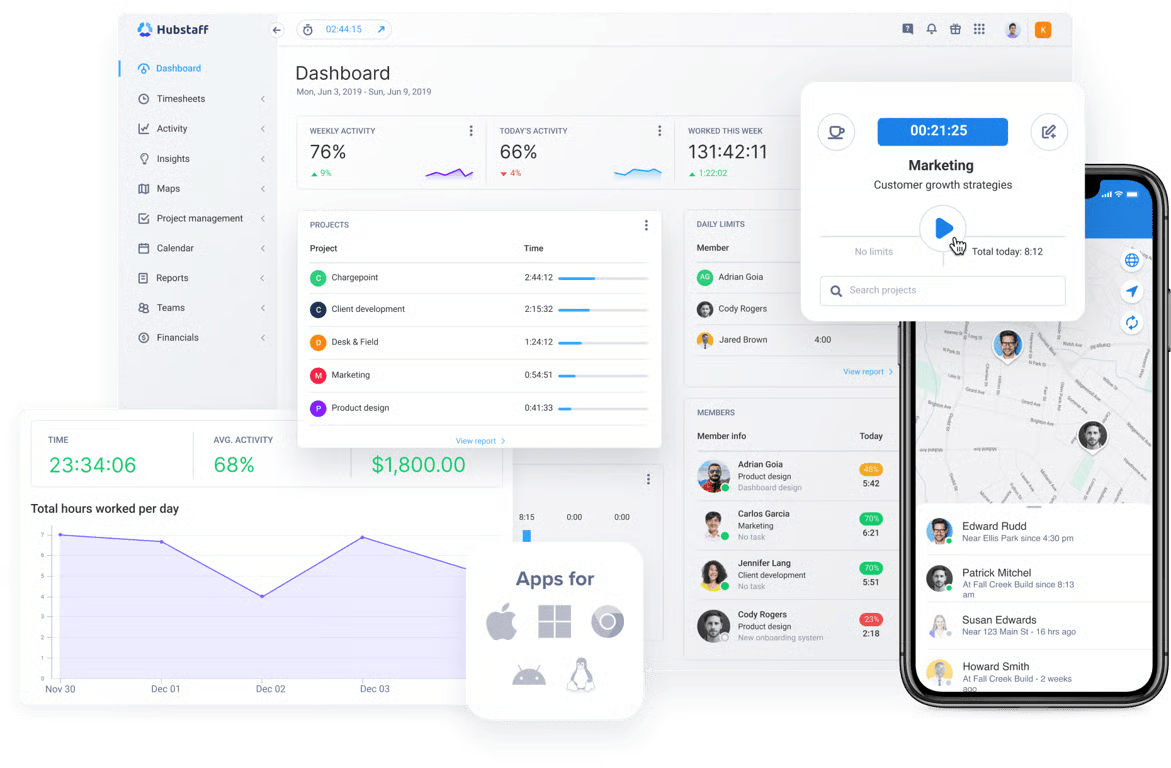
For Harvest users, the most important features come after the timer. Hubstaff’s time tracking and invoicing software builds invoice line items from hours by project, client, or team member. You can send invoices from Hubstaff or as a PDF, then record full or partial payments.
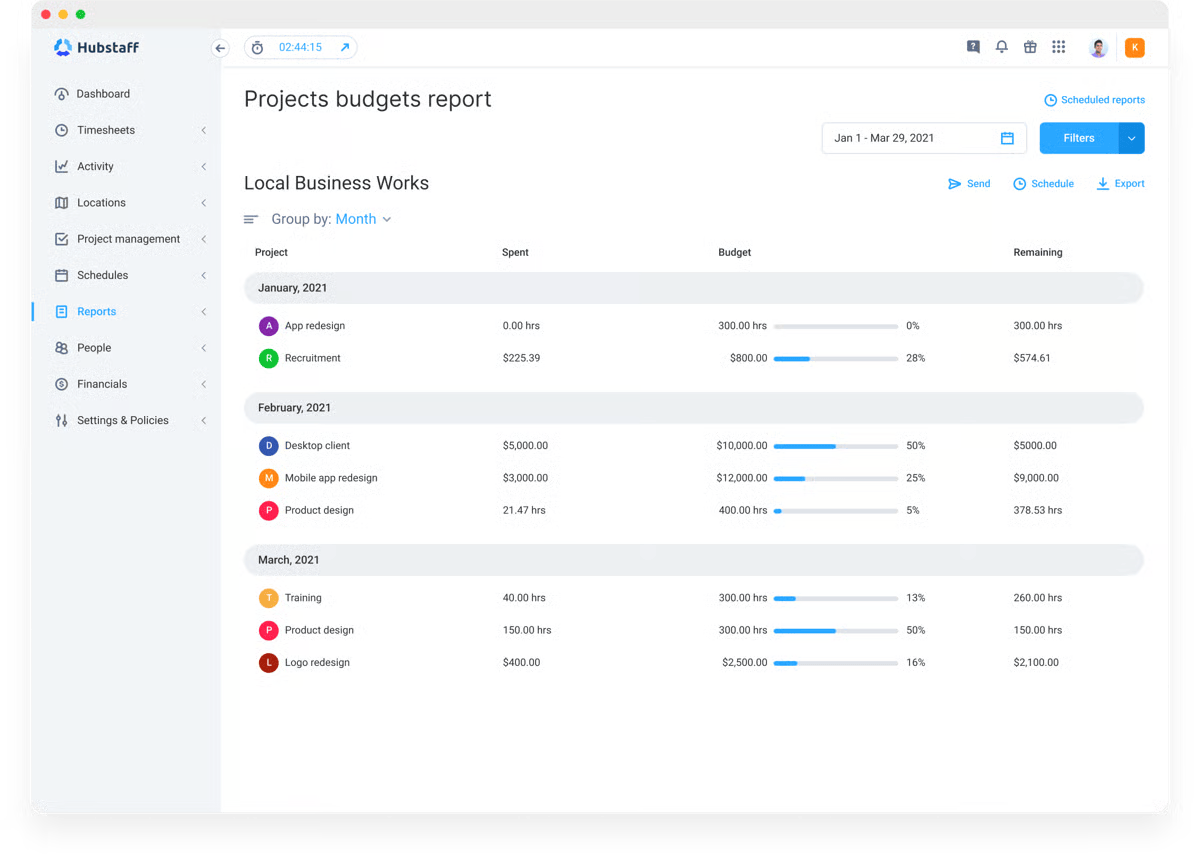
Project budgets let you set spending and hour limits, see labor costs in real time, and get alerts before a project runs over. This helps you protect margins while the work is still in progress.
Hubstaff also handles attendance, schedules, payroll and payments. Approved timesheets flow into payments through providers like Deel, Gusto, Wise, Payoneer, and PayPal, so you can bill clients and pay your team from the same hours.
Pricing is a flat rate per seat, with no charges tied to how many projects, clients, or invoices you run. For a team of 50 or more, that makes the annual cost easy to calculate and explain to leadership.
Also included:
- Timesheets and approvals: Automatic timesheets with one-click review and approval
- Time off: PTO policies, requests, and balances in the same place as tracked time
- Optional productivity monitoring: Activity levels, app and URL tracking, and optional screenshots, each of which can be turned on or off per team or per person
- Works where your team works: Windows, Mac, Linux, web, Chrome, iOS, and Android
- 35+ integrations: Connect the project management, payroll, and accounting tools you already use, including QuickBooks
For a full side-by-side, see our Hubstaff vs. Harvest comparison.
Pricing
Hubstaff uses flat per-seat pricing, with optional add-ons. Every plan comes with a 14-day free trial (no credit card required) and a 30-day money-back guarantee. See Hubstaff pricing for full plan details.
| Plan | Annual billing | Monthly billing |
|---|---|---|
| Starter | $4.99/seat/month | $7/seat/month |
| Grow | $7.50/seat/month | $9/seat/month |
| Team | $10/seat/month | $12/seat/month |
| Enterprise | $25/seat/month | Annual billing only |
2. Toggl
Best for: Teams that want a simple timer with built-in capacity planning
Pricing model: Flat per-seat + add-ons
Out of all the alternatives on this list, Toggl (formerly Toggl Track) is the closest match to Harvest’s simplicity. You can set it up in minutes and have your team track time from the web, desktop, mobile, or a browser extension.
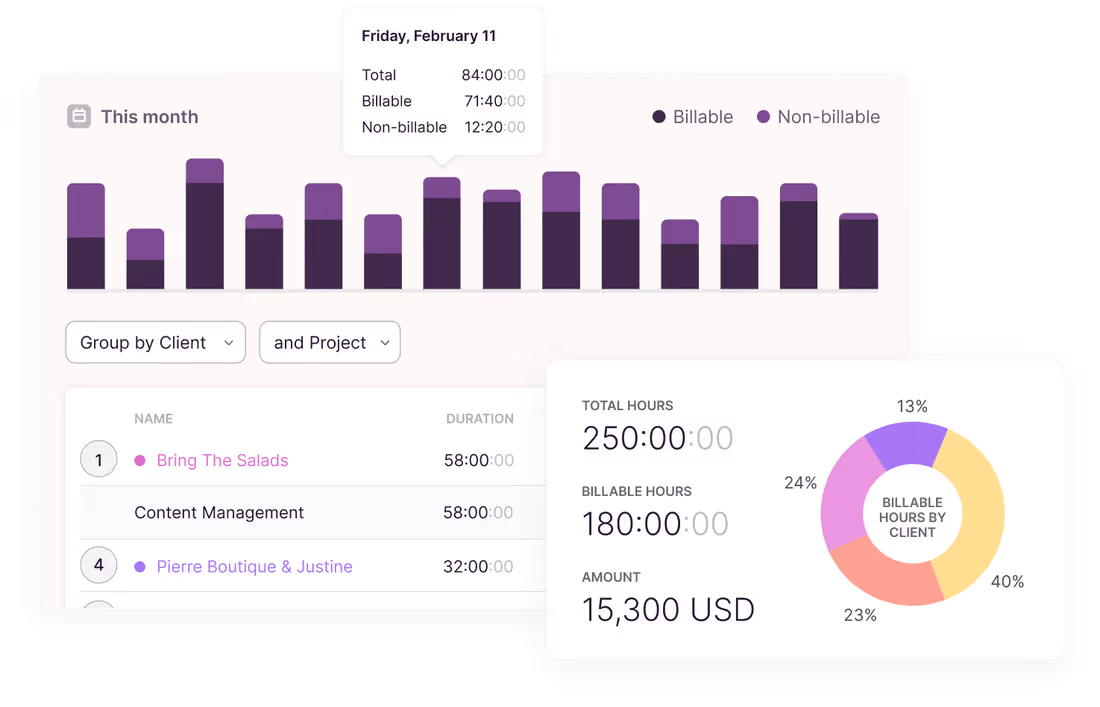
Toggl supports custom billable rates by workspace, member, project, or task. It also allows you to export invoice-ready reports as PDF, CSV, or XLSX files.
There’s also the option to set project budgets in hours or fees, and get alerts when your team gets close to going over budget. Labor costs, profitability reports, and timesheet approvals are available on the Premium plan.
Pricing
Toggl offers a 30-day free trial. Plans include:
- Free: $0 for up to 3 users
- Starter: $12/user/month
- Premium: $24/user/month
- Enterprise: Custom pricing
Optional add-ons include Time Off Management ($2/user/month) and Capacity Management ($6/user/month).
3. Clockify
Best for: Budget-conscious teams
Pricing model: Flat per-seat
If you want a Harvest free alternative, Clockify’s free plan covers up to five users and has some of the lowest per-seat prices on this list, making it a good option for small teams.
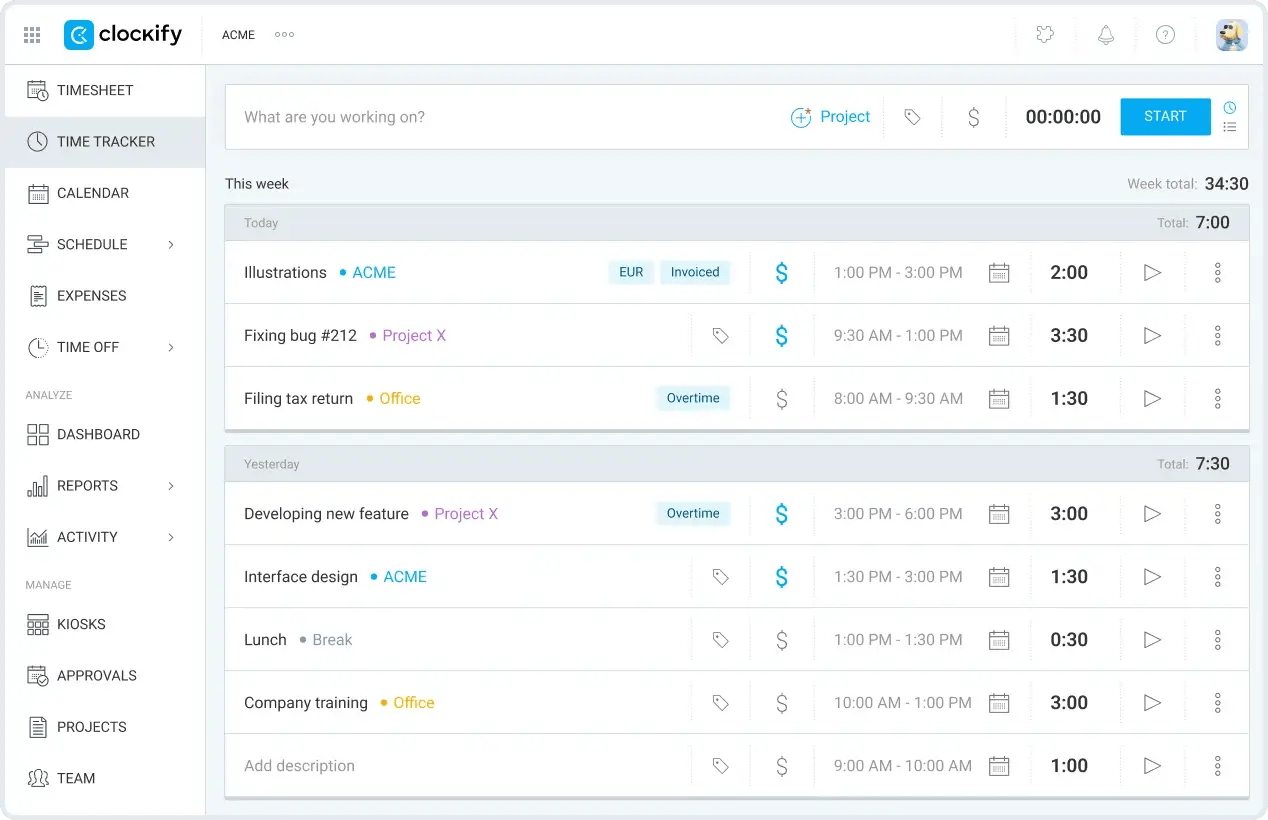
Invoicing is available starting from the Standard plan, and allows you to create invoices from billable time and expenses, set up recurring invoices, add taxes, and discounts, and record payments.
You can record project expenses by amount or by unit (such as miles), attach receipts, and add billable expenses to client invoices.
If you need project budgets, estimates, and budget alerts, you’ll need to opt for the Pro plan. Labor cost, profit reports, and team scheduling are also available.
Pricing
You can use the 7-day free trial to try out Clockify. Plans include:
- Free: $0 for up to 5 users
- Basic: $4.99/seat/month
- Standard: $6.99/seat/month
- Pro: $9.99/seat/month
- Enterprise: $14.99/seat/month
4. TimeCamp
Best for: Small teams focused on billable hours
Pricing model: Flat per-seat (optional AI billed by usage)
TimeCamp is a straightforward time tracking tool built around billable hours. It can turn tracked time into invoices and export them to QuickBooks or Xero.
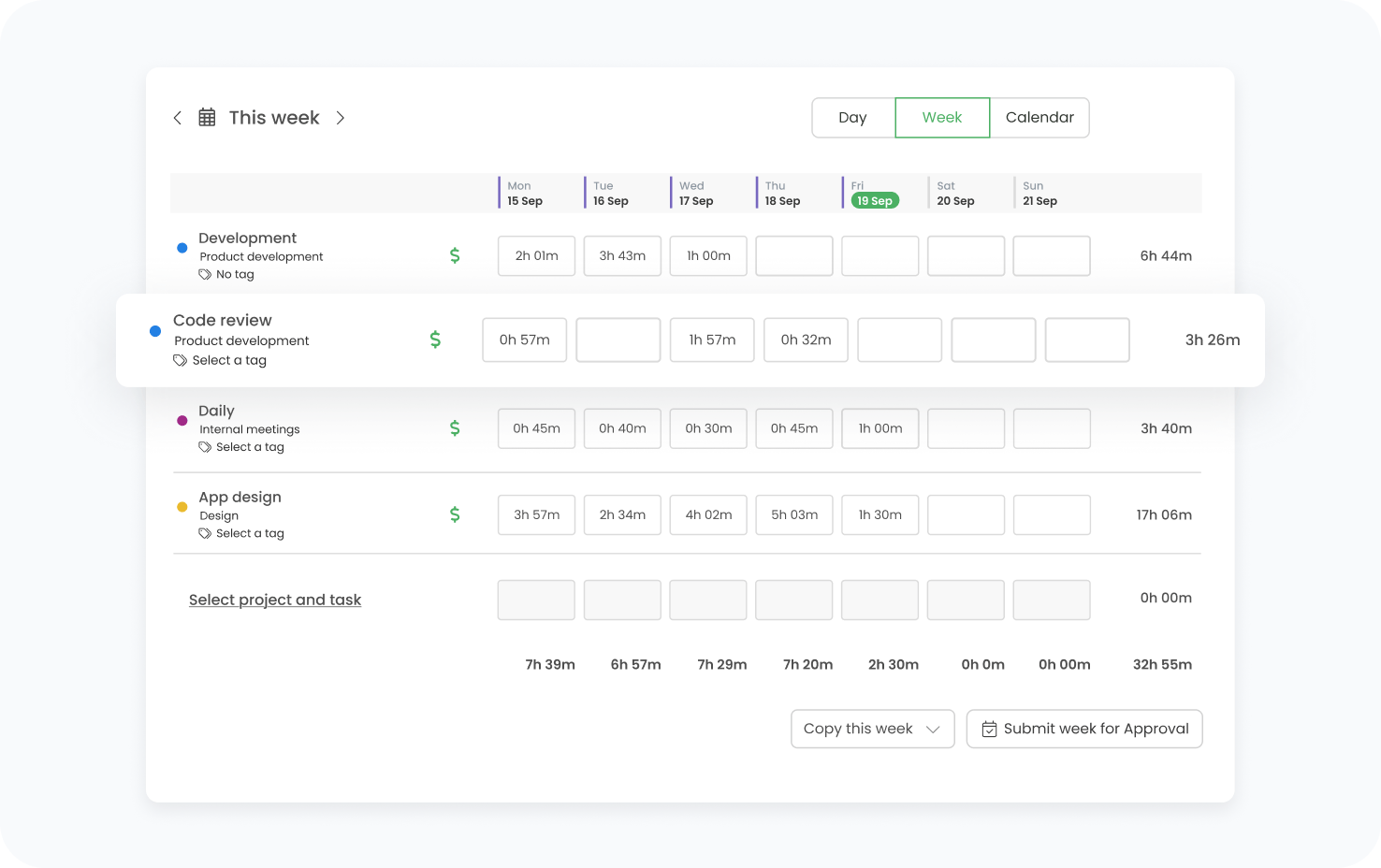
There are also features like project budgets with alerts, profitability reports, and a resource planner. A Recurring Budgets add-on that can help agencies keep track of monthly retainers.
TimeCamp can also track attendance and leave. It allows you to set an overtime policy to keep logged hours within daily and monthly limits.
An interesting feature is the client portal, a password-protected space where clients can see tracked time, tasks, files, and approvals.
TimeCamp also offers a free importer for Harvest, Clockify, and Toggl data.
Pricing
TimeCamp offers the following plans:
- Free: $0 for unlimited users
- Starter: $3.49/user/month
- Premium: $4.99/user/month
- Ultimate: $6.99/user/month
- Enterprise: Custom pricing
5. Everhour
Best for: Teams tracking time inside Asana, Jira, or Trello
Pricing model: Flat per-seat
Everhour lets you track time inside the project management tools your team already uses, including Asana, ClickUp, Jira, Linear, Monday, and Trello. You can use the time tracking and expense data to generate invoices with taxes, discounts, and payment links included.
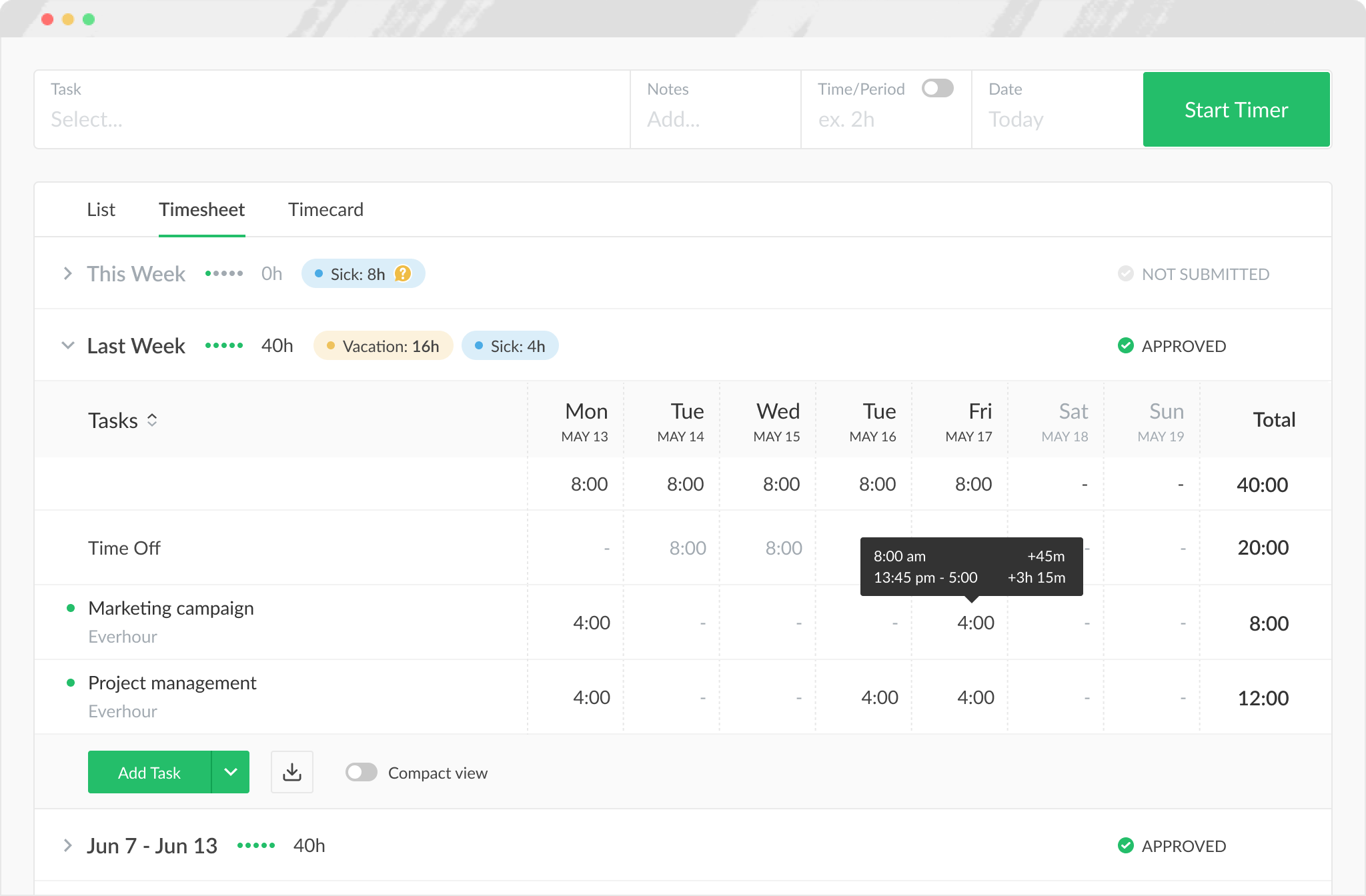
There’s also a real-time dashboard that lets you see who’s tracking time on what right now, without having to interrupt anyone.
Everhour supports project budgets and alerts, and even has an option to automatically stop time tracking once a budget runs out. It also includes project profitability reports, resource planning, and time off tracking.
Pricing
- Free: $0 for up to 5 seats, with limited features
- Team: $10/seat/month, 5-seat minimum
- Custom: Custom pricing for 50+ seats
The free plan includes a 14-day trial of all features.
6. Productive
Best for: Agencies wanting resourcing and profitability in one platform
Pricing model: Flat per-seat + add-ons
Productive is an agency management platform that combines time tracking, invoicing, budgets, and resource planning. It’s built for agencies and consultancies looking for a single tool to run most of their operations.
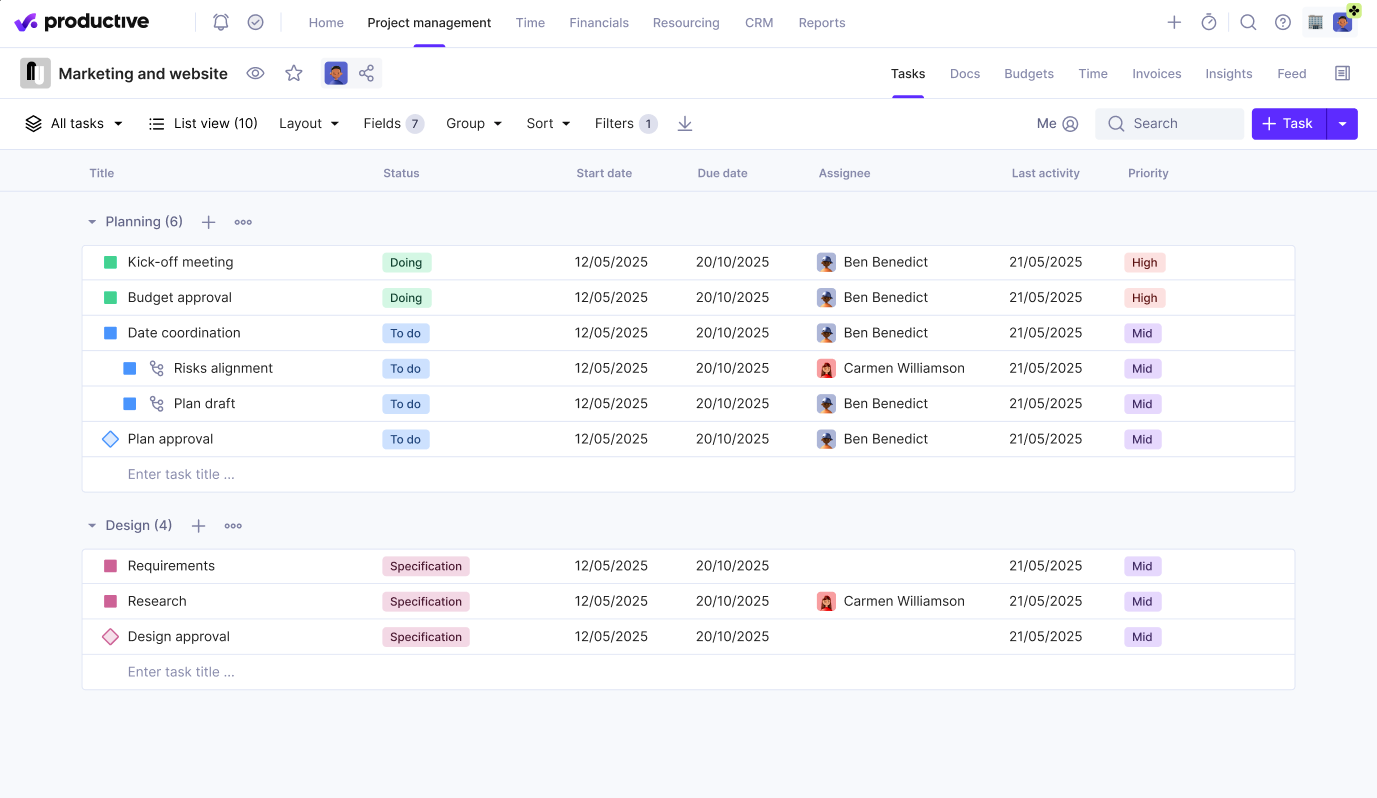
Productive can create invoices straight from project budgets, and update revenue, cost, and profit in real-time as your team logs hours. It includes resource planning features that combine capacity, utilization targets, and even placeholders for future hires.
The software comes with 50+ prebuilt reports, supports fully custom reports, and can email reports to you daily, weekly, or monthly.
Pricing
- Essential: $12/seat/month
- Professional: $29/seat/month
- Ultimate: Custom pricing
An optional Notetaker add-on includes 10 free recording hours per month.
7. Paymo
Best for: Freelancers and small teams that invoice clients
Pricing model: Flat per-seat
Paymo is a time tracking platform for independent professionals and small teams. You can use it to turn timesheets and estimates into invoices, bill clients, and accept payments through Stripe, PayPal, and Authorize.net.
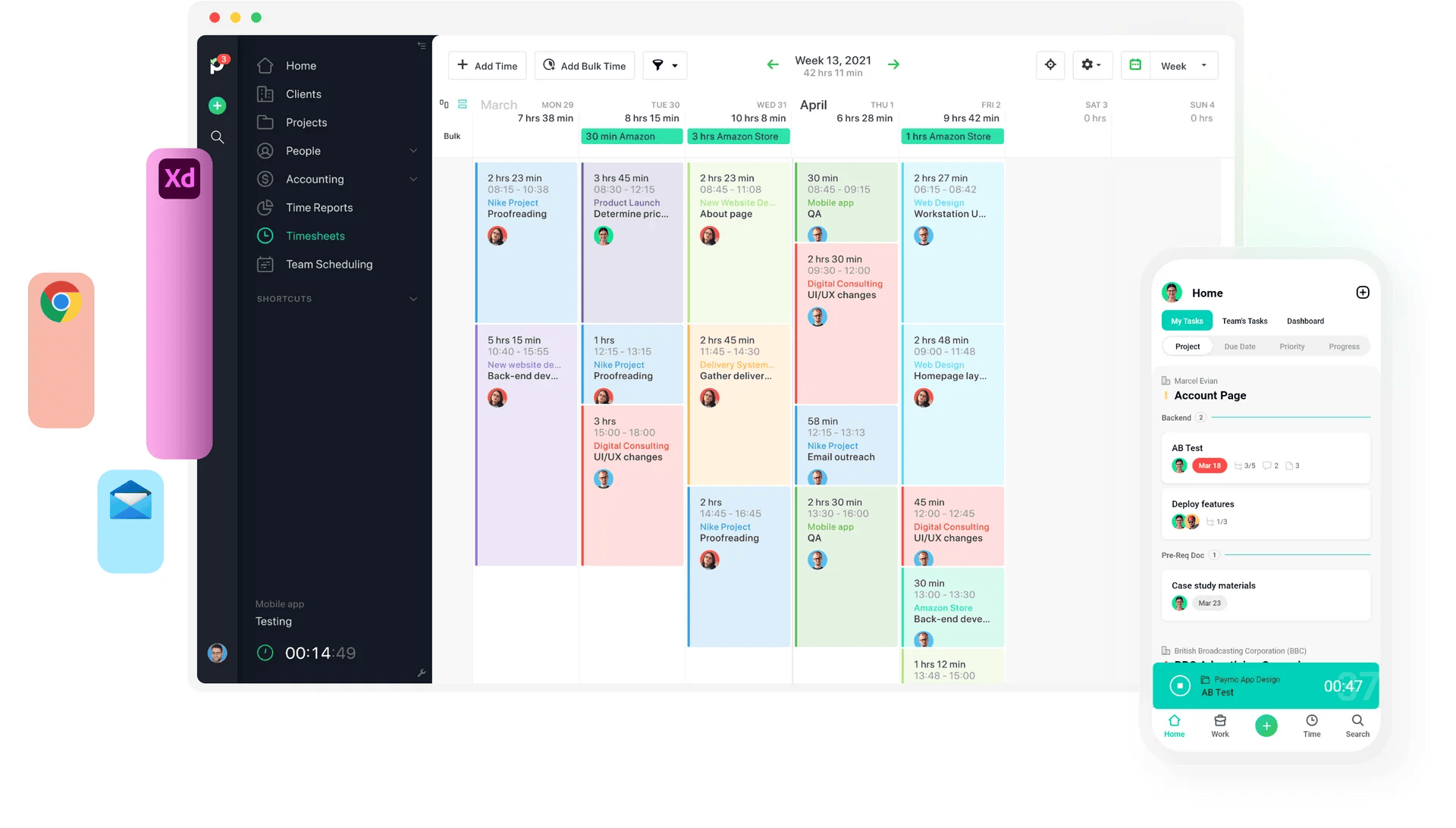
The software supports project budgets with alerts and profitability reports. It also lets you record expenses by client or project, tag them by category, and scan receipts with the mobile app. The Pro plan comes with team scheduling, leave planning, and timesheet approval features.
Paymo also has its own payment service, which you can use to let clients pay invoices by credit card or ACH.
Pricing
- Free: $0 for 1 user
- Solo: $9.90/month, 1 user
- Plus: $15.90/user/month
- Pro: $23.90/user/month
How to switch from Harvest
For most teams, switching from Harvest will take a few weeks. It’s a good idea to start well before your renewal date so you have enough time to export all your data, try out the new software you’ll be using, and run both tools side by side in the beginning.
Follow these steps to switch from Harvest:
- Export your Harvest data: Start by going to Settings>Import/Export and downloading all your time entries as a CSV file and all your invoices and estimates as PDFs. Then, export projects, clients, people and tasks to a CSV or Excel file from their own sections.
- Save your invoice history: Download your invoice and payment reports from Invoices>Report. You’ll need these for your accounting and tax records.
- Shortlist and trial 2 to 3 tools: Pick 2 or 3 tools from our list to try out. Test each one with a real project and go over tracking, invoicing, and budgets.
- Move your data into the tool you choose: Once you decide on a tool, import your clients, projects, and time history, then set up your rates and budgets.
- Run both tools for a month: Use both tools side by side for a month before moving your whole team over. This will allow you to catch missing time entries, wrong rates, or broken integrations before they hurt your business.
What’s the best Harvest alternative for you?
The best Harvest alternative for you depends on your business’s specific needs, namely what other features you need beyond time tracking and what your software budget looks like. Here are our recommendations:
- Growing team that needs invoicing, budgets, payroll, and predictable per-seat pricing: Hubstaff
- Agency platform for resourcing and profitability: Productive or Everhour
- Lowest cost per seat: Clockify or TimeCamp
- Simple timer with capacity planning: Toggl
To see how Hubstaff and Harvest compare feature by feature, read our Hubstaff vs. Harvest comparison. Then book a demo or start a free 14-day trial to try it with your own team.
Frequently asked questions
Is there a free version of Harvest?
Yes, Harvest offers a free plan that supports one user and two active projects, with time tracking, invoicing, and expense tracking. It’s fairly limited in terms of features, with no option to customize or export invoices, or import data.
Can I change my Harvest plan or negotiate before renewal?
Yes, you can change your Harvest plan but a downgrade only takes effect at your next renewal date.
Which Harvest alternatives include resource planning like Harvest Forecast?
Hubstaff, Toggl, Clockify, TimeCamp, Everhour, Productive, and Paymo all include resource or capacity planning. Hubstaff connects resource planning to schedules, time off, budgets, and payroll, allowing you to see who has room for more work and what that work will cost before you commit to it.
How long does it take to switch from Harvest?
Most small teams can get started with a new tool within days. Bigger teams should plan 4 to 8 weeks for a full transition, since rebuilding rates, recurring invoices, and integrations will likely take longer.
Most popular
Daily Work Routines and Habits for Better Team Productivity
Small habits—like frequent context switching, losing time to distracting websites or apps, or having meetings during the most pr...
The Top Time Management Statistics in 2026 for Workplace Productivity
We all have the same hours in the day. But when employees struggle to focus, those hours likely won’t be used effectively. Witho...
The Best Coaching Conversations Start With Productivity Data
Most coaching conversations happen too late. A deadline is missed, or a client flags a problem, and then a manager schedules a sit...
A Quick Guide to Work Order Management
From quick fixes to long-term stability, work orders are crucial to asset management and helping managers keep operations running...