Woman working at a desktop computer with an employee productivity dashboard showing team members, activity percentages, and hours worked.

Workforce Intelligence vs. Workforce Management: What's the Difference?

Teams are collecting more workforce data than ever, from timesheets to project hours and task activity. Workforce management and workforce intelligence are commonly discussed, but the two words still get used interchangeably.

The two solve different problems. Workforce management runs daily operations, including scheduling, time tracking, task assignment, and payroll. Workforce intelligence applies AI and data analysis to the information produced by those operations.

In this guide, we'll compare both side by side. You will learn when a team needs one layer or both, including how each one fits within the broader field of workforce analytics.

workforce-management-vs-workforce-intelligence

What is workforce management?

Workforce management is the set of systems and processes an organization uses day-to-day to track time, schedule employees, assign work, and pay its team.

It produces much of the organization’s operational data about its team, which is why it’s considered the engine behind analytics. Large organizations commonly run these functions across multiple locations and teams at once, which multiplies the amount of data involved.

Workforce management activities include:

  • Scheduling and shift planning: Assigning team members to shifts and projects based on availability and demand

  • Time tracking and timesheets: Recording the hours each team member works and setting them up for approval

  • Task and project assignment: Distributing work across team members and following its progress against deadlines

  • Payroll: Calculating pay from approved hours and issuing payments to employees and contractors

For a full breakdown of this concept, where you can learn about goal setting, implementation, and what to look for in software, we prepared a comprehensive guide to workforce management.

What is workforce intelligence?

Workforce intelligence refers to the use of AI and data analysis on workforce data, such as time, activity, and output. The goal is to use this information to reveal patterns, predict needs, and guide operational decisions.

Where workforce management records what happened, workforce intelligence explains why it happened and what’s likely to happen next. If workforce management runs operations, workforce intelligence software interprets the data generated by those operations.

This makes workforce intelligence capable of answering questions that raw workforce management data cannot answer by itself:

  • Which projects are trending over budget: Comparing hours logged against tasks completed shows a project on pace to exceed its time budget weeks before the deadline.

  • Where utilization is dropping: A steady decline in billable utilization across a team shows up in the data before it appears in revenue.

  • What staffing a team will need: Past hours and incoming project volume can show if a team will need additional people before an influx of work leads to a backlog.

Because workforce intelligence draws on time, activity, and output data, its accuracy depends heavily on how consistently that data is captured. This means that in order for it to be reliable, the workforce management before it has to be too.

wm-vs-wi-comparison-table_1.png

Workforce intelligence vs. workforce management: Key differences

Workforce intelligence is not a single capability.

It's a set of several, with each one driving a specific outcome. Some catch problems before they grow, while others influence how staffing decisions are made to begin with. Below is a direct map of these five capabilities and the workforce performance outcome each one is designed to produce.


AspectWorkforce managementWorkforce intelligence

Primary focus

Running day-to-day operations

Interpreting the data, those operations produce

Core activities

Scheduling, timesheets, payroll, task assignment

Analytics, forecasting, benchmarking

Data direction

Produces raw operational data

Consumes and analyzes that data

Time orientation

Present/reactive

Predictive/forward-looking

Typical output

A schedule, a timesheet, a paycheck

A report, a trend, a recommendation

The two run in sequence, with management producing the data and intelligence turning it into decisions.

A workforce intelligence platform can only analyze what workforce management captures, so the quality of the analysis follows the quality of the underlying records.

How workforce management and workforce intelligence work together

The two layers connect through a single flow of data.

Workforce management tools capture the raw activity data as work happens, such as hours tracked to each project, shifts completed, tasks assigned and closed, and timesheets approved.

Workforce intelligence then takes that record and analyzes it for patterns, then returns insight to the people who make decisions about staffing, budgets, and big-picture priorities. Those decisions feed back into scheduling and assignments, and then the cycle starts again with better information.

workforce-intelligence-resource-how-it-works.png

For instance:

  • A design agency bills clients on fixed-price projects. The agency has a workforce management system that tracks hours per project every week. On its own, that record only shows how many hours each team member worked. However, with workforce intelligence, it’s possible to compare those hours against each project's time budget and completion rate.

  • A website build is budgeted for 200 hours, and the team has logged 130 hours, with only a third of the total work accomplished. According to the workforce intelligence analysis, the build is on pace to exceed its budget, as several earlier projects did. Now the team knows they have to adjust scope, reassign work, or talk to the client before the overrun cuts into the margin. Without that comparison, the overrun becomes visible much later, when most, if not all, of the hours have already been spent.

This is also where workforce optimization becomes practical. Optimization means matching people, time, and budget to the work that needs to be done, which requires knowing where time has gone and where it is headed.

Teams that connect the two layers also gain a shared reference point, since scheduling, budgeting, and reporting all pull from the same set of recorded hours.

Signs your team needs both

Most teams set up a workforce management platform before they need workforce intelligence.

The need for workforce intelligence typically comes up when leadership asks questions and cannot get answers quickly. If several of these sound familiar, your team is likely ready for both.

  • Scheduling and timesheets are handled, but leadership can’t say where time is going. Hours are recorded and approved every week. Yet, nobody can name which clients, projects, or activities take up most of them.

  • Manual review has failed to keep up. Spreadsheets and hand-checked timesheets were useful when the team was small, but as the headcount grew, patterns started to go unnoticed. Nobody simply has the hours to look for them.

  • Performance is hard to compare across tools or locations. With each office or department keeping its own records in its own format, lining them up takes days. Because of this, the results are out of date by the time they’re ready.

  • Staffing decisions rest on instinct. Managers decide when to hire or bring in contractors based on how busy the team feels, because there is no trend data on hours and workload to check that impression against.

  • Your team is spread across time zones. Managers cannot see work happening in person, so remote workforce management depends on a shared record of hours and output to show how the team is doing.

  • The organization spans several offices, contractor groups, or client accounts. Each group has its own rates, budgets, and reporting needs. Leadership needs one consistent view of hours and output to see which arrangements are paying off.

Tracking the right workforce analytics metrics like utilization, hours against budget, and hours per project is how teams turn these questions into answers. If you recognize two or three of these signs, you likely already have the raw data but lack the layer that interprets it.

How Hubstaff brings workforce management and workforce intelligence together

Platforms like Hubstaff combine both layers in one system, so the data that runs daily operations is the same data that gets analyzed. You don’t need to reconcile or move any data between tools before it can be interpreted.

Hubstaff’s workforce management layer handles the daily work:

  • Team members track time to tasks and projects from desktop, web, or mobile. Hubstaff automatically generates timesheets as they go.

  • Managers approve timesheets with one click. The approval of timesheets can automatically trigger payments through integrations like Deel, Wise, and PayPal.

  • Scheduling, attendance, and project budgets can be found in the same dashboard, so hours and labor costs are visible as they accumulate.

The workforce intelligence layer, Hubstaff Insights, is built on that same record and uses AI to interpret it:

  • Utilization rates, focus time, and work time classification show how time is being spent.
  • Benchmarks allow you to compare team performance against other users in the industry or role.
  • Unusual activity detection spots patterns that may indicate inaccurate time records.
  • API, CLI, and MCP access let teams connect Hubstaff data to AI tools such as ChatGPT and Claude and ask questions about hours, utilization, and anomalies without building reports by hand.
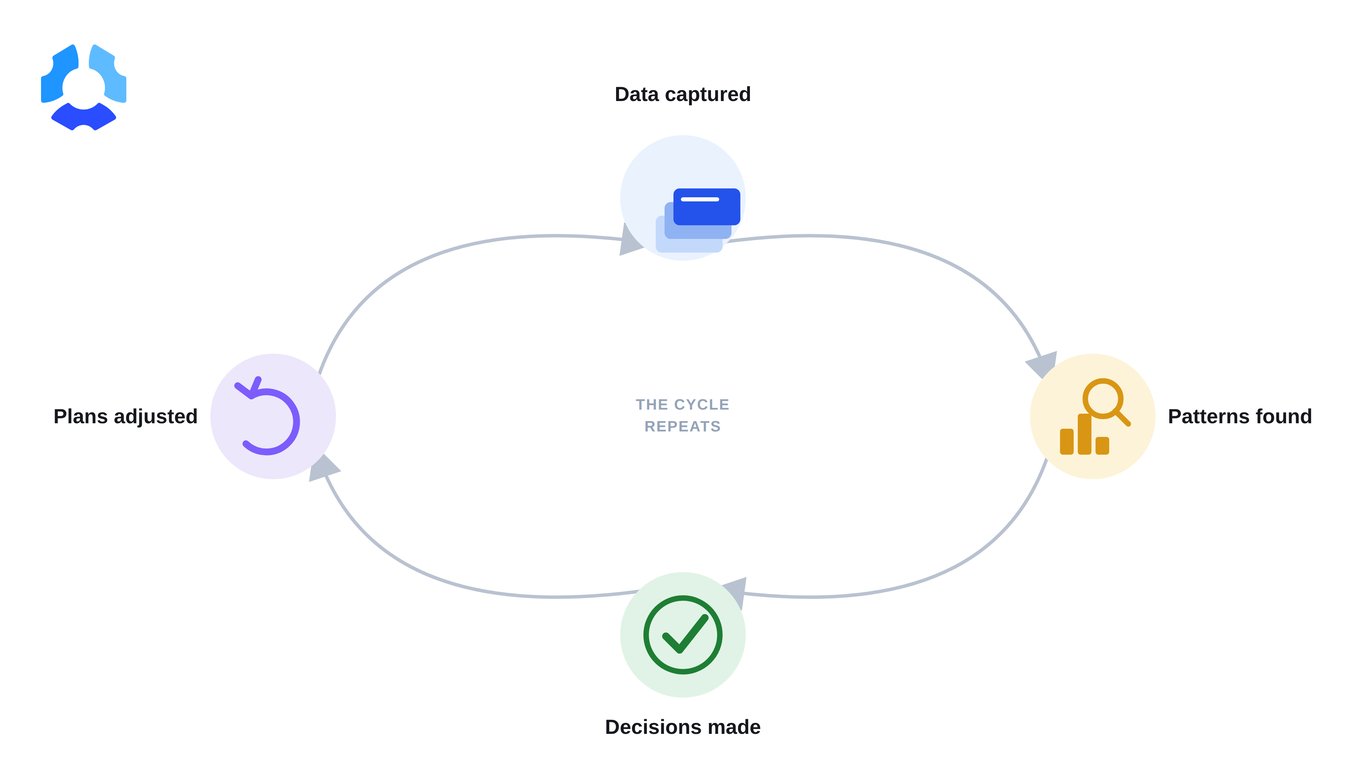
wm-wi-feedback-loop.png

The activity data behind these views comes from productivity monitoring settings that each organization can configure, guided by Hubstaff's principles of transparency, access, and control.

For larger organizations, SSO, SCIM, role-based permissions, and SOC 2 Type II, GDPR, and HIPAA compliance support rollout across offices, remote teams, and contractor teams.

If you want to see how Hubstaff can help you understand how your team spends time and how to turn that understanding into confident decisions about staffing, budgets, and growth, sign up for a 14-day free trial.

Or, if you’re making decisions across multiple teams or locations, book a demo for a guided walkthrough built around your setup.

Workforce management keeps operations running; workforce intelligence tells you whether they're running well. When both draw on the same tracked, approved, and paid hours, you're not stitching separate tools together to get from a timesheet to an answer.

Frequently asked questions

Let your workforce data drive efficiency and ROI

Use Hubstaff to bring workforce management and intelligence together, giving leaders clearer visibility across teams, projects, and locations.