Time Conversion Chart for Payroll
guide

How to Automate the Time-to-Payroll Process (Step-by-Step Guide)

If you map out the time-to-payroll process, you should theoretically have a simple flow:

Hours worked > Hours approved > Hours paid

Like most things in life, it’s easier said than done. In reality, there might be manual exports that someone forgets to run, spreadsheets that fall out of sync, and approvals that sit in inboxes past the payroll cut-off.

The time-to-payroll process connects tracked work hours to payroll calculations and payments — and that should be the whole job. But when each of those stages runs on a different tool (or manually), budget overruns and payroll errors are born.

Understanding how to automate the time-to-payroll process helps teams eliminate manual admin work, reduce payroll errors, and streamline payments. But first, to see where automation has the biggest impact, we have to understand the process as a whole.

What is the time-to-payroll process?

The time-to-payroll process is the chain of steps that moves work hours from a timesheet into an employee's bank account. Every business that pays hourly workers or bills clients by the hour runs this chain, whether they've named it or not.

Understanding where each link sits makes it easier to see where this chain tends to break: 

  1. Time tracking. Employees log hours worked, either manually or through automated tracking software. Everything downstream depends on how accurate and complete this data is.

  2. Approval. A manager reviews and signs off on submitted timesheets. Without a clear approval process, unverified hours can reach payroll, leading to mistakes that cost businesses billions each year.

  3. Payroll calculation. Approved hours are converted into gross pay, accounting for pay rates, overtime rules, and any deductions.

  4. Integration and sync. Time data moves into a payroll system either manually or through a direct integration.

  5. Payment. Payroll runs, and employees are paid on time and at the correct rate.

The best kind of payroll process is invisible: it just happens correctly and on time. Otherwise, the problems usually materialize during payday, which is the worst possible moment.

Why manual time-to-payroll processes break

Manual payroll processes fail in the small spaces between person-to-person handoffs, tools that don’t communicate, and unclear processes.

The worst thing about this problem is that it only appears when someone’s paycheck has already been affected. Here’s how it can happen:

  • Duplicate data entry. Hours logged in a time tracking tool have to be re-entered into a payroll system by hand. Every transfer is another opportunity to introduce a number that doesn't match the original.

  • Payroll discrepancies. Inconsistent data moving between disconnected tools produces inconsistent pay. Small miscalculations (especially across a large team) add up to real money and real disputes.

  • Delayed approvals. Email-based timesheet approvals are better than manual payroll, but they lack a clear way to enforce deadlines. Approvals that miss the payroll cut-off push the entire cycle back.

  • Overtime miscalculations. Overtime rules are easy to track in a system and easy to miss in a spreadsheet. The manual payroll process handles exceptions poorly, almost by design.

  • Lack of labor cost visibility. Without a connected system, there is no reliable picture of what labor is actually costing in real time.

Payroll errors and payroll delays are usually treated as execution problems. Perhaps someone didn't check carefully enough, or someone simply forgot to follow up.

But more often than not, they are structural. The tools themselves are asking for mistakes by requiring humans to bridge what software could connect automatically.

How to automate the time-to-payroll process

Automation doesn't replace the fundamental logic of the time-to-payroll process. What it does is reduce the administrative burden and room for human error. Each step below maps to a stage in the workflow, and each one builds on the last.

1. Implement real-time time tracking

Everything in the time-to-payroll process flows out of time tracking, which determines the integrity of every calculation that follows.

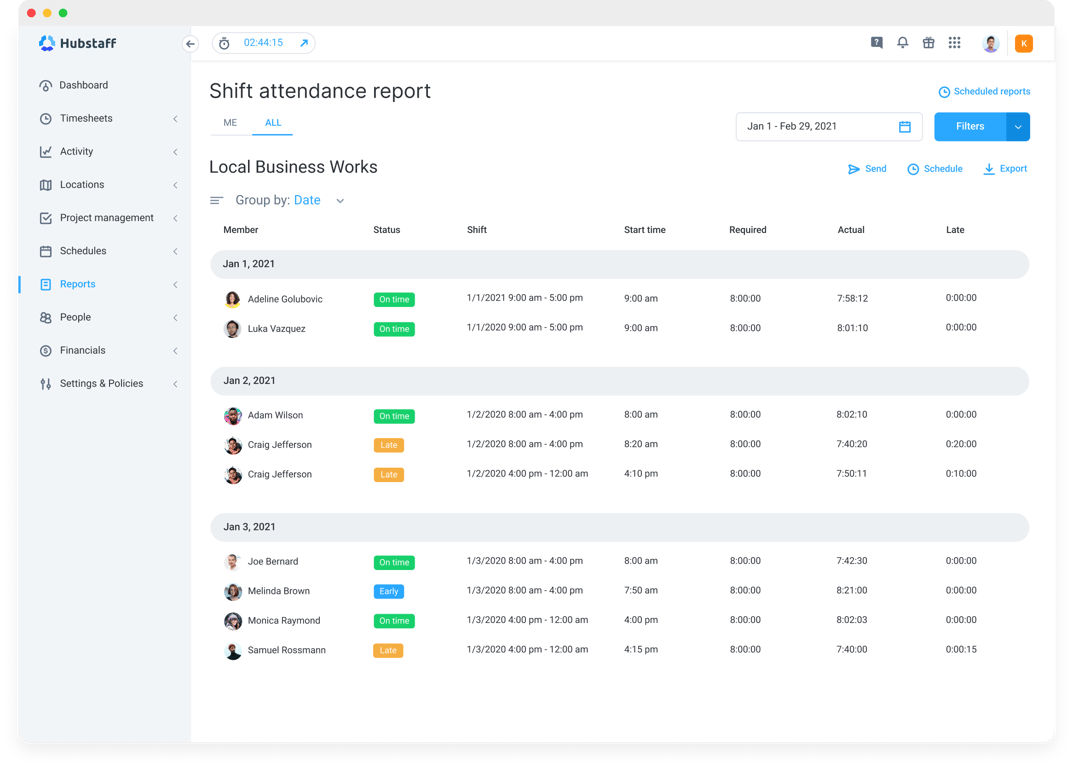
Automated time tracking removes the guesswork of manual entry. That means:

  • Clock-ins are recorded as they happen.
  • Hours are attributed to the right projects.
  • Payroll disputes and inconsistencies can be resolved with tangible data.
2-not-having-a-time-tracking-system-a-1.png

In payroll, the data is either right or wrong. Even the slightest mistakes can be costly, making real-time time tracking software appealing. The practical result is payroll-ready timesheets that don't need to be corrected or manually reconciled before they can move to the next stage.

2. Automate timesheet approvals

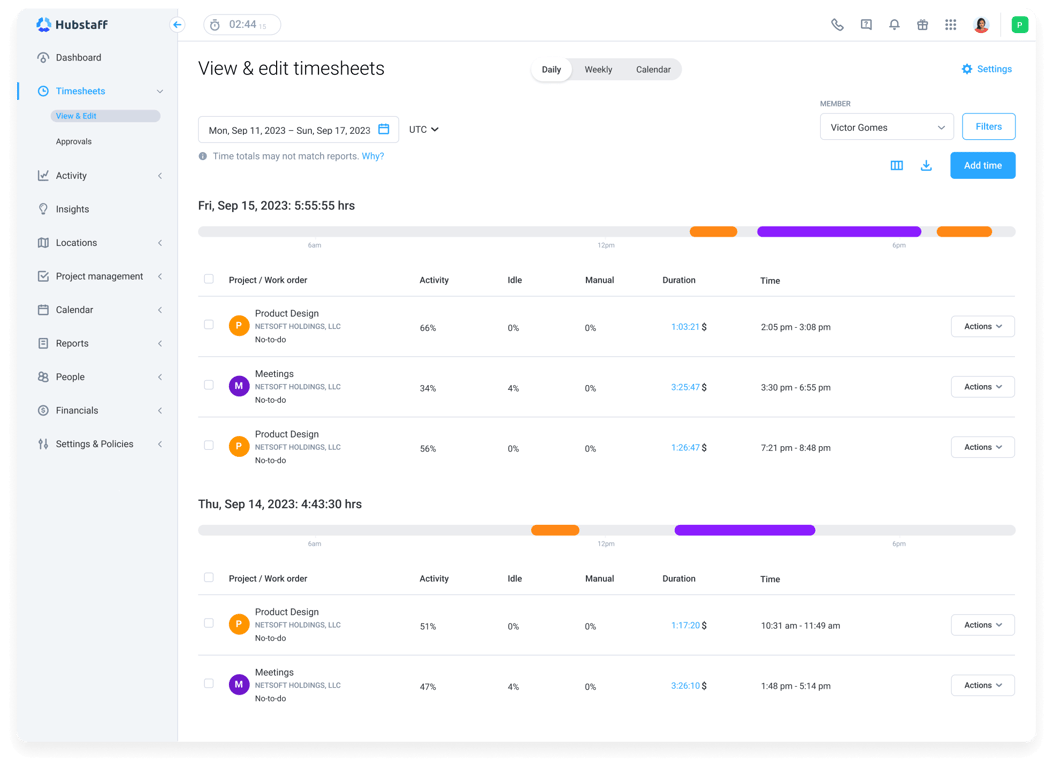
Even clean timesheets stall when the approval step lacks structure. Automated approval workflows give the process a spine. These tools route submissions to the right managers, sending reminders before deadlines, and closing the loop without anyone having to chase anyone down.

The practical benefits compound quickly:

  • Faster turnaround. Approvals move on a schedule instead of whenever a manager checks their inbox.

  • Payroll cut-off automation. Deadlines are enforced by the system, not through manual follow-up emails the morning payroll runs.

  • Audit trail. Every approval is timestamped and recorded, which matters when a discrepancy needs to be traced back.

  • Prevent payroll delays. Timesheets that miss the cut-off push the entire payroll cycle back. Automated reminders make that issue much rarer.

The approval step is easy to underestimate because it feels administrative rather than technical. That said,  it's the last checkpoint before hours become dollars, and leaving it unstructured is how small errors get waved through.
tab-1-smarter-timesheets-3.png

3. Sync time tracking with payroll systems

Once timesheets are approved, they’ll still need to be moved into a payroll system for processing as payments. This step matters a lot because re-entering approved hours by hand is slow, error-prone, and unnecessary given how capable modern payroll integrations have become.

Syncing time tracking with payroll eliminates that transfer step entirely. Approved hours flow directly into payroll systems like Gusto, QuickBooks, or ADP without anyone touching them in between.

Payroll integration software handles matching employees, rates, and hours across platforms so that what was tracked is what gets paid. This automation saves significant time for teams paying hourly workers, as weekly payroll runs that used to take hours of manual reconciliation become a review-and-confirm process.

4. Automate overtime and pay rate rules

Overtime is where manual payroll processes are most likely to produce compliance problems, because the rules aren't always simple, and spreadsheets and outdated tools don't enforce them. Automated pay calculations handle this by building the rules into the system rather than relying on someone to apply them correctly each cycle.

Overtime compliance becomes a function of configuration — the software knows when a threshold is crossed and adjusts accordingly, without anyone having to flag it. The same logic applies to pay rate variations across roles, locations, or contract types.

Labor cost automation at this level also produces better data for more accurate budgeting. Knowing what overtime is costing (in real time and by team) enables you to:

  • Adjust schedules
  • Redistribute hours
  • Catch overruns early

These outcomes are only achievable if calculations are happening automatically and continuously.

5. Enable automated payments

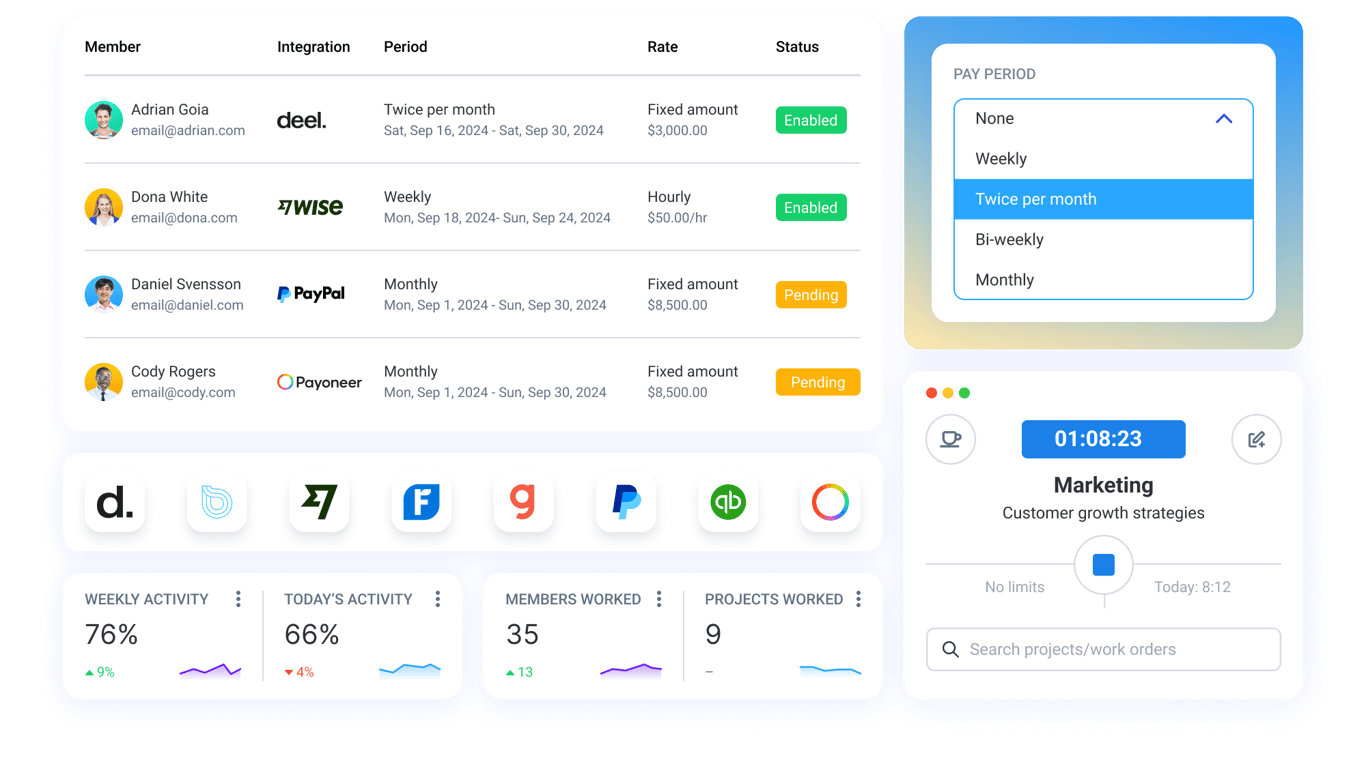
The last step is also the most visible one to employees: they either get paid correctly and on time, or they don't. Automated payments close the loop by turning approved, calculated timesheets directly into disbursements.

The ability to automatically convert timesheets into payments makes the time-to-payroll process feel seamless rather than stitched together.
3-flexible-payroll-1.png

Platforms like Hubstaff help automate the time-to-payroll workflow by:

  • Converting tracked hours into approved timesheets
  • Syncing them with payroll systems
  • Enabling automated payments from approved timesheets directly to your team

This way, the chain from clock-in to employee payment runs seamlessly.

How automation improves payroll accuracy and cost control

Typically, payroll accuracy and cost control are treated as separate problems, with one assigned to HR and the other to finance.

In practice, however, they stem from the same root cause: unreliable data moving too slowly through disconnected systems. Automation fixes both by making labor data accurate at the source and visible in real time.

  • Labor cost tracking. Automated systems track what work is costing as it happens. That means labor cost tracking becomes a continuous process, enabling real-time adjustments to project staffing.

  • Payroll forecasting. With clean, consistent time data flowing through a connected system, projecting future payroll costs becomes far more reliable.

  • Avoid budget overruns. Overruns accumulate across weeks of untracked overtime and unchecked hours. Automated labor data makes the trajectory visible early enough to address it.

  • Real-time labor visibility. The ability to see what labor is costing right now, by team, project, or location, allows for more flexible decision-making.

These capabilities don't stop at payroll either. The data that makes payroll accurate is the same data that makes project budgets defensible. And if you're managing costs across multiple projects or clients, time tracking with project budgeting becomes as important as the payroll workflow itself.

Tools that automate time-to-payroll workflows

ToolTime TrackingApproval WorkflowsPayroll IntegrationsAutomated Payments

Hubstaff

🟩 Automated, multi-device

🟩 Built-in, one-click

🟩 Gusto, Wise, PayPal, Payoneer

🟩 Yes

Harvest

🟩 Manual + timers

🟥 Not built-in

🟩 QuickBooks, Xero

🟨 Via Stripe, PayPal (client billing only)

Clockify

🟩 Manual + timers

🟩 Built-in

🟨 QuickBooks, Xero, Sage (manual export)

🟥 No

Gusto

🟨 Basic

🟩 Built-in

🟩 Native payroll

🟩 Yes

Not every tool handles the full time-to-payroll chain, which is why many teams end up stitching together tools to handle the process.

The tools below each approach the workflow differently. Some start from payroll and work backward, while others start from time tracking and connect outward.

Hubstaff

Hubstaff tracks time across desktop, mobile, and web, then converts those hours directly into automated timesheets without manual entry. Managers can approve submissions in one click. Approved timesheets connect to payroll providers like Gusto, QuickBooks, Deel, and Wise to trigger payments automatically.

Hubstaff also handles overtime rules, pay rates, and labor cost reporting in a single platform, so the time-to-payroll process runs without switching tools. This streamlined approach makes Hubstaff the best option for teams needing unified time tracking, payroll integrations, and automated payments.

Harvest

Harvest is a good option for client-facing teams that bill by the hour and need invoicing built into the same workflow. It tracks time by client, project, and task, then automatically turns those hours into invoices, making it a natural fit for agencies and professional services teams.

Harvest doesn't have built-in approval workflows or direct payroll integrations in the way dedicated time-to-payroll platforms do. That said, it connects with QuickBooks Online and Xero for accounting, and with Stripe and PayPal for client payments. It's a stronger tool for billing clients than for paying employees.

Clockify

Clockify tracks hours via timer or manual timesheet entry, handles approval workflows, and calculates overtime once you set cost rates. Then, it lets you export that data as a PDF, CSV, or Excel file for payroll processing.

It integrates with QuickBooks, Xero, and Sage, though those connections require more manual steps than a native sync. The free tier is genuinely useful, which is a real differentiator, but the payroll side of the workflow stops at export. There are no automated payments built in, but teams comfortable bridging that last step themselves might see value in the tool’s versatility overall. 

Gusto

Gusto approaches the time-to-payroll workflow from the opposite direction of most other tools on this list: payroll is the core product, and time tracking connects into it rather than the other way around.

hubstaff_gusto-08d9d5621b8837c556fd0fa4969ec73906ff95031f9409b8adca928f78f92ca4-1.png

Tracked hours sync directly to payroll, taxes are automatically filed, and the platform handles benefits, PTO, and compliance in a single interface. Where it trades off is depth on the time tracking side; it covers the basics well, but teams with complex tracking needs across multiple projects, or clients may find it thinner than a dedicated time tracking platform.

What to look for in time-to-payroll automation software

The right software for your team depends on where your current process falls apart. Evaluate these features before committing to anything.

  • Real-time time tracking. Hours should be recorded as work happens. Accuracy at this stage determines the reliability of everything that follows.

  • Built-in approval workflows. Timesheet approvals need structure (e.g., routing rules, deadlines, and reminders). Without this, the approval step becomes the bottleneck that holds up every payroll cycle.

  • Payroll integrations. Look for direct, native connections to the payroll systems your team already uses, whether that's PayPal, Gusto, or others. Integrations that rely on manual exports or third-party connectors reintroduce the friction you're trying to remove.

  • Automated overtime compliance. Overtime rules should be enforced by the system, not tracked manually. This is especially important for teams operating across multiple jurisdictions.

  • Labor cost reporting. A platform that breaks down labor costs by team, project, or time period gives you visibility that a payroll report simply can't.

  • Automated payments. The final step in a well-built time-to-payroll workflow shouldn't require a manual trigger. Approved, calculated hours should be able to move to payment without having to initiate each run by hand.

No single tool will be the right fit for every team, and the checklist above won't weigh each item equally for every operation.

For instance, a small agency billing clients by the hour has different priorities than a distributed team paying hourly workers across multiple countries. That said, these capabilities together define what a complete time-to-payroll automation looks like.

Time to improve time-to-payroll

Automating the time-to-payroll process starts with accurate time tracking and seamless payroll integration, but it delivers more than just a faster payroll run.

Most payroll problems aren't payroll problems. They're data, approval, and handoff problems, and they've been sitting in the same place the whole time. You don’t have to rip out your entire tech stack to fix these issues when you can simply connect these systems together.

In order for that to happen, you need a tool that treats the entire workflow as a single system rather than a collection of features — one where time tracking, approvals, and payments are connected by design. See how Hubstaff converts tracked hours into approved timesheets, synced payroll, and automated payments without manual work with a free, 14-day trial of Hubstaff.

Try Hubstaff free for 14 days

Get full feature access with a 14-day trial. No credit card needed. Cancel anytime.

Try Hubstaff free