Time Doctor vs. ActivTrak: Which Tool Is Right for Your Team?

 10 min read
- Time Doctor suits agencies and contractor-heavy teams needing payroll and billing workflows, while ActivTrak fits mid-market orgs focused on workforce optimization.
- Both platforms carry hidden costs through add-ons: SSO, HRIS integrations, and video monitoring can significantly raise your total spend beyond the base per-user rate advertised.
- Teams needing deep time tracking AND workforce analytics may find gaps in both tools. Hubstaff combines built-in payroll, reporting, and productivity insights in one platform.

Time Doctor and ActivTrak are two of the most powerful and popular time tracking solutions.
Both have strong features, and both can deliver real outcomes, so when you’re deciding between them, the decision isn’t really about the features. Instead, it’s based on the outcome you hope to achieve.
Time Doctor is built around accountability:
- Was your team working?
- How long were they working for?
- Can you provide proof of that work to key stakeholders?
On the other hand, ActivTrak addresses how work is happening across your organization and where inefficiencies may be hiding.
Both tools give managers visibility into employee productivity, but that can mean different things depending on what you’re managing for. If your biggest challenge is tracking hours, managing contractors, or tying time to payroll and client billing, that points in one direction. If you’re more focused on workforce patterns, capacity planning, and operational bottlenecks, it points to another.
Luckily, this post is for decision-makers trying to figure out which direction to take.
Hubstaff Walkthrough
Dive into our interactive demo and explore the features that make managing global teams easier than ever.
Time Doctor vs. ActivTrak: Quick summary
Time Doctor and ActivTrak overlap enough that a feature-by-feature comparison can feel misleading without context. We’ll go into a more in-depth comparison later, but if you want a quick look at where each platform excels, the table below is a good place to start.
| If you need… | Recommended tool |
| Time tracking and proof of work | Time Doctor |
| Screenshots and employee monitoring | Time Doctor |
| Payroll-related workflows | Time Doctor |
| Workforce analytics and productivity trends | ActivTrak |
| Capacity planning and workload balancing | ActivTrak |
| Burnout detection and workload insights | ActivTrak |
| Hybrid workforce optimization | ActivTrak |
| Operational visibility plus workforce analytics | Hubstaff |
While both tools share a lot of common ground, neither one is trying to do exactly what the other does.
Time Doctor vs. ActivTrak at a glance
| Category | Time Doctor | ActivTrak |
| Time tracking | Interactive start/stop timer with automatic tracking options. | Automatic background tracking. Time data serves analytics rather than payroll or billing. |
| Screenshots | Regular screenshot monitoring with optional screen recording. | Triggers screenshots for compliance verification. Less of a routine monitoring feature. |
| App & URL monitoring | Detailed app and website tracking focused on accountability and record of work. | App and website monitoring focused on behavioral patterns and productivity analysis. |
| Workforce analytics | Productivity, attendance, and workload reporting with AI-powered benchmarking. | Advanced workforce analytics, including AI tool usage tracking, capacity utilization, and organizational trends. |
| Workload management | Work-life balance reporting and burnout signals through tracked hours and attendance patterns. | Capacity planning, overutilization detection, and workload balancing across teams. |
| Payroll workflows | Built-in payroll integrations, timesheet approvals, billable hours, and multi-currency support. | Not designed around payroll workflows. |
| Invoicing | Supports billable hours and client billing. | Not designed for invoicing workflows. |
| Hybrid work insights | Productivity visibility across remote and distributed teams. | Location adherence tracking, RTO policy analysis, and hybrid productivity comparisons. |
| AI usage tracking | Not a current focus | Tracks AI tool adoption and measures its impact on workflows and output. |
| Mobile apps | iOS and Android. | No dedicated mobile app. |
| Pricing | Starts at $6.70 per user/month. 14-day free trial included, but no free plan. | Free plan up to 3 users. Paid plans start at $10 per user/month. |
What’s the difference between Time Doctor and ActivTrak?
The core difference between the two lies in the philosophy around which they were built.
Both tools track app usage, both capture screenshots, and both give managers more visibility into how their teams spend their time. If you stopped there, you might reasonably conclude they’re interchangeable. They aren’t.
- Time Doctor is designed to answer whether or not work happens. It’s a tool built for accountability. It helps teams create a verifiable record of what was done, by whom, and for how long.
- ActivTrak is built to help teams understand how work is happening. It’s designed to uncover patterns so teams can better understand how work runs through the organization, where capacity isn’t being used well, and whether the organization is structured to support sustained performance.
| Time Doctor | ActivTrak | |
| Core question answered | Did work happen? | How is work happening? |
| Main outcome | Accountability | Optimization |
| Focus | Time tracking and activity visibility. | Workforce analytics and productivity insights. |
| Typical use case | Payroll, billing, and proof of work. | Workforce planning and operational visibility. |
The distinction here (i.e., accountability versus optimization) is the lens through which everything else in this comparison should be read.
Time tracking and employee accountability
When teams invest in time tracking software, the reasons are most often operational.
- Payroll accuracy. Accurate hours mean people get paid correctly, and payroll errors are harder to fix after the fact than they are to prevent.
- Client billing. When you bill by the hour, the record of how long something took is the invoice.
- Proof of work. When you can’t physically see your team, tracked time becomes the closest thing to verification.
- Attendance visibility. Knowing who showed up, when, and for how long keeps scheduling and expectations aligned.
- Contractor management. Contractors working across projects and time zones are difficult to manage without a reliable hours record tied to deliverables.
Time Doctor is built around all of this. The experience is timer-first: employees start and stop tracking to specific tasks and projects, and that tracked time automatically feeds into timesheets, attendance reports, and project tracking.
ActivTrak collects work activity data, but it isn’t primarily a time tracking platform. Time data does exist in ActivTrak, but it serves the analytics layer rather than operational workflows. There is no native path from tracked hours to payroll or client billing.
Winner: Time Doctor
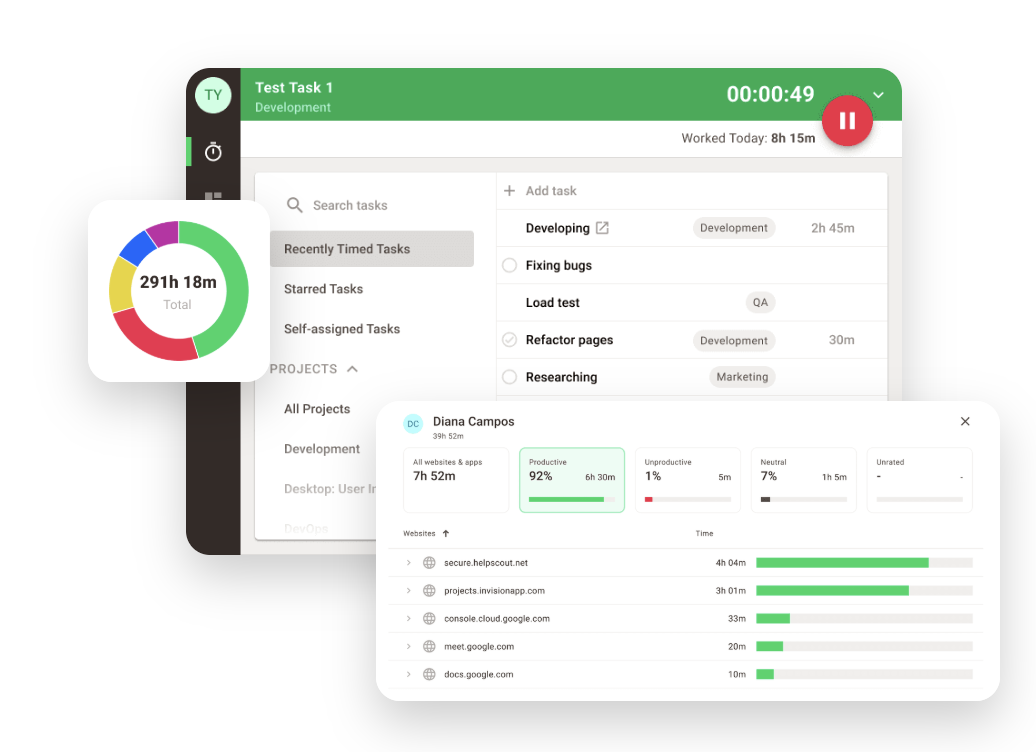
Organizations that prioritize payroll accuracy, billable hours, and attendance management will find Time Doctor’s approach more directly aligned with how those workflows behave.
Employee monitoring
Tracking hours and monitoring activity are not the same thing. Time tracking is often used to generate timesheets and administer payments, while monitoring provides context for those hours by recording each user’s work.
Here is how each tool approaches that capability.
Time Doctor
- Screenshots. Time Doctor captures periodic screenshots during tracked hours, giving managers and clients visual confirmation that work was happening. Screenshot frequency is customizable, and employees can see what’s being captured.
- Activity levels. The platform measures keyboard and mouse activity to generate an activity score, giving managers a quick read on engagement during tracked time.
- App tracking. Every application an employee uses during tracked hours is logged, making it easy to see whether time was spent on the right tools.
- Website tracking. Time Doctor records websites visited during tracked hours and categorizes them as productive or unproductive based on configurable settings.
- Idle time detection. When activity stops, Time Doctor flags it, helping distinguish genuine work time from time that was tracked but inactive.
ActivTrak
- Application monitoring. ActivTrak tracks which applications employees use and for how long, with a focus on understanding behavioral patterns rather than holding individuals accountable.
- Website monitoring. Browsing activity is captured and categorized, with the ability to flag policy violations and identify distractions at a team level.
- Activity visibility. Managers can see both historical and real-time activity data across teams with the goal of identifying trends rather than verifying individual work.
- Behavioral monitoring. ActivTrak analyzes patterns in how people work to reveal insights about team performance.
Winner: Time Doctor
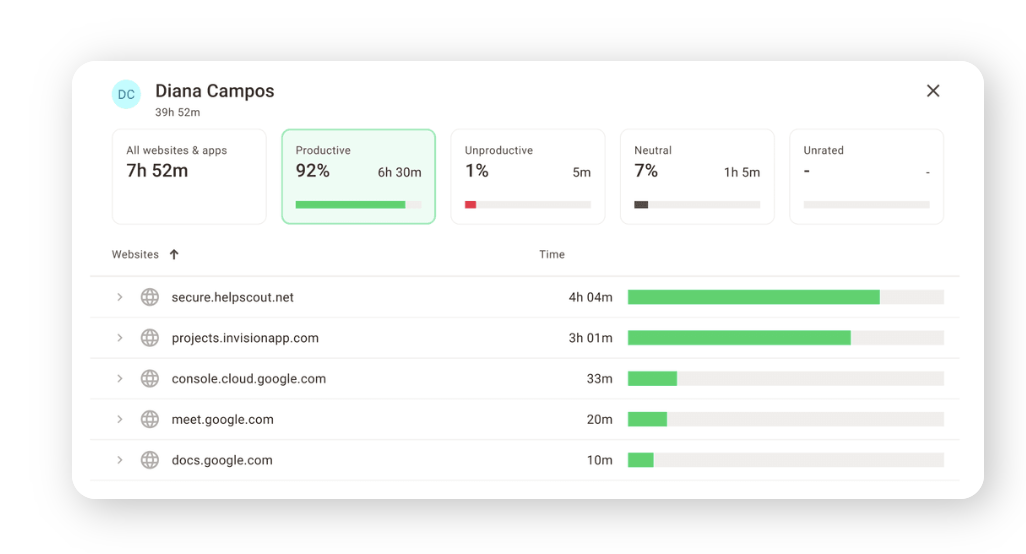
Organizations that need detailed visibility into employee activity, client-facing proof of work, or stronger accountability controls will generally find Time Doctor more capable.
Productivity analytics and workforce insights
The natural starting point for a lot of organizations weighing the pros and cons of ActivTrak and Time Doctor centers around the desire to know if people are working.
Eventually, however, they start needing to understand why performance looks the way it does across their teams. This use case requires a different kind of tool from the one they might have been using before their goal changed.
The two platforms diverge here.
Time Doctor
- Activity reports. Time Doctor generates detailed reports on how time was spent across tasks, projects, and clients. This gives managers a clear picture of where hours go on the individual level.
- Screenshots. Visual records of work activity add context to time data, particularly useful for client-facing accountability.
- App and website data. Managers can see which tools employees were using and for how long, categorized by productivity level.
- Individual visibility. Time Doctor’s analytics are strongest at the individual level, helping managers understand what a specific person did during a specific period.
ActivTrak
- Productivity trends. ActivTrak identifies patterns in how productivity shifts over time across teams, making it easier to spot sustained issues rather than one-off anomalies.
- Focus time. The platform measures how much uninterrupted, high-focus work is happening versus fragmented or distracted time.
- Workload analysis. Managers can see which employees are overutilized and which have capacity to spare, which informs smarter task distribution.
- Team patterns. Analytics are oriented toward the team and organizational level, as opposed to individual activity.
- Workforce visibility. Leaders get a broader operational view of how work is moving across the organization.
- Capacity insights. ActivTrak gives teams the data they need to mitigate capacity problems before they escalate.
Winner: ActivTrak
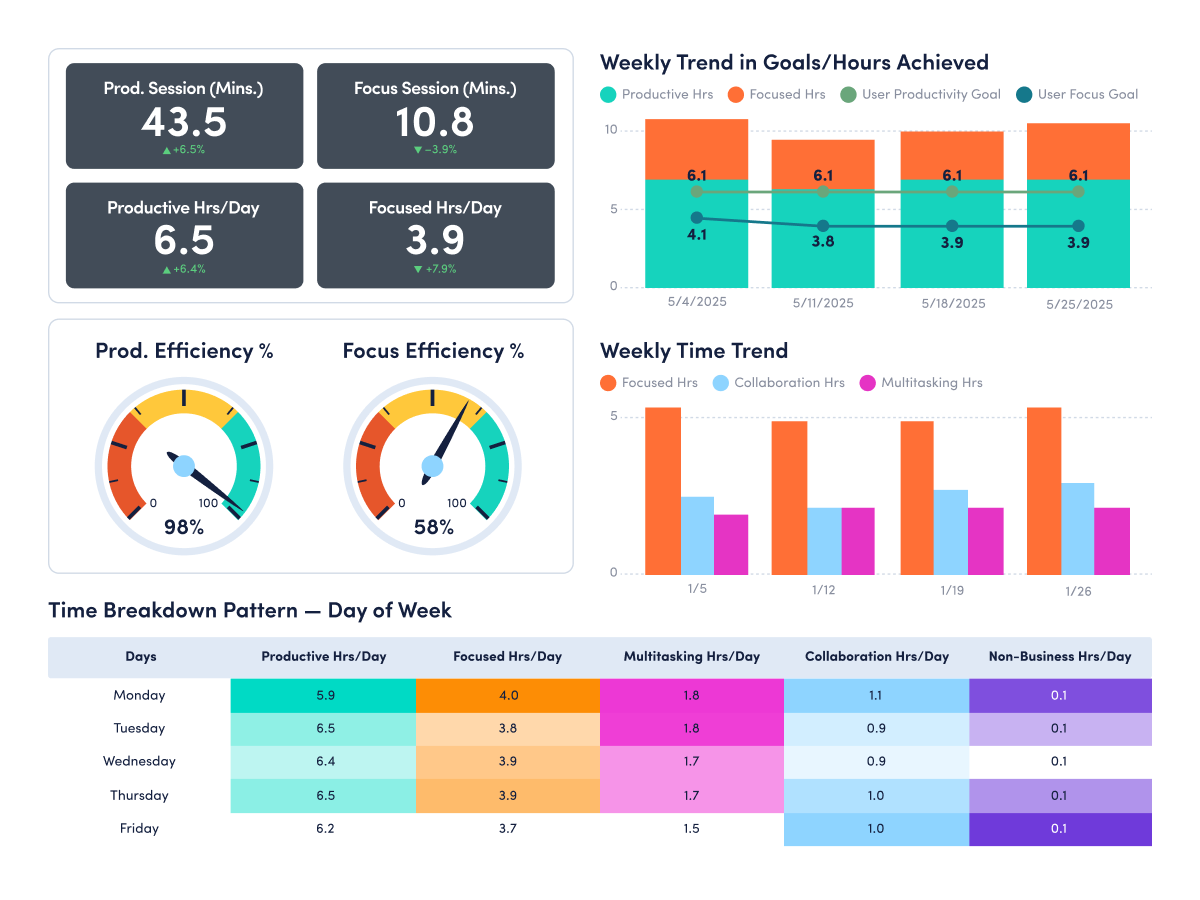
Organizations focused on improving productivity, balancing workloads, and identifying operational bottlenecks will find ActivTrak’s analytics capabilities are known for beingmore advanced than other tools.
Payroll, billing, and workforce operations
As useful as time tracking is for productivity monitoring purposes, that’s only one of the benefits. Organizations also rely on time tracking for timesheets, payroll, and billing clients. Here’s how both tools handle these feature sets.
Time Doctor
- Timesheets. Time Doctor generates automatic timesheets from tracked hours. It provides options for manual or automatic approval.
- Payroll integrations. The platform connects directly to payroll tools and supports multiple currencies, which makes it practical for teams managing contractors or distributed workforces across different regions.
- Attendance tracking. Attendance is tracked automatically alongside time, giving managers a reliable record of who showed up, when, and for how long.
- Billable hours. Hours can be tracked to specific clients and projects. This saves teams a significant amount of time on client billing and provides accurate records for client-facing work.
- Client billing support. Time Doctor supports the full client billing workflow, from tracked hours to invoicing.
- Contractor management. Teams managing freelancers or outsourced workers can track hours by contractor, project, and client.
ActivTrak
- Workforce analytics focus. ActivTrak is built around understanding how work happens, not processing what happens after it does.
- Limited payroll capabilities. There is no native payroll workflow, and time data isn’t structured to flow into a payment process.
- Limited billing functionality. Client billing and invoicing are not part of what ActivTrak is designed to do.
- Productivity reporting rather than operational workflows. The reports ActivTrak generates are designed for performance insight.
Winner: Time Doctor
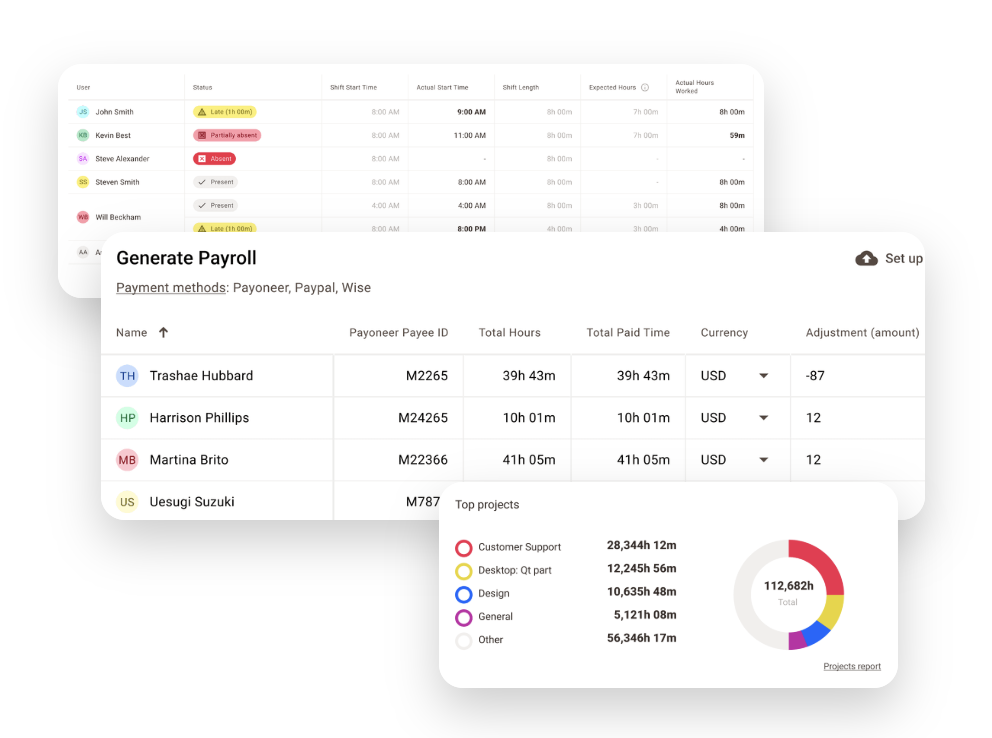
Organizations that rely on tracked time for payroll, invoicing, attendance management, or client billing will find Time Doctor’s operational workflows more mature.
Pricing comparison
The best value depends on what you’re trying to accomplish.
- ActivTrak costs more at every paid tier, but for organizations that need workforce analytics and capacity planning, those figures may be easily justifiable.
- Time Doctor is specifically designed for teams in need of employee monitoring features at an affordable price.
| Plan | Time Doctor | ActivTrak |
| Free plan | No | Up to 3 users |
| Entry plan | Basic: $6.67/user/month | Essentials: $10/user/month |
| Mid-tier plan | Standard: $11.67/user/month | Essentials Plus: $15/user/month |
| Advanced plan | Premium: $16.70/user/month | Professional: $19/user/month |
| Enterprise plan | Custom | Custom |
| Annual billing required | Optional | Yes |
| Minimum seats | No | No |
All prices are based on annual billing.
Before deciding which pricing plan gets you the best value, consider the following.
- Feature availability by plan.
- Time Doctor’s most operationally useful features do not appear until the Standard plan at $11.67.
- ActivTrak’s most prominent analytics capabilities (e.g., capacity planning and team performance) are locked behind the $19 Professional plan.
- Time Doctor’s most operationally useful features do not appear until the Standard plan at $11.67.
- Add-on costs. Both platforms have add-ons that can push the real monthly cost above the advertised tier.
- Time Doctor charges separately for features like Single Sign-On ($200/account/month), HRIS integration ($200/account/month), and video screen recording ($3/user/month).
- ActivTrak’s screenshot feature is not included in any standard plan as it is part of a separate Screen Details add-on.
- Time Doctor charges separately for features like Single Sign-On ($200/account/month), HRIS integration ($200/account/month), and video screen recording ($3/user/month).
- Billing flexibility. Time Doctor offers both monthly and annual billing across all plans. ActivTrak requires annual billing on all paid plans, which means teams considering it need to be sure it is the right long-term fit.
- Free plans and trials. If you’re looking to ease into a tool with a free plan:
- ActivTrak offers a free plan, but it is capped at three users and 30 days of data history, and accounts are deleted after 30 days of inactivity.
- Time Doctor has no free plan, but it offers a 14-day trial with complete Premium access.
- ActivTrak offers a free plan, but it is capped at three users and 30 days of data history, and accounts are deleted after 30 days of inactivity.
Which tool is right for you?
Both Time Doctor and ActivTrak are capable platforms. That said, they are designed for different buyers with different priorities. The right tool will depend on the pain point your organization is experiencing.
Choose Time Doctor if…
Time Doctor is a better fit if a significant amount of your operations relies on time tracking. Choose it if:
- You bill clients based on tracked hours.
- Payroll depends on employee timesheets.
- You manage contractors, freelancers, or outsourced teams.
- Proof of work is important.
- Employee accountability is your primary concern.
- You need detailed time tracking tied to projects or clients.
Best fit for: Time Doctor is a strong choice for agencies, BPOs, outsourcing firms, and professional services firms. It is particularly well-suited for contractor-heavy teams where hours worked translate directly into payments and invoices.
Potential limitations: Time Doctor’s analytics are solid at the individual level, but they aren’t that advanced when it comes to organizational patterns or workforce trends. Teams that need these capabilities may find that Time Doctor falls short of what they need.
Choose ActivTrak if…
ActivTrak is the stronger fit for teams who want to understand how work is happening. Choose it if:
- You want to understand productivity patterns across teams.
- Workforce optimization is a priority.
- You need workload visibility.
- Capacity planning is important to how you resource and plan.
- You want to identify bottlenecks and productivity trends.
- You’re focused on improving operational efficiency.
Best fit for: ActivTrak will excel in technology companies, hybrid organizations, and mid-market businesses where operations leaders and HR teams need more than a record of hours worked. It is designed for teams that want to improve how work happens instead of just tracking it.
Potential limitations: ActivTrak is not designed around operational processes like payroll and invoicing. If an organization needs tracked time to support those processes, those capabilities are either absent or require additional configurations to replicate.
If your organization needs to track work accurately and convert that data into payroll information and invoices, Time Doctor will get you there more easily.
On the other hand, if you need to understand how work moves in your organization and use that understanding to improve performance, ActivTrak is more capable.
A better alternative for teams that need both
By this point in the article, most readers will have a clear answer between the two.
However, there are organizations in which the choice just isn’t that simple, like teams that need both strong time tracking and deep workforce operations, analytics and intelligence. Settling for one and hoping the other half works itself out can deliver real consequences.
- Time Doctor handles accountability, time tracking, and payroll workflows well.
- ActivTrak does workforce analytics and productivity insights well.
The tradeoff is visible even at a glance. But what if you need both?
That’s where Hubstaff comes in. It brings together, in one intuitive package, what is otherwise split across two separate platforms.
- Time tracking and timesheets. Hubstaff tracks time to specific tasks, projects, and clients, and automatically converts those hours into accurate timesheets ready for payroll and invoicing.
- Workforce analytics and productivity insights. Insights gives teams real-time data on utilization, focus time, unusual activity, and productivity trends, including how remote and in-office work compares across the organization.
- Payroll, scheduling, and attendance management. Hubstaff connects directly to providers like Deel, Gusto, Payoneer, and PayPal to streamline payroll with in-app payments, with attendance, PTO tracking and scheduling built into the same workflow.
- Operational reporting. With over 20 report types covering time, activity, budgets, payments, and project costs, managers have what they need for both daily decisions and longer-term planning.
- Mobile time tracking with GPS and geofencing. Field and mobile teams can track time by Job site or work order, with location-based clock-ins and route visibility built in.
If you want to see how easy time tracking, productivity monitoring, and workforce analytics can be, book a demo or try Hubstaff free for 14 days.
See how Hubstaff compares to Time Doctor and ActivTrak.
Most popular
The Top Time Management Statistics in 2026 for Workplace Productivity
We all have the same hours in the day. But when employees struggle to focus, those hours likely won’t be used effectively. Witho...
The Best Coaching Conversations Start With Productivity Data
Most coaching conversations happen too late. A deadline is missed, or a client flags a problem, and then a manager schedules a sit...
A Quick Guide to Work Order Management
From quick fixes to long-term stability, work orders are crucial to asset management and helping managers keep operations running...
How to Identify High Performers Using Work Patterns
Every business has top performers, and managers are told to find them all the time. But in most cases, they default to approaches...